AONMeetings In-Depth Review - Enterprise-Grade Browser Video Conferencing Without the Price Tag
If you've ever stared at a download progress bar while a meeting was supposed to be starting, you know exactly why browser-based tools are winning. This AONMeetings review dives deep into a platform that eliminates that friction entirely — no installs, no waiting, just instant access.
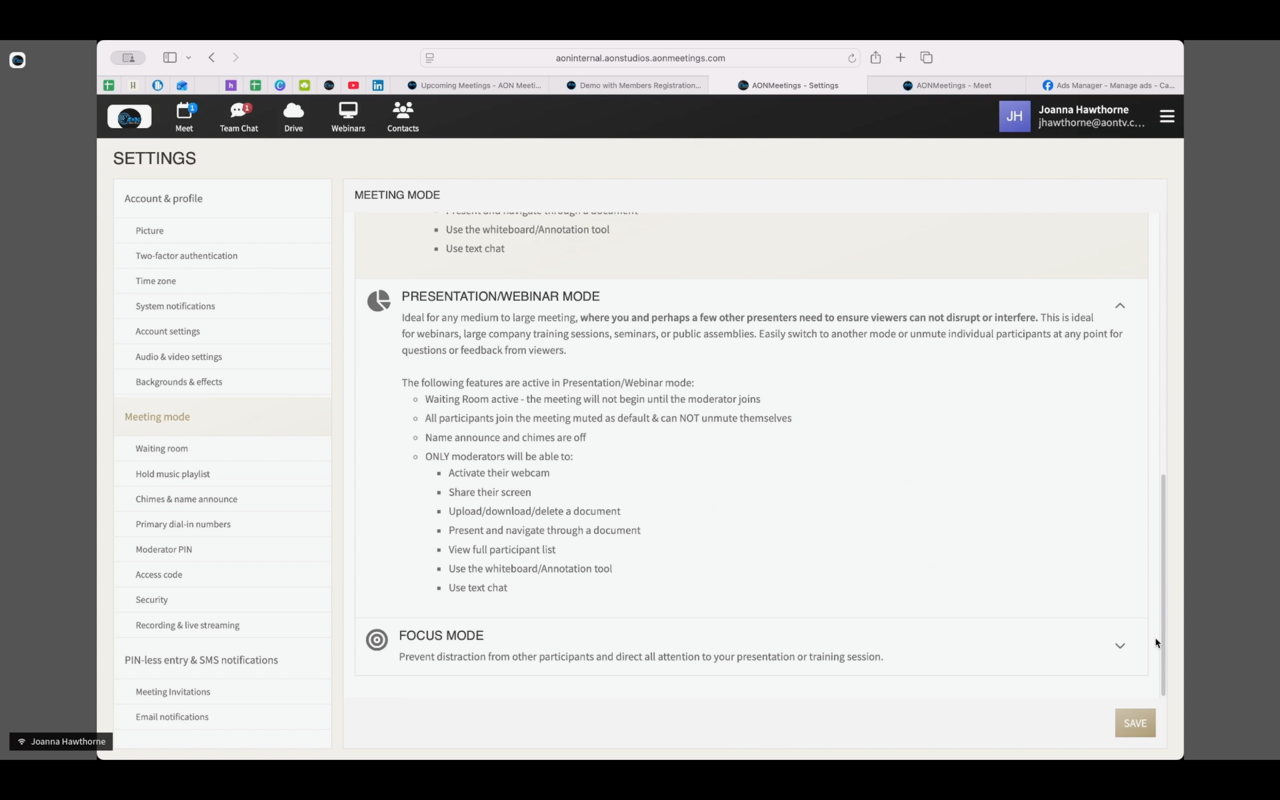
At its core, AONMeetings combines HD video, unlimited webinar hosting, screen sharing, recording, and a full collaboration suite — all delivered through a secure browser interface that requires zero downloads. With HIPAA compliance baked in, enterprise-level encryption, and plans beginning at merely $3.99 per user monthly, it democratizes professional video conferencing.
Why Traditional Platforms Fall Short
Legacy video meeting solutions burden users with several structural problems:
- Mandatory Installs: App downloads and recurring updates create unnecessary friction for attendees and support headaches for IT departments
- Webinars Cost Extra: Competitors routinely gate webinar functionality behind premium tiers or charge per-event fees
- Weak Security Defaults: Most consumer-focused tools lack the HIPAA compliance and encryption depth required by healthcare, legal, and finance sectors
- Opaque Billing: Participant limits, session duration caps, and surprise fees undermine budget predictability
- Steep Onboarding: Cluttered UIs and overly complex settings slow team adoption and inflate training overhead
- Fragmented Compatibility: Users encounter issues across different devices, browsers, and operating systems
AONMeetings eliminates these pain points with a browser-native architecture that prioritizes security, simplicity, and cost transparency — all while preserving professional-grade capabilities.
What Sets AONMeetings Apart
- 🌐 Zero-Install Access: Join instantly from any modern browser — no downloads, no installations
- 🔐 HIPAA Compliant: Enterprise encryption with end-to-end protection suitable for healthcare and regulated industries
- 🎥 HD Video & Audio: WebRTC-powered clarity for every conversation
- 📹 Unlimited Webinars: Every plan includes unrestricted webinar hosting — no premium upcharges
- 💰 Budget-Friendly Pricing: Starting at $3.99/user/month, backed by a 30-day money-back guarantee
- 🤖 AI Capabilities: Automated meeting summaries, live closed captioning, and intelligent search
- 📊 Collaboration Suite: Screen sharing, annotation tools, whiteboard, document sharing, real-time chat
- 📡 Multi-Platform Streaming: Broadcast to YouTube, custom RTMP endpoints, and social channels
- ⏱️ No Time Restrictions: Meet for as long as you need with no artificial cutoffs
- 📅 Calendar Integration: Syncs with Google Calendar, Outlook, and Calendly (Business Pro)
- 📱 Mobile-Ready: Responsive design optimized for smartphones and tablets
- 🎨 White-Label Branding: Custom logos and colors available on Business Pro plans
Feature Deep Dive
The Browser-First Experience
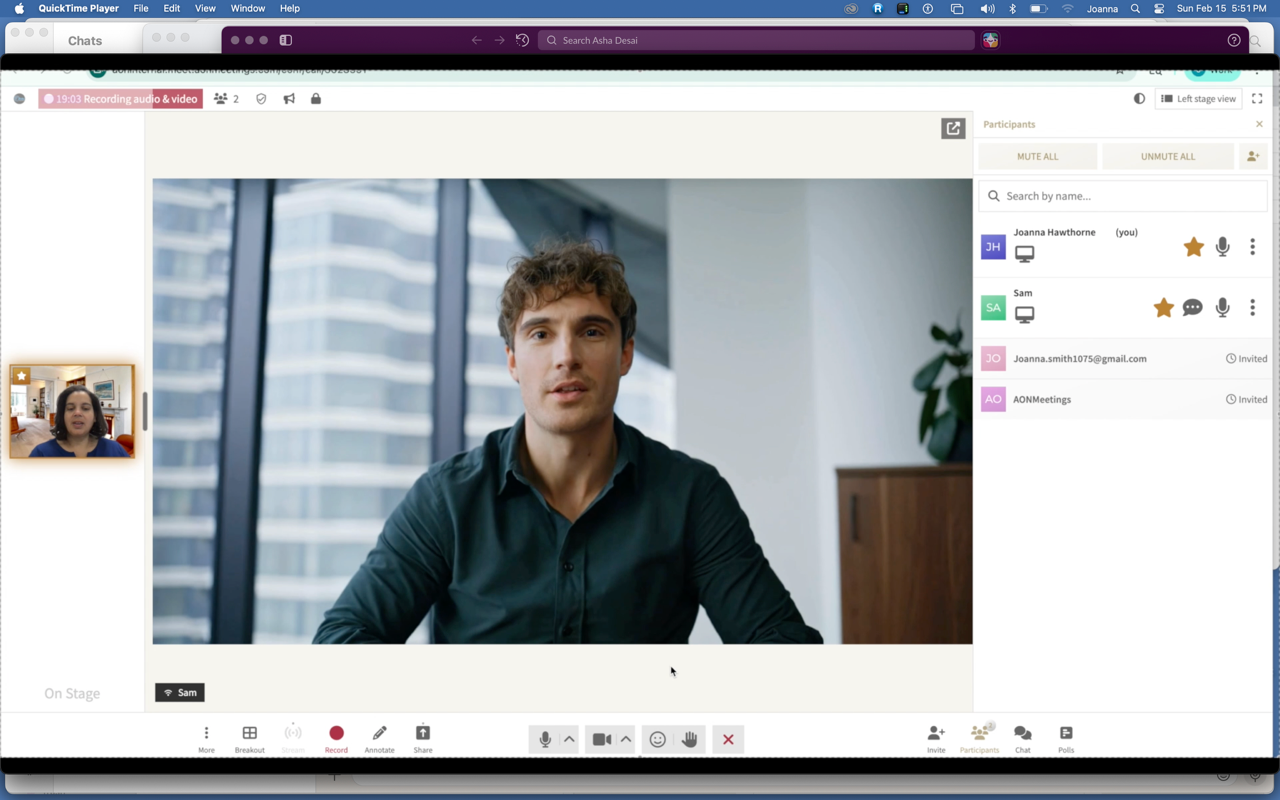
How Joining Works
The join flow couldn't be simpler:
- Receive the Link: Hosts share a secure meeting URL with participants
- Click and Join: No app installs, no account creation — any modern browser handles it immediately
- Universal Compatibility: Functions identically on Windows, macOS, Linux, iOS, and Android
- Always Up to Date: Browser-based delivery means you're perpetually on the latest version
The Real Benefits of No Downloads
Eliminating the install step delivers concrete advantages:
- Instant Onboarding: Participants enter meetings in seconds without technical barriers
- IT Team Relief: Zero deployment, patching, or compatibility management burden
- BYOD Ready: Any device with a browser works — ideal for diverse device environments
- Smaller Attack Surface: No installed client means fewer security vectors
- Guest-Friendly by Design: Clients, vendors, and students join without creating accounts
Jennifer W., a Real Estate Consultant at eXp Realty, captures this perfectly: "I like the fact that no app needs to be downloaded to access the meetings! This is one of my favorite features."
Best suited for: Real estate professionals, consultants, healthcare providers, educators — anyone whose participants shouldn't face technical hurdles just to join a call.
Security and Compliance
HIPAA-Ready Infrastructure
Organizations managing sensitive data get enterprise protections:
- HIPAA Business Associate Agreement: Available to healthcare customers
- Full Encryption: Industry-standard end-to-end encryption across all communications
- SOC 2 Type II: Rigorous enterprise security certification
- GDPR Alignment: European data protection compliance built in
- SSL/TLS: Secure transport for every data stream
Granular Access Controls
Meeting hosts retain comprehensive security oversight:
- Waiting Room: Vet attendees before granting entry
- Session Lock: Bar new participants once a meeting is underway
- Passcode Protection: Optional access codes for added security layers
- Host Moderation: Complete control over meeting security parameters
- Single-Use Codes: Generate one-time access tokens for high-sensitivity sessions
Jacquelyn S., CEO of Seymour Consulting, states: "This platform is very user friendly, the platform price point is very reasonable and is HIPAA compliant."
Meena A., an Employee Relations Manager, adds: "AONMeetings Makes Sensitive Conversations Simple and Secure."
Best suited for: Healthcare organizations, law firms, financial institutions, government bodies, and any sector handling confidential communications.
Webinar Capabilities
Core Webinar Features
Every plan comes with a full-featured webinar toolkit:
- No Webinar Caps: Host as many webinars as you want with no limits
- Registration Built-In: Native attendee signup and management
- Monetization Support: Charge for webinar access with integrated payment processing
- Real-Time Polling: Engage audiences with live polls and surveys
- Q&A Management: Structured question handling for large audiences
- Streaming Output: Push to YouTube, custom RTMP, and social platforms
- Multi-Camera Production: Professional-grade broadcasts with multiple angles (Business Pro)
- White-Label Options: Custom branding on Business Pro tier
Scaling Up for Big Audiences
Flexible add-ons for larger events, available monthly or as one-time purchases:
- 500 Attendees: $54.99/month or $60 one-time
- 1,000 Attendees: $239.99/month or $300 one-time
- 3,000 Attendees: $712.99/month or $800 one-time
- 5,000 Attendees: $1,799.99/month or $1,900 one-time
All large-webinar tiers include chat, registration tools, and live engagement features.
Best suited for: Training organizations, marketing departments, academic institutions, and businesses producing virtual events at scale.
AI-Driven Capabilities
Automated Meeting Summaries
Turn recordings into structured, actionable outputs:
- Summary Generation: AI produces concise recaps automatically
- Key Point Extraction: Discussion highlights surfaced without manual review
- Action Item Capture: Decisions and tasks identified and catalogued
- Speaker Attribution: Contributions tagged to individual participants
Intelligent Search and Discovery
Navigate your meeting archive effortlessly:
- Full-Text Transcript Search: Search across all recordings
- Topic Clustering: AI groups content by subject
- Engagement Analytics: Patterns in participation and interaction surfaced
- Auto-Categorization: Meeting content tagged and organized automatically
Maya J., a Performance Manager, confirms: "Clear Weekly Reviews with Great Screen Sharing and AI Summaries."
Live Captioning
Enhanced accessibility through real-time transcription:
- In-Meeting Captions: Live text generation during sessions
- Multi-Language: Captioning across multiple languages
- Downloadable Output: Export transcripts for records and compliance
Best suited for: Corporate training, educational settings, performance reviews, and accessibility-focused organizations.
Collaboration Toolkit
Screen Sharing and Visual Tools
Share and annotate with precision:
- Flexible Screen Sharing: Full screen, app window, or browser tab options
- On-Screen Annotations: Draw and highlight directly on shared content (Pro+)
- Digital Whiteboard: Brainstorming and planning canvas
- Multi-Presenter Mode: Several participants can share screens simultaneously
- Picture-in-Picture Webcam: Keep face-to-face presence while presenting (Pro+)
File and Resource Sharing
Distribute materials during meetings:
- Document Upload: Share files directly in-session
- Content Popup: Surface important documents and resources
- Cloud Storage: 1 GB included with Standard plan
Real-Time Messaging
Stay connected through text alongside video:
- Group Team Chat: Multi-license team messaging
- Private Messaging: One-on-one chat between participants (Pro+)
- Speaker Spotlight: Direct attention to specific presenters
- Audio/Video Controls: Comprehensive connection management
Best suited for: Team meetings, project planning, design reviews, training, and collaborative sessions.
Scheduling and Integration
Calendar Sync
Plug into your existing workflow:
- Google Calendar: Automatic bidirectional sync
- Microsoft Outlook: Full Outlook integration
- Calendly: Native integration on Business Pro
- Automated Reminders: Timely notifications to boost attendance
- Built-In Scheduler: Organize and manage all meetings in one place
Contact Organization
Keep participant information structured:
- Address Book: Central contact repository
- Quick Join: One-click access for frequent contacts
- Team Grouping: Organize members by department or function
Best suited for: Sales teams, consultants, educators, and professionals managing recurring client or student meetings.
Pricing Breakdown
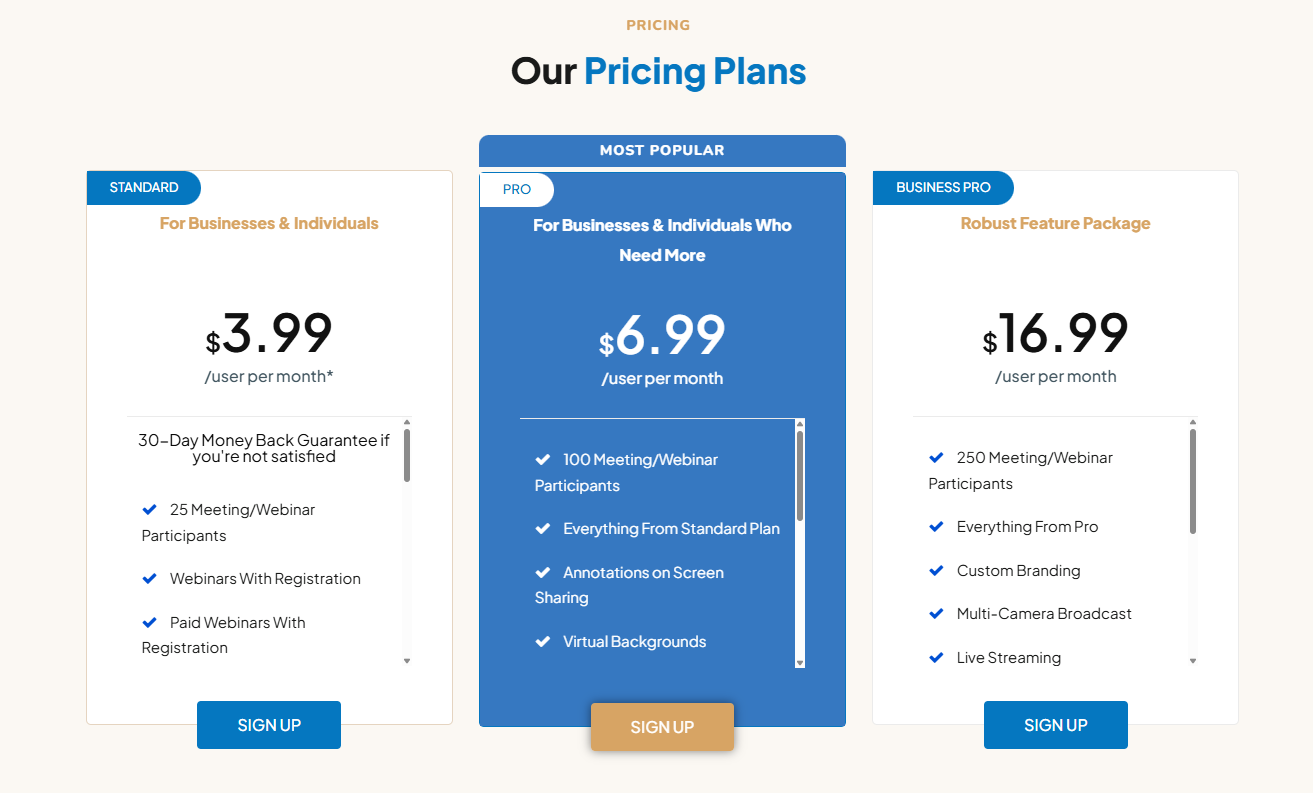
AONMeetings maintains transparent pricing with no hidden charges, backed by a 30-day money-back guarantee.
Launch Promotion: Use code LAUNCH50 for 50% off your initial month!
Standard Plan — $3.99/User/Month
- Cost: $3.99 per user monthly
- Capacity: Up to 25 participants per meeting or webinar
- What's Included:
- Unlimited-duration HD video meetings
- Unlimited webinars with registration
- Paid webinar support with payment integration
- Document sharing (1 GB storage)
- Screen sharing
- Live polling
- Interactive whiteboard
- Meeting scheduling
- Address book
- Waiting room with music
- Instant join
- Connection tools
- Moderator controls
- Speaker spotlight
- Audio and video recording
- Smart meeting summaries
- Smart search
- Closed captioning
- Unlimited monthly meetings
- Team chat (multi-license)
Versus Zoom at $14.99/month — that's 73% less while including more features. 30-day money-back guarantee. No time limits. No hidden fees.
Pro Plan — $6.99/User/Month
- Cost: $6.99 per user monthly
- Capacity: Up to 100 participants
- All Standard features, plus:
- Screen sharing annotations
- Virtual backgrounds
- Content popup
- Private chat
- Meeting lock
- Custom hold music
- One-time access codes
- Call display
- Webcam during screen share
- Multi-license team chat
Business Pro Plan — $16.99/User/Month
- Cost: $16.99 per user monthly
- Capacity: Up to 250 participants
- All Pro features, plus:
- Custom branding and white-labeling
- Multi-camera broadcast
- Live streaming
- Cue insights
- Calendly integration
- Gallery popover
- YouTube and custom RTMP livestreaming
- Multi-license team chat
Large Webinar Add-Ons
Monthly Recurring
Chat-enabled, starting at $54.99/month:
- 500 attendees: $54.99/month
- 1,000 attendees: $239.99/month
- 3,000 attendees: $712.99/month
- 5,000 attendees: $1,799.99/month
Includes chat, polling, registration, and live interaction capabilities.
One-Time Event Pricing
Single-event, no recurring billing:
- 500 attendees: $60 one-time
- 1,000 attendees: $300 one-time
- 3,000 attendees: $800 one-time
- 5,000 attendees: $1,900 one-time
Chat features included for the event duration.
Enterprise Tier
- Custom Pricing: Scoped to your organization's requirements
- What You Get: Everything in Business Pro, plus:
- Volume-based discounts
- Custom participant ceilings
- Dedicated account management
- 24/7 priority support
- HIPAA Business Associate Agreement
- Bespoke integrations
- SLA guarantees
Real-World Track Record
AONMeetings holds a 4.9 out of 5 rating on G2 drawn from over 154 verified reviews.
Performance highlights from actual users:
- AV Quality: Verified reviewers consistently report clear audio and video
- Bandwidth Resilience: Quality holds up even on suboptimal connections
- No Duration Limits: Sessions run as long as needed with no artificial caps
Compatibility and Requirements
Built for maximum reach with minimal prerequisites:
- Browser Support: Chrome, Firefox, Safari, Edge — any modern browser works
- Operating Systems: Windows, macOS, Linux, iOS, Android
- Zero Install Footprint: Fully browser-based — nothing to download ever
- Internet: Stable connection recommended for HD quality
- Hardware: Camera and microphone needed for video and audio
- Storage: 1 GB cloud storage bundled with Standard plan
The browser-only approach means universal device compatibility — no software management or OS-specific concerns.
Competitive Landscape
AONMeetings carves out its position through simplicity, security, and aggressive pricing.
Core Differentiators
- Purely Browser-Based: Zero installs — participants join instantly from anywhere
- Webinars on Every Plan: Unlimited webinar hosting without premium surcharges
- HIPAA-Ready: Enterprise encryption and compliance for regulated industries
- AI Baked In: Summaries, search, and captions included at no extra cost
- Aggressive Pricing: Entry at $3.99/user/month — well below market norms
- No Session Caps: Meet without time restrictions
- Native Streaming: YouTube and RTMP output for Business Pro users
- Risk-Free Trial: 30-day money-back guarantee
Head-to-Head Comparison
| Feature | AONMeetings | Zoom | Google Meet | Microsoft Teams |
|---|---|---|---|---|
| Browser-Based Access | ✅ Yes | ❌ Requires App | ✅ Yes | ❌ Requires App |
| No Downloads Required | ✅ Yes | ❌ No | ✅ Yes | ❌ No |
| End-to-End Encryption | ✅ Yes | ✅ Paid Plans | ❌ No | ❌ No |
| Unlimited Webinars Included | ✅ All Plans | ❌ Paid | ❌ No | ❌ Paid |
| AI Meeting Summaries | ✅ Included | ❌ No | ❌ No | ❌ No |
| AI-Powered Transcriptions | ✅ Included | ✅ Paid | ❌ No | ✅ Paid |
| Smart Search for Recordings | ✅ Yes | ❌ No | ❌ No | ❌ No |
| Sentiment Analysis | ✅ Yes | ❌ No | ❌ No | ❌ No |
| Live Streaming Included | ✅ Business Pro | ❌ Paid | ❌ Paid | ❌ Paid |
| One-Time Access Codes | ✅ Included | ❌ No | ❌ No | ❌ No |
| Session Locks | ✅ Included | ❌ No | ❌ No | ❌ No |
| Custom Branding | ✅ Business Pro | ✅ Paid | ⚠️ Limited | ✅ Paid |
| Meeting Recording | ✅ Included | ✅ Paid | ✅ Paid | ✅ Paid |
| Cloud Storage for Recordings | ✅ Yes | ✅ Paid | ⚠️ Limited | ✅ Paid |
| Business Pro Participants | ✅ Up to 250 | Up to 100 | Up to 100 | Up to 300 |
| Enterprise Participants | ✅ Up to 250 | Up to 500 | Up to 250 | Up to 250 |
| Starting Price (per user/mo) | ✅ $3.99 | $14.99 | $12.00 | $4.00 |
| 30-Day Money-Back Guarantee | ✅ Yes | ❌ No | ❌ No | ❌ No |
Ideal Use Cases
AONMeetings spans a wide range of industries and roles:
- Small Businesses and Freelancers: Full professional toolset at $3.99/month, with no time limits and effortless client access
- Healthcare Practices: HIPAA-compliant telehealth platform for secure patient consultations
- Educational Institutions: Unlimited webinars, interactive tools, and AI-generated summaries for virtual instruction
- Distributed Teams: Scalable collaboration with screen sharing and calendar integration
- Marketing and Event Teams: Live streaming, brand customization, and attendee registration systems
- Consultants and Professional Services: Secure, client-friendly meeting access
What Users Are Saying
The team behind AONMeetings actively incorporates feedback into platform improvements:
- Elijah M., Software Developer: "Professional service, software is secure, excellent meeting platform for any organization."
- Diane B., CEO: "AONMeetings offers an exceptional service that exceeds expectations in both functionality and value."
- Irina G., Client Success Manager: "Makes virtual client onboarding smoother."
Final Verdict
AONMeetings punches well above its price point, packing enterprise features into a package starting at just $3.99/user/month. The browser-first design eliminates every install barrier — participants click a link and they're in. Unlimited webinars, AI-powered tools, and HIPAA compliance ship with every plan. The 30-day money-back guarantee removes any risk from evaluating the platform.
Ratings at a Glance
- Ease of Use: ⭐⭐⭐⭐⭐ (5/5)
- Browser-Based Experience: ⭐⭐⭐⭐⭐ (5/5)
- Security & Compliance: ⭐⭐⭐⭐⭐ (5/5)
- Feature Set: ⭐⭐⭐⭐⭐ (5/5)
- Webinar Capabilities: ⭐⭐⭐⭐⭐ (5/5)
- AI Features: ⭐⭐⭐⭐⭐ (5/5)
- Value for Money: ⭐⭐⭐⭐⭐ (5/5)
- Customer Support: ⭐⭐⭐⭐⭐ (5/5)
- Overall Review Score: ⭐⭐⭐⭐⭐ (5/5)
Ready to upgrade your meetings? 👉 Try AONMeetings for Free and discover browser-based video conferencing with unlimited webinars, enterprise-grade security, and AI-powered features. Thousands of businesses have already switched to AONMeetings as their affordable Zoom alternative.
Tags
# Review# AONMeetings# Video Conferencing software# Zoom alternative# Browser based video conferencing# HIPAA compliant video conferencing# Affordable video conferencing# Webinar platform# Video meeting software# Secure video calls# Online meeting solution# No download video conferencing# Team collaboration tool# Remote work software# Virtual meeting platform# Screen sharing# Video recording# AI meeting summaries# WebRTC video conferencing# Enterprise video meetings# Small business video conferencing# Healthcare video meetings# Educational webinars# Live streaming platformJust Call AI Review - Screen-Free Voice AI Accessible from Any Phone
ProjectAdulting Review - Your Personal AI Life Coach for Mastering Adult Skills
Follow for new blogs
Subscribe to our blog
Subscribe to Newsletter
Subscribe to our newsletter to get the best products weekly.