This project is scheduled for launch
Launch date: Sunday, November 8, 2026 at 08:00 AM UTC
Scheduled
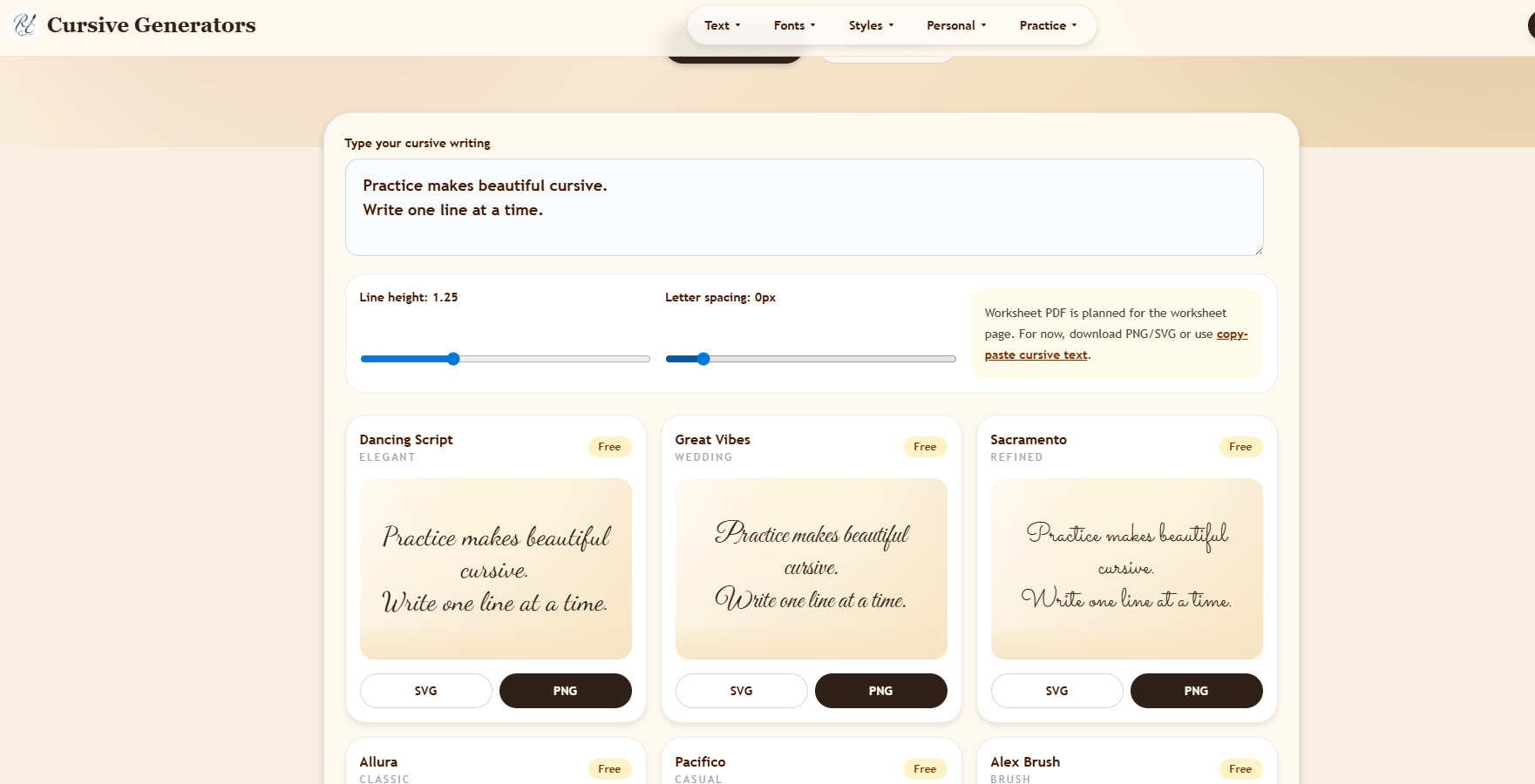
CursiveGen is a versatile online cursive generator designed to transform plain text into elegant cursive styles. It offers both copy-paste Unicode text for social media and downloadable real-font images (PNG/SVG) for professional and creative applications. This tool caters to a broad audience, including social media users, designers, educators, tattoo enthusiasts, and anyone needing decorative or authentic cursive text for various projects.
Key Features:
CursiveGen is highly beneficial for personalizing social media profiles, creating unique tattoo references, designing elegant wedding invitations, and generating professional email signatures. Educators can utilize it to produce printable worksheets and classroom labels, while designers can create brand mockups and quote images with transparent PNG or scalable SVG files. Its ability to provide both text and image output makes it adaptable for quick decorative touches or high-quality design work.
Furthermore, the generator serves as an excellent resource for learning cursive handwriting. Users can generate individual letters, words, or names to practice tracing, or create custom worksheets for children and students. This dual functionality addresses both immediate decorative needs and educational support for mastering cursive.
Pricing Information:
CursiveGen operates on a completely free model. There is no requirement for sign-up, credits, or payment to access and utilize its core copy, SVG, and PNG generation tools.
User Experience and Support:
The platform boasts a mobile-friendly layout and an intuitive user interface, allowing users to type text once and immediately preview it across all available styles. The process is streamlined: type, choose output type (copy-paste or image), and then copy or download. While explicit support channels aren't detailed, the site provides extensive "How-to" guides and FAQs covering cursive writing, font choices, and tool usage, ensuring users can easily navigate and maximize the generator's potential.
Technical Details:
CursiveGen functions as a web-based application, converting user input into either Unicode characters or rendering it into image files (PNG, SVG) directly within the browser. This approach ensures broad accessibility across various devices and operating systems without requiring any software installation. The distinction between Unicode and real-font output addresses compatibility and design consistency needs effectively.
Pros and Cons:
Pros:
CursiveGen stands out as a comprehensive and accessible online tool for all cursive text generation needs, from quick social media updates to professional design assets. Its blend of free access, diverse styles, and practical output formats makes it an invaluable resource for anyone looking to create beautiful cursive text. Explore CursiveGen today to effortlessly transform your text into elegant script.
Key Features:
- Instant conversion of plain text to multiple cursive styles.
- Copy-paste Unicode output for social platforms (Instagram, TikTok, Discord).
- Downloadable real-font images (PNG, SVG) for consistent visual assets.
- 36 real cursive font previews covering elegant, casual, bold, and calligraphy styles.
- 35 Unicode copy-paste styles, including script, bold script, and decorative variants.
- No sign-up, account, or payment required for core functionality.
CursiveGen is highly beneficial for personalizing social media profiles, creating unique tattoo references, designing elegant wedding invitations, and generating professional email signatures. Educators can utilize it to produce printable worksheets and classroom labels, while designers can create brand mockups and quote images with transparent PNG or scalable SVG files. Its ability to provide both text and image output makes it adaptable for quick decorative touches or high-quality design work.
Furthermore, the generator serves as an excellent resource for learning cursive handwriting. Users can generate individual letters, words, or names to practice tracing, or create custom worksheets for children and students. This dual functionality addresses both immediate decorative needs and educational support for mastering cursive.
Pricing Information:
CursiveGen operates on a completely free model. There is no requirement for sign-up, credits, or payment to access and utilize its core copy, SVG, and PNG generation tools.
User Experience and Support:
The platform boasts a mobile-friendly layout and an intuitive user interface, allowing users to type text once and immediately preview it across all available styles. The process is streamlined: type, choose output type (copy-paste or image), and then copy or download. While explicit support channels aren't detailed, the site provides extensive "How-to" guides and FAQs covering cursive writing, font choices, and tool usage, ensuring users can easily navigate and maximize the generator's potential.
Technical Details:
CursiveGen functions as a web-based application, converting user input into either Unicode characters or rendering it into image files (PNG, SVG) directly within the browser. This approach ensures broad accessibility across various devices and operating systems without requiring any software installation. The distinction between Unicode and real-font output addresses compatibility and design consistency needs effectively.
Pros and Cons:
Pros:
- Completely free with no hidden costs or sign-ups.
- Offers both copy-paste text and high-quality image downloads (PNG/SVG).
- Wide variety of cursive styles (36 real fonts, 35 Unicode styles).
- User-friendly and mobile-responsive interface.
- Excellent resource for both decorative use and cursive learning/practice.
- Unicode output may have compatibility issues on older devices or certain apps.
- Commercial use of generated images requires checking individual font licenses.
- No explicit mention of advanced customization options beyond style selection.
- Lacks direct integration with other design software.
CursiveGen stands out as a comprehensive and accessible online tool for all cursive text generation needs, from quick social media updates to professional design assets. Its blend of free access, diverse styles, and practical output formats makes it an invaluable resource for anyone looking to create beautiful cursive text. Explore CursiveGen today to effortlessly transform your text into elegant script.
Comments
Comments will be available once the project is launched.
Publisher

Launch Date2026-11-08
Platformweb
Pricingfree
Tech Stack
#web
Sponsors

Product Hunt Email Scraper
Scraper Email for Product Hunt Daily leaderboard and peerlist, tinylaunch, uneed.
Become a Sponsor
Get your brand featured here
Outbid
View🥇 🥈
🥈 🥉
🥉
Want this spot? Pay what you wantBoost Domain Rating - Boost Domain Rating is a platform to discover and upvote the best tech products. Find top products launching daily.
Boost Domain Rating is a platform to discover and upvote the best tech products. Find top products launching daily.
$35
DirEasy - The Best Directory Boilerplate with AI | DirEasy
The best directory boilerplate, packed with AI, Listings, Payment, Submission, CMS, Blog, Authentication, Newsletter, SEO and more.
$30
Quiz Shot - Solve Any Screenshot Question in Seconds.
AI Study Assistant that answers any screenshot question. Get free AI tutor and step-by-step math and homework help with ChatGPT.
$25