Greetings Island AI Invitation Maker Review - Beautiful Event Invites Made Instantly with AI
Here's our in-depth Greetings Island AI invitation maker review. Let's dive into what makes this AI-driven design tool a standout choice for event hosts.
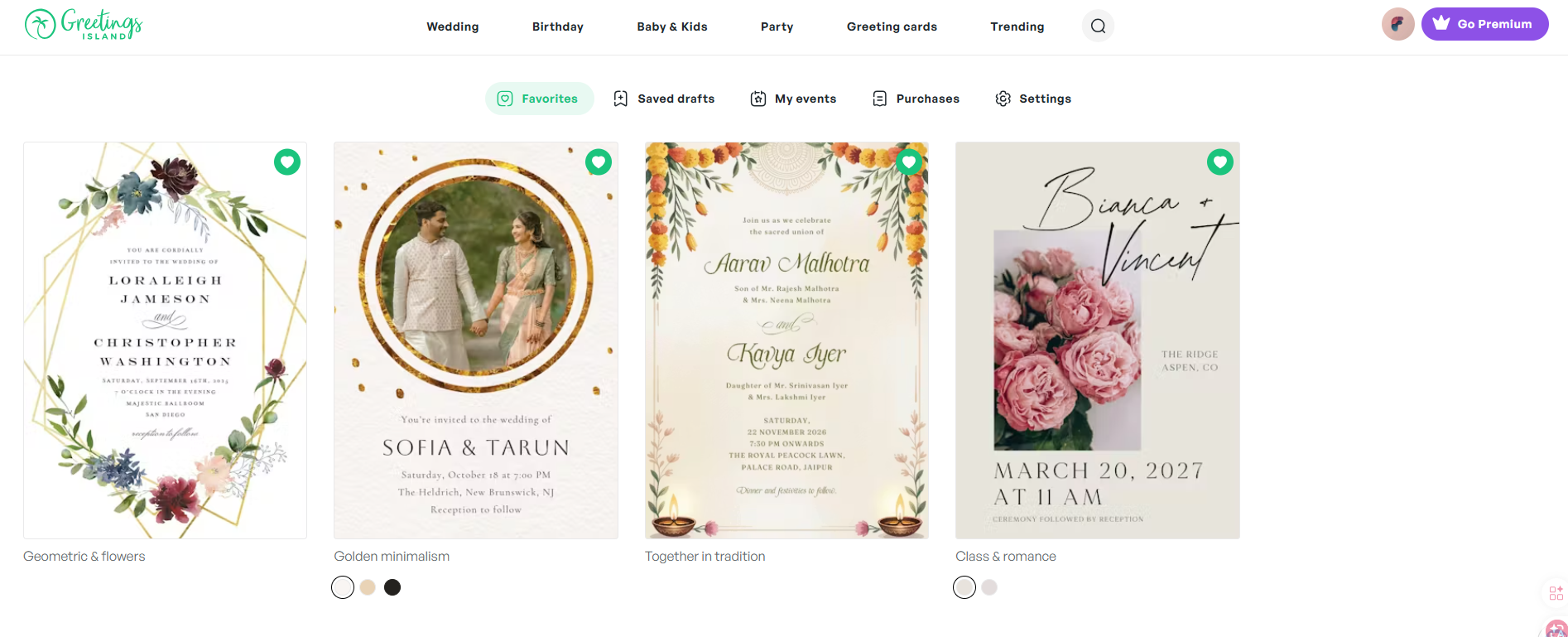
Every celebration deserves an invitation that captures its spirit. From weddings and milestone birthdays to baby showers and casual get-togethers, the invitation is the very first glimpse guests get of what's to come. The problem? Crafting visually stunning invitations has long demanded either serious design chops or a professional designer's budget.
Greetings Island flips that script. Their AI invitation generator uses generative AI to turn plain-language descriptions into invitation designs in a matter of seconds. Where many AI design tools hand you a flat image you cannot touch, Greetings Island's editor lets you keep working on the generated design before you send it.
How Greetings Island describes itself: the service provides web and mobile tools for invitations and cards that can be downloaded, printed, or sent online. Invitations can include RSVP and event-management features.
Bottom line: You go from concept to a shareable invitation in minutes, not days.
The appeal is the pairing of AI-powered generation with editing tools. The AI gives you a starting point, and from there you can work with text, fonts, colors, stickers, and your own photos. Add RSVP and event-management options alongside download, print, and online sending, and you have a single platform aimed at the modern event planner.
Product capabilities, plan contents and prices change over time, so treat the descriptions below as a snapshot and confirm the details on Greetings Island's own pages before you rely on them.
Let's walk through exactly how Greetings Island's AI invitation maker lets anyone — regardless of design experience — produce gorgeous invitations for any kind of celebration.
Why Event Hosts Are Switching to AI Invitation Maker by Greetings Island
- ✨ AI-Generated Designs: Describe your event in everyday language and watch the AI deliver a custom invitation within seconds
- 🎨 Editing Tools: A drag-and-drop editor lets you modify text, fonts, colors, stickers, and your own photos (which elements can be edited depends on the template)
- 📅 Integrated RSVP: One-click insertion of online RSVP links, gift registries, maps, and supplemental event details
- 🎉 Suits Every Occasion: Weddings, birthday parties, baby showers, holiday gatherings, corporate events — you name it
- 🆓 Free and Paid Options: Some invitation creation is available at no cost, with paid plans that add more; check the official pricing page for what is currently included
- 📱 iOS & Android Apps: Grab the free mobile app from the App Store or Google Play to create and manage invitations on the go
- 🔗 Flexible Distribution: Download for physical printing, share via link, or send digitally straight to your guest list
- 🖼️ Your Photos Become the Design: Upload your own images and event details so the invitation is built around them
- 🌐 Massive Template Library: Thousands of professionally crafted templates spanning every conceivable occasion
- 💾 Drafts & Favorites: Save works-in-progress and favorited designs to revisit for future celebrations
- 🌈 Diverse Style Palette: Elegant, rustic, floral, modern, minimalist, vintage, beach, and many more aesthetic directions
Core Features: What Makes This Invitation Maker Tick
AI Magic Invite Generator
The AI Magic Invite sits at the heart of Greetings Island's experience, transforming a simple description into a polished invitation.
The Four-Step Flow
Cranking out an invitation is dead simple:
- Describe Your Event: Jot down the key details in plain language — event type, date, time, location, and the overall vibe you're after
- AI Generates the Design: In seconds, the AI translates your description into an editable, ready-to-use invitation
- Refine the Design: Hop into the editor and adjust fonts, colors and layout where the template allows it
- Distribute and Track RSVPs: Wrap up by downloading for print, sharing online, or sending digitally while managing guest responses
Because the AI parses natural language, you just describe what you need. Type "a pastel floral baby shower invitation for March 15 at 2pm" or "Sarah and Michael's elegant wedding invitation with gold accents for June 20th" — the AI interprets your intent and produces a foundation you can build on.
Tips for Getting the Most Out of AI Generation
Greetings Island offers guidance to help you get optimal results:
- Feed It Key Event Details: Include what the event is, plus essentials like date, time, location, and any guest instructions
- Specify Desired Elements: Tell the AI what should appear — event title, host names, RSVP call-to-action, special notes
- Describe Visuals and Layout: Mention the design elements you envision, whether that's balloons, unicorns, floral frames, or anything fitting your theme
- Set Style and Color Preferences: Pick your style and color palette right inside the Magic invite interface so the AI matches your vision from the jump
Best suited for: Busy party hosts, professional planners, brides-to-be, expecting parents, and anyone craving gorgeous invitations minus the hours of design work.
Magic Photo Feature
Greetings Island's Magic Photo capability turns your personal photos into enchanting AI-enhanced invitations.
The Magic Photo Process
- Pick a Magic Photo Template: Browse through AI-ready photo invitation designs
- Upload Your Own Photo: Drop in a favorite image — a wedding portrait, a baby snapshot, a birthday highlight, or any meaningful picture
- AI Generates the Invitation: The system weaves your photo into a professionally composed design
- Tailor It Your Way: Edit text, layer on embellishments, and fine-tune the editable details
- Distribute and Manage RSVPs: Complete the workflow all from one platform
Magic photo invitations excel at infusing personality — they build an emotional bridge with guests before the celebration even kicks off.
When Magic Photo Shines
- Weddings: Pair engagement or couple portraits with refined design accents
- Birthdays: Spotlight milestone moments or personality-driven shots for both kids and adults
- Baby Showers & Announcements: Feature ultrasound images or newborn photos wrapped in sweet designs
- Anniversaries: Use treasured wedding or anniversary portraits to celebrate lasting love
- Graduations: Showcase graduation photos in festive, celebratory layouts
- Family Reunions: Add group pictures to build anticipation for the gathering
Magic Photo fuses the warmth of traditional photo invitations with the speed and polish of modern AI design.
Template Library: Depth and Breadth
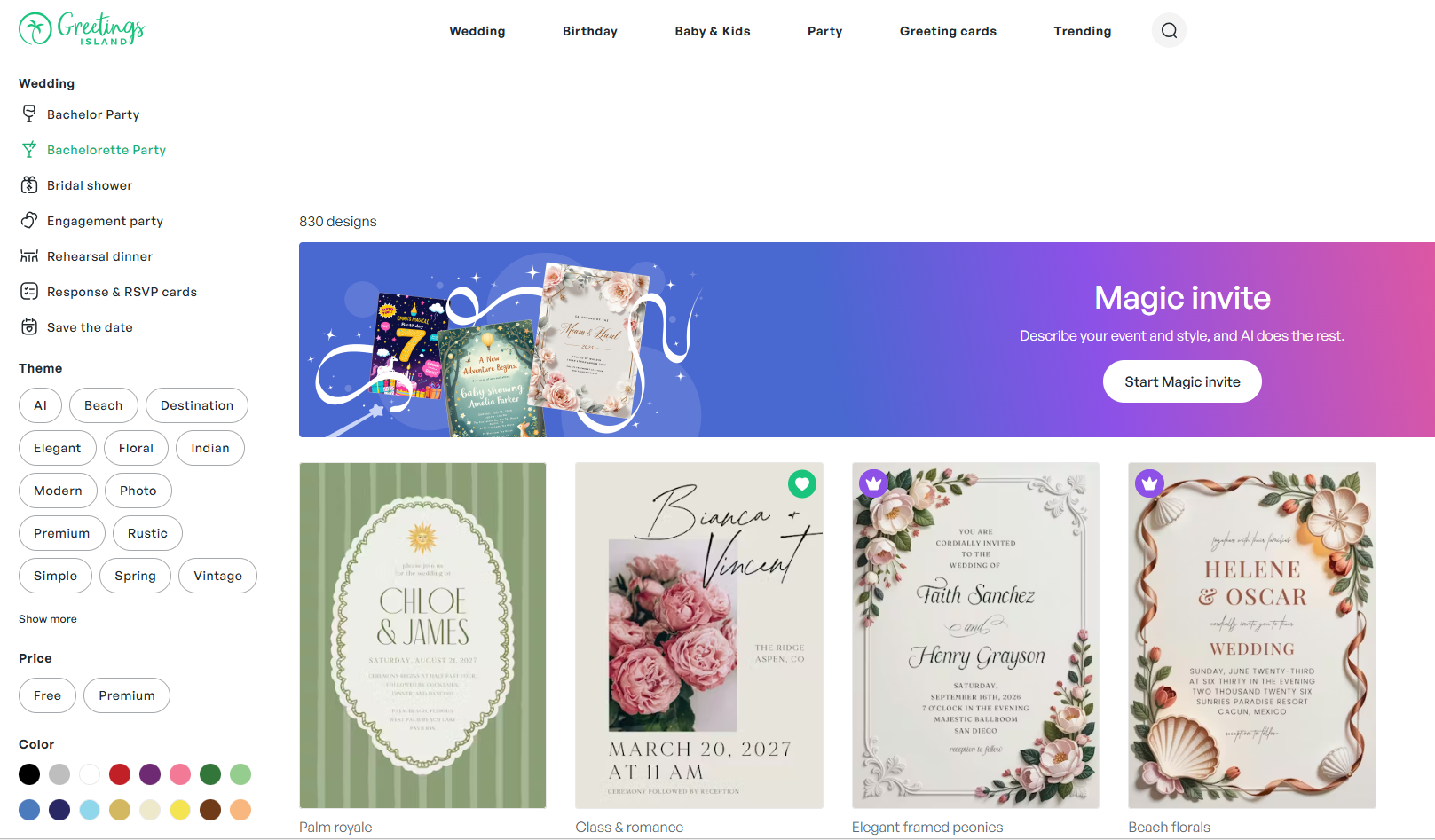
Greetings Island houses an enormous library of professionally designed templates covering practically every occasion you could imagine.
Wedding Templates
- Styles: AI-generated, elegant, rustic, floral & botanical, modern, simple, Indian, vintage, beach, photo, destination, premium
- Stationery: Save the date cards, RSVP cards, bridesmaid cards, engagement announcements, wedding announcements
- Pre-Wedding Events: Engagement party, bridal shower, bachelor party, bachelorette party, rehearsal dinner
- Greetings: Wedding wishes, thank you cards, engagement congratulations
Birthday Templates
- Invites: Kids, women's, add a photo, men's, babies, teens, save the date, surprise
- Kids Milestones: 1st birthday, 2nd birthday, 10th birthday, 13th birthday, sweet 16, quinceañera, bar & bat mitzvah
- Adult Milestones: 18th, 21st, 25th, 30th, 40th, 50th, 60th, 70th, 80th, 90th birthday
- Themes: AI, princess, animal, unicorn, butterfly, sleepover, dinosaur, rainbow, mermaid, gaming
Baby & Kids Templates
- Events: Baby shower, gender reveal, baby sprinkle, sip & see
- Shower Themes: Floral, woodland, butterfly, safari, princess, rustic, elephant, rainbow, dinosaur, fiesta
- Announcements: Birth announcements, pregnancy announcements
- Religious Milestones: Baptism & christening, bar & bat mitzvah, first communion
Party Templates
- Celebrations: AI-generated, graduation party, anniversary, retirement & farewell, engagement party, baby shower, rehearsal dinner, bridal shower, bachelor party, memorial, save the date
- Gatherings: Housewarming, dinner party, cocktail party, lunch & brunch, family reunion, back to school, sleepover, BBQ, potluck, summer & pool, luau, sports & games, picnic
- Holidays: Ramadan, St. Patrick's Day, Easter, 4th of July, Labor Day, Rosh Hashanah, Halloween, Diwali
- Business: Gala, grand opening, open house, cocktail party, dinner party, retirement, save the date
Greeting Cards
- Birthday: AI-generated, kids, funny, milestone, belated, add a photo, family, for her, for him
- Occasions: New baby, graduation, wedding, anniversary, retirement, engagement, bar mitzvah, new home
- Thank You: General, graduation, teacher appreciation, for support, wedding, birthday, baby, baptism
- Sentiments: Get well, sympathy, love & romance, congratulations, good luck, sorry, miss you, farewell & goodbye
With this breadth of templates, creative inspiration is never in short supply — whether you're orchestrating a wedding, throwing a birthday bash, or hosting any special moment.
Robust Editing Capabilities
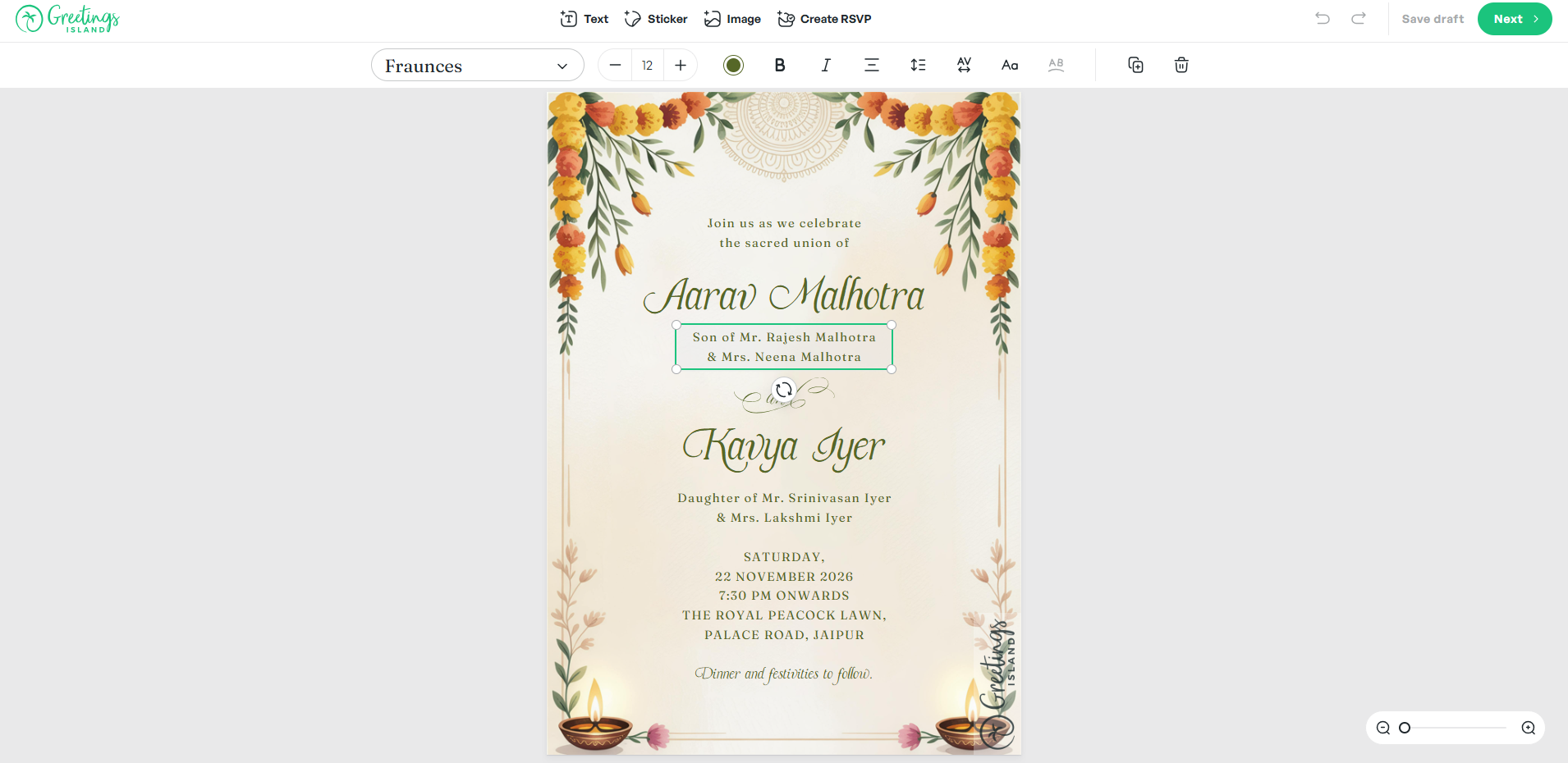
The editor is what separates Greetings Island from AI tools that only hand back a flat image. It gives you a set of editing tools to work with after generation.
What You Can Edit
The editor's toolkit covers:
- Text: Modify fonts, sizes, colors, and positioning
- Elements: Move, resize, and rearrange supported design components (which layers you can move depends on the template and on how the design was generated, so some parts of a design are fixed)
- Typography: A range of font choices to match your event's mood
- Color Palette: Shift colors to nail your theme perfectly
- Stickers: Layer on decorative stickers and flourishes
- Photos: Upload and position your personal images
- Layout: Adjust composition and spacing within the limits of each template
The Case for Editable Designs
AI generation provides the springboard, but every event is one-of-a-kind. Editable templates mean:
- Personalization: Weave in names, dates, and details that make invitations feel bespoke
- Error Fixes: Correct typos or adjust details without scrapping the whole design
- Theme Matching: Align colors and styles with your actual decor or party palette
- Last-Minute Edits: Update the venue, time, or other logistics as plans shift
- Creative Freedom: Morph a template into something unmistakably yours
This flexibility helps your invitation represent your event rather than settling for a cookie-cutter result.
Guest Response Management (RSVP)
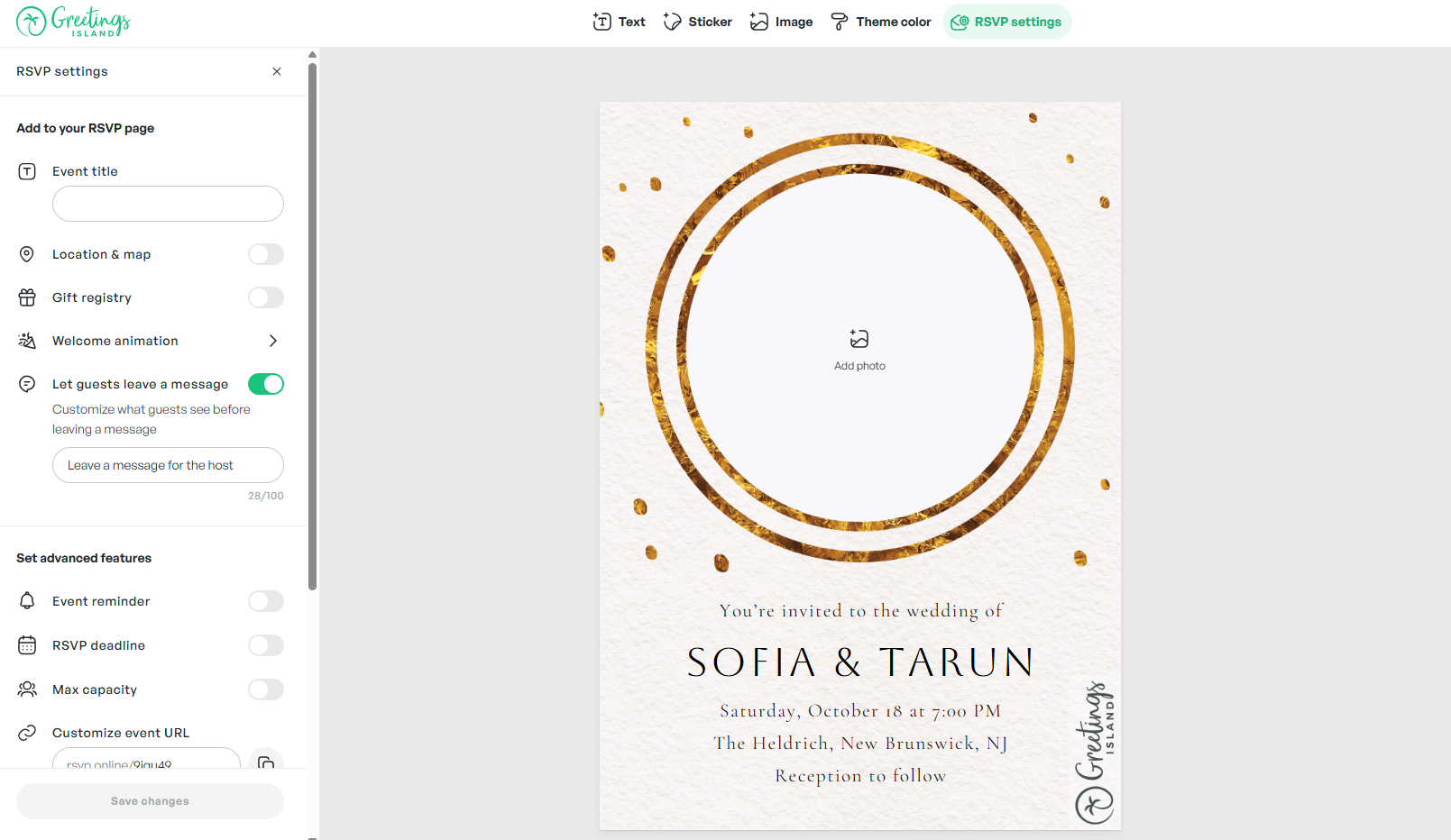
Handling guest replies is central to event planning, and Greetings Island bakes this right into the platform.
One-Click RSVP Additions
With a single click, you can embed:
- Online RSVP Links: Let guests respond digitally for straightforward tracking
- Registry Links: Seamlessly attach wedding or baby shower gift registries
- Map Links: Provide location and driving directions
- Extra Info: Include parking instructions, dress code, or any special notes
Why Integrated RSVP Matters
- Single Dashboard: Monitor all guest responses from one centralized place
- Fewer Interruptions: Cut down on guests calling or texting with questions
- Accurate Counts: Plan food, seating, and supplies with real numbers
- Guest Ease: Make responding and getting event details frictionless
- Modern Workflow: Designed for hosts who live digitally
By consolidating invitation design and guest tracking, Greetings Island removes the need for external RSVP tools and streamlines your entire event planning process.
The Pain Points Greetings Island Addresses
Conventional approaches to invitation design come with a host of frustrations:
- Tedious Design Workflow: Crafting beautiful invitations from a blank canvas takes graphic design know-how and hours of labor
- Stale Template Selection: Many platforms serve up static templates that feel generic and fail to reflect your personal style
- Rigid Customization: Swapping fonts, colors, or layout components usually demands technical skills most people don't have
- Disconnected RSVP Tools: After designing your invitations, you're forced to juggle separate apps for managing guest responses
- Uneditable Outputs: Numerous tools produce fixed images you can't adjust, meaning one imperfection sends you back to square one
- Steep Designer Costs: Professional designers charge premium fees, squeezing budget-conscious hosts out of quality design
Greetings Island tackles these friction points head-on with AI-fueled design and all-in-one event management — empowering anyone to create stunning, personalized invitations regardless of design background.
Pricing: Plans and Availability
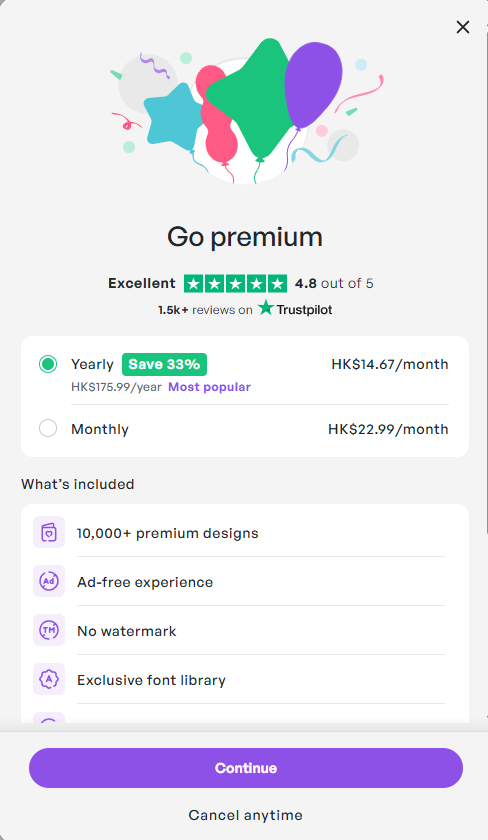
Greetings Island offers a mix of free and paid options, and the lineup has changed more than once.
What to Expect
- Free and paid options: Some invitation creation is available at no cost, alongside paid memberships that add more
- Details change over time: Which features sit on which plan, how many credits a plan includes, and the current prices are set by Greetings Island and can change at any time
- Check the official page: For the current breakdown, read the plan details on Greetings Island before committing
Because plan contents, credit limits and prices move around, we deliberately do not publish a feature-by-feature tier comparison here. What the service supports right now is described on its own pricing pages, and invitations can include RSVP and event-management features.
Where the Value Comes From
Rather than a specific feature list, it is more useful to think about what you are paying for:
- Time saved: Generation plus editing replaces starting from a blank canvas
- Consistency: Reuse a look across save-the-dates, invitations and thank-you cards
- Guest handling: RSVP and event-management features live next to the design
- Delivery choice: Download, print, or send online depending on the plan you are on
Compatibility and System Requirements
Greetings Island runs entirely in the cloud for maximum accessibility:
- Account: Create an account to save your work; see the official site for what each plan currently includes
- Internet: Required for AI generation and cloud-based editing
- Browser: Any modern web browser — works on desktop, tablet, and mobile
- Mobile App: Free app downloadable from the App Store and Google Play for editing and sharing on the move
- No Installs: Everything operates in-browser or in-app — zero complicated setup
- Access on Web and Mobile: Create and manage invitations on the website or in the free mobile app
Since it's cloud-native, there's nothing to install or maintain. Open the website and start designing.
Step-by-Step: Making Your First AI Invitation
Jumping into Greetings Island's AI invitation maker is intuitive:
- Head to the AI Invitation Generator: Go straight to the AI invitation page
- Describe Your Event: Enter your event details, theme, and any design elements you have in mind
- Select Style and Colors: Choose your preferred aesthetic direction and color scheme
- Generate the Design: Let the AI produce your custom invitation
- Customize Freely: Adjust fonts, text, colors, and drop in photos or stickers
- Add RSVP Info: Embed online RSVP links, registry info, maps, and other guest-facing details
- Share It: Download for print, share a link, or send digitally to your guests
The whole flow takes minutes. The AI understands everyday language — just tell it what you want in plain English.
Competitive Landscape: What Sets Greetings Island Apart
Greetings Island carves out its niche by merging AI-powered generation with editable design customization.
Standout Differentiators
- Editable AI Designs: Generative AI creates a starting point you can refine in the editor
- Plain-Language Input: No design jargon needed — describe your event in everyday speech
- Encyclopedic Template Library: Thousands of professionally designed templates across every event type
- Baked-In RSVP Management: Integrated links and guest tracking remove the need for external tools
- Multiple Distribution Paths: Download, share online, or send digitally — all from one hub
- Photo-Driven Designs: Your photos and event details become the basis of the invitation
- Magic Photo Integration: Turn personal snapshots into AI-elevated designs
- Free Option: Some invitation creation is available at no cost, with optional paid plans for more
- Cross-Platform Mobile Apps: Free apps on App Store and Google Play
Head-to-Head Comparison
Various invitation design tools approach the problem from different angles.
| Feature | Greetings Island AI | Canva | ChatGPT/Gemini |
|---|---|---|---|
| AI-Powered Design | ✅ Yes | ✅ Limited | ✅ Yes |
| Editable Designs | ✅ Yes (varies by template) | ✅ Yes | ❌ No (Static) |
| Natural Language Input | ✅ Yes | ❌ No | ✅ Yes |
| RSVP Management | ✅ Built-in | ❌ Separate | ❌ No |
| Photo Integration | ✅ Yes | ✅ Yes | ⚠️ Limited |
| Print Downloads | ✅ Yes | ✅ Yes | ❌ No |
| Template Library | ✅ Thousands | ✅ Millions | ❌ No |
| Free Option | ✅ Yes | ✅ Limited Credits | ⚠️ Depends |
| Mobile Friendly | ✅ Yes | ✅ Yes | ✅ Yes |
| Event-Specific Categories | ✅ Extensive | ✅ General | ❌ No |
This table is an orientation aid, not a specification. Plan contents, credit limits and feature availability change, so confirm current details on Greetings Island's own pricing pages.
The Greetings Island Advantage
AI + Customization: AI generation and editing tools in one package. Start with what the AI creates, then refine details using the editor's toolkit.
Deep Event Specialization: Built specifically for invitations and event stationery, with meticulously organized templates for weddings, birthdays, baby showers, parties, holidays, and business functions.
End-to-End Workflow: Covers the full journey from design creation through guest response tracking — a true one-stop shop for event hosts.
Your Details Shape the Invitation: The photos and event details you supply are what the design is built around.
Who Benefits Most from AI Invitation Maker?
👰♀️ Brides-To-Be: Coordinate weddings with elegant, personalized invitations aligned to your colors, fonts, and aesthetic. Create matching save-the-dates, bridal shower invites, and rehearsal dinner cards for a beautifully unified suite.
👶 New & Expecting Moms: Announce baby showers, gender reveals, and new arrivals using Magic Photo to share precious moments wrapped in adorable, celebratory designs.
🎂 Busy Moms: Power through kids' birthday parties, milestone events, and family gatherings with rapid AI generation. From princess to superhero themes, create invites your little ones will adore.
🎓 Young Women: Design on-trend invitations for graduation parties, sweet 16s, milestone birthdays, and social events. AI generation puts beautiful design within reach for celebrations on a budget.
👨👩👧👦 Multi-Generational Families: Plan reunions, holidays, and family milestones with personal photos and heartfelt messages. Craft designs that speak to family members across all ages.
🎉 Social Hostesses: Organize casual gatherings, dinner parties, brunches, and get-togethers with stylish invitations that set just the right mood. Wow your guests without logging hours in a design tool.
Final Verdict: Is Greetings Island's AI Invitation Maker Worth Your Time?
After a thorough exploration of Greetings Island's AI invitation maker, it's clear this tool redefines the invitation design experience. Rather than producing uneditable static images like many competitors, this platform fuses AI generation with customizable designs, integrated RSVP management, and a professional-grade template library.
What stood out most was how elegantly it balances AI speed with human creative judgment. AI Magic Invite delivers beautiful jumping-off points in seconds, while the editor ensures the final result matches your exact vision.
The free option lowers the barrier to entry, so you can try the tool before paying anything. Paid plans add flexibility for hosts juggling multiple events, and what each plan currently includes is listed on Greetings Island's pricing pages. Head to Greetings Island to try the AI invitation generator yourself.
This tool is an especially powerful asset for anyone juggling weddings, milestone birthdays, baby showers, or any event where a personalized invitation sets the stage.
Review Summary
- Ease of Use: ⭐⭐⭐⭐⭐ (5/5)
- Design Quality: ⭐⭐⭐⭐⭐ (5/5)
- Customization Options: ⭐⭐⭐⭐⭐ (5/5)
- Template Variety: ⭐⭐⭐⭐⭐ (5/5)
- AI Generation Speed: ⭐⭐⭐⭐⭐ (5/5)
- RSVP Integration: ⭐⭐⭐⭐⭐ (5/5)
- Value for Money: ⭐⭐⭐⭐⭐ (5/5)
- Overall Review Score: ⭐⭐⭐⭐⭐ (5/5)
Ready to make beautiful invitations in seconds? 👉 Try AI invitation maker by Greetings Island today. Transform your event planning with AI-powered design that makes invitation creation fun, fast, and beautifully personalized.
Tags
# Review# AI invitation maker# invitation# design# rsvp# AI invitation generator# event invitations# wedding invitations# birthday invitations# party invitations# baby shower invitations# invitation templates# generative AI# custom invitations# digital invitations# invitation design# event planning# invitation maker# AI-powered design# RSVP management# print invitations# online invitations# femaleDirEasy Deep Dive - Build AI-Powered Directory Websites with This Next.js Boilerplate
DepLog In-Depth Review - Intelligent Dependency Monitoring and Risk Assessment
Follow for new blogs
Subscribe to our blog
Subscribe to Newsletter
Subscribe to our newsletter to get the best products weekly.