InviteJam Review - Online Invitations with RSVP Tracking

You spend an evening choosing colours and wording, you send the invitation out, and then the chasing starts. Half the replies arrive as texts, some come through a group chat, three people ask what time it starts because they never scrolled, and one family replies "we'll be there" without saying how many of them that means. Two days before the event you are copying names from four different places into a spreadsheet, and the caterer wants numbers.
InviteJam is built around that exact gap. It is an online invitation maker with an animated envelope, a browser-based RSVP form and a guest list dashboard, all in one place. The brand line it uses for itself is "Beautiful invites. Easy RSVP management.", and after going through the product's own walkthroughs and guides, that description is unusually accurate for a marketing line.
This InviteJam review looks at how the whole thing fits together: choosing a design, personalising it, uploading your own artwork, what guests see, and what the RSVP side gives you once replies start arriving.
The problem with sending invitations the usual way
Paper invitations are lovely and no one is arguing otherwise. But they are slow, they carry no reply mechanism of their own, and printing corrections is expensive. Digital invitations solved the speed part and often created a new problem: a beautiful image file in a group chat, with replies scattered across messages.
The middle ground is what people usually mean by online invitations with RSVP: guests tap a link, see something nicer than a JPEG, and answer questions that land in a list you can plan from. InviteJam sits in that space, and a few of its choices are worth arguing about.
Digital invitations versus paper, briefly
InviteJam has a horse in this race, so treat its comparison with the usual caution. Its cost figures do match what a printer will quote you, so they hold up.
| Digital | Paper | |
|---|---|---|
| Cost | Free to cheap | Roughly $1 to $5 or more per guest, with design, print and postage |
| Delivery | Seconds, by link | Days to weeks |
| Replies | Collected in one place automatically | Texts, calls and word of mouth, then a spreadsheet |
| Changes after sending | Edits apply to the same link | Reprint and repost |
| Keepsake value | Low | High |
Its conclusion is a split one, which is fair. Digital wins for birthdays, dinners, barbecues, board game nights, short-notice plans, and any event where the headcount has to be accurate. Paper still wins for formal weddings and black-tie events, for milestone celebrations where the guest list skews older, and for hosts who want the invitation itself to be something guests keep.
The usual worry is older guests and links. An InviteJam invitation opens in a browser with nothing to install and no account to create, which is a lower barrier than an app. If a handful of guests would still rather have something for the fridge, print for the grandparents and send the link to everyone else.
How InviteJam works
InviteJam describes itself as combining invitation design, an animated envelope and online RSVP management. In practice the product runs in five steps, which the homepage sets out directly:
- Pick a design
- Make it yours
- Ask what you need to know
- Send the invitations
- Watch the replies come in
Each step has details that only show up later, so they are easier to take in order.
The free plan is usable and guests never install anything, which matters more than any feature list.
Step one: picking a design
InviteJam offers more than 300 designs, and many of them are hand drawn. You can pick one out at a glance: illustrated flowers, little sketched balloons, hand-lettered titles and painted washes, rather than the same five stock gradients that turn up in every invitation generator.
If hand-drawn invitations are what you came for, browse here first. The rest of the catalogue covers the occasions most people host:
- Birthday invitations, for adults and for kids
- Kids' party invitations
- Wedding and engagement invitations
- Baby shower invitations
- Dinner party invitations
- Party, barbecue, pool party and brunch invitations
- Graduation, housewarming and anniversary invitations
- Halloween and seasonal designs
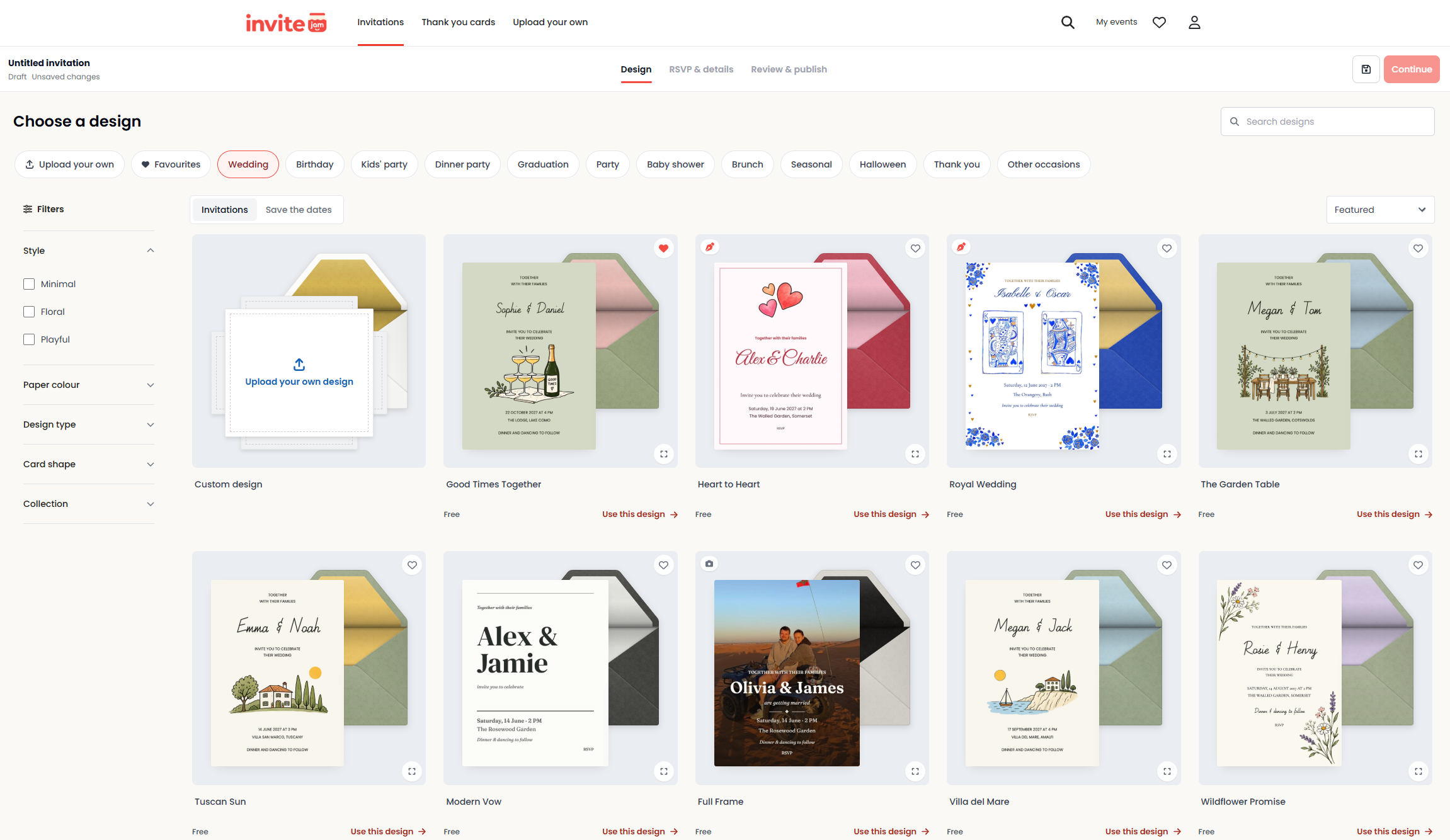
There are separate areas for save-the-date cards and thank-you cards too. Pull all three from the same design family and a wedding looks planned rather than assembled from three different tools.
If you already have a design, the upload option lives here as well, and I will come back to it because it may be the most useful thing on the site.
Step two: making the invitation yours
Most invitation tools get fiddly at this point, usually because they hand you a full canvas editor and then expect you to be a designer. InviteJam narrows the options instead, which I think is the right call for its audience.
You can change the colours to match the party, add a photo, and write the details on the card: the title, the date and the place. The card updates as you type. The preview earns its keep the first time you paste a long venue address and watch the layout absorb it instead of breaking.
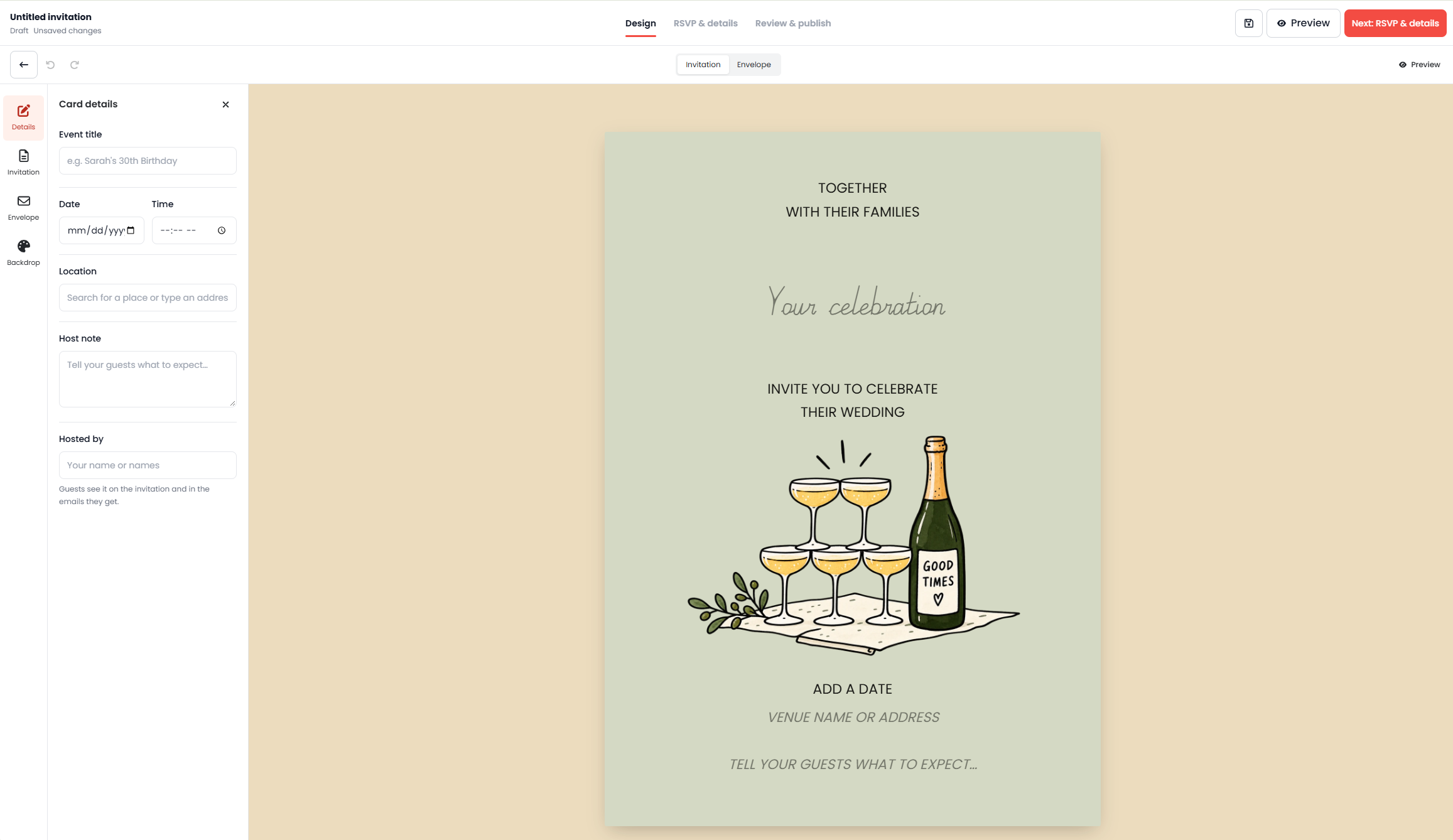
Editing is scoped on purpose. You are working inside a designed template rather than building from nothing, so the illustrated artwork stays intact. For anyone who wants a good-looking invitation rather than a graphic design project, that constraint is a feature. If you do want full control, the upload route covers you.
For online wedding invitations in particular, the template plus photo combination handles the usual requirements without fuss: names, date, venue, a line of warmth, and a picture of the couple if you want one.
Step three: uploading a Canva invitation
Plenty of people have already made an invitation in Canva and now face the awkward second half of the job. The design is done, but a flat exported image cannot collect replies and cannot hold a guest list.
InviteJam's answer is simple: upload the exported file and it adds the envelope and the RSVP form. PNG, JPEG, WebP or PDF, up to 10MB.
What you get on top of your own artwork:
- An animated envelope to hold your design
- An RSVP form with your own questions
- A guest list with a live headcount
- A single shareable invitation link
Reminders sit with a pass or Pro rather than the free tier, which the pricing section below covers.
The limit matters: this is an upload, not an integration, and there is no two-way Canva sync. Change your mind about the wording in Canva and you export again and upload the new version. For a one-off celebration that is a reasonable workflow, and it means Canva invitations with RSVP do not have to be rebuilt inside another editor.
Step four: the animated envelope
Guests remember this bit, so it needs describing properly rather than in marketing language.
The invitation arrives as a digital envelope, sealed and addressed to each guest by name. They tap it, the flap lifts, and the invitation slides out. Then a reply sheet appears asking whether they can make it, along with any questions you have added.
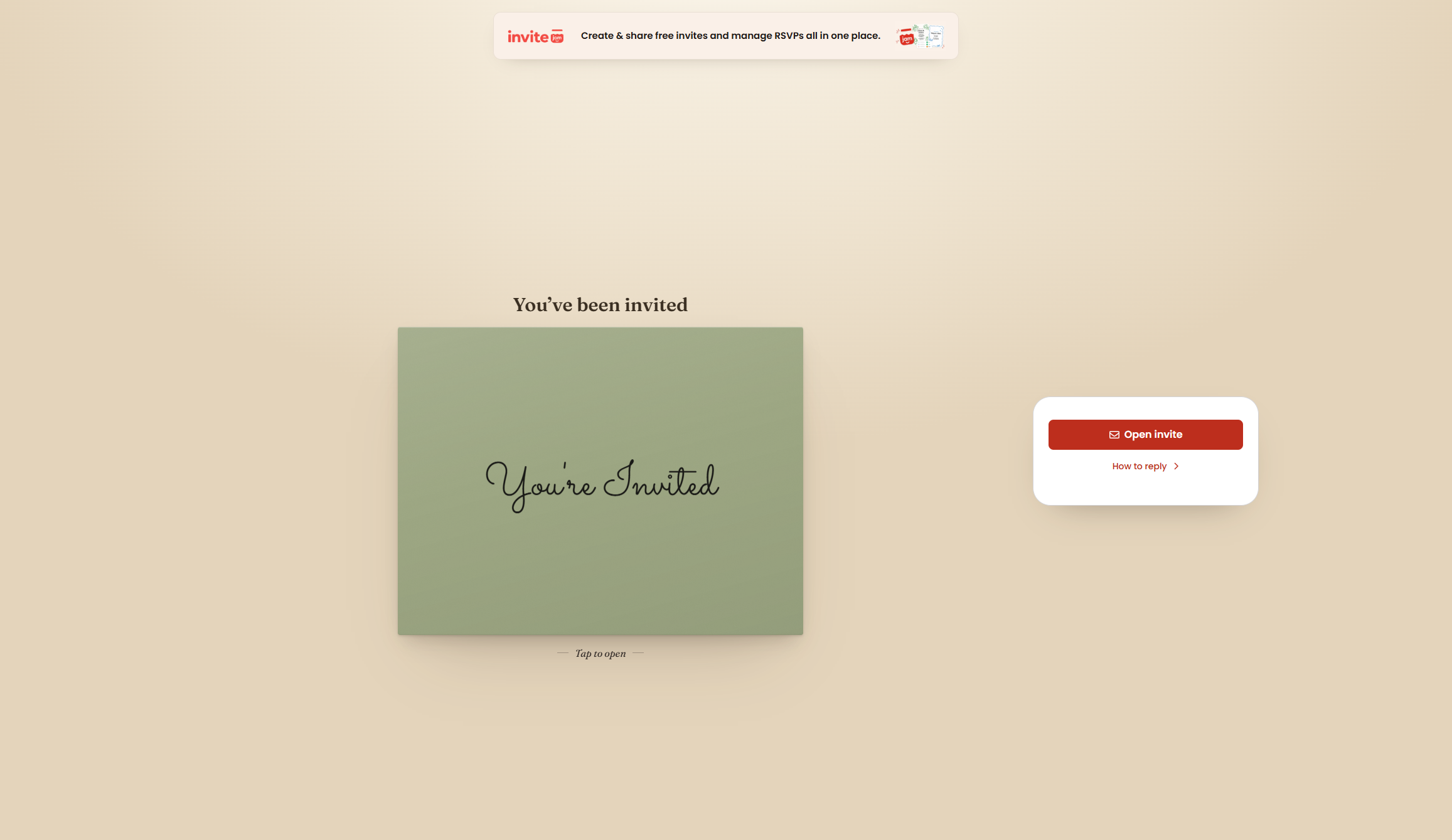
If you add guest names, each person sees an envelope addressed to them individually. That small detail does a lot of work. A personalised envelope reads as an invitation. A generic link in a group chat reads as a notice.
Sharing is one URL, and that is the entire mechanism. Text it, send it on WhatsApp, email it, or drop it in a group chat. You can also email everyone on your guest list from inside InviteJam. Either way, guests end up in the same place.
The combination of animated envelope invitations and one URL is the reason people screenshot your invitation and ask which tool you used.
Step five: RSVPs without an app or an account
Guests tap the link, open the envelope and reply in their browser. Nothing to download, no sign-up, on any phone or computer. For a non-technical guest list, including grandparents and the friend who still asks what a link is, that absence of friction is what decides whether you get replies at all.
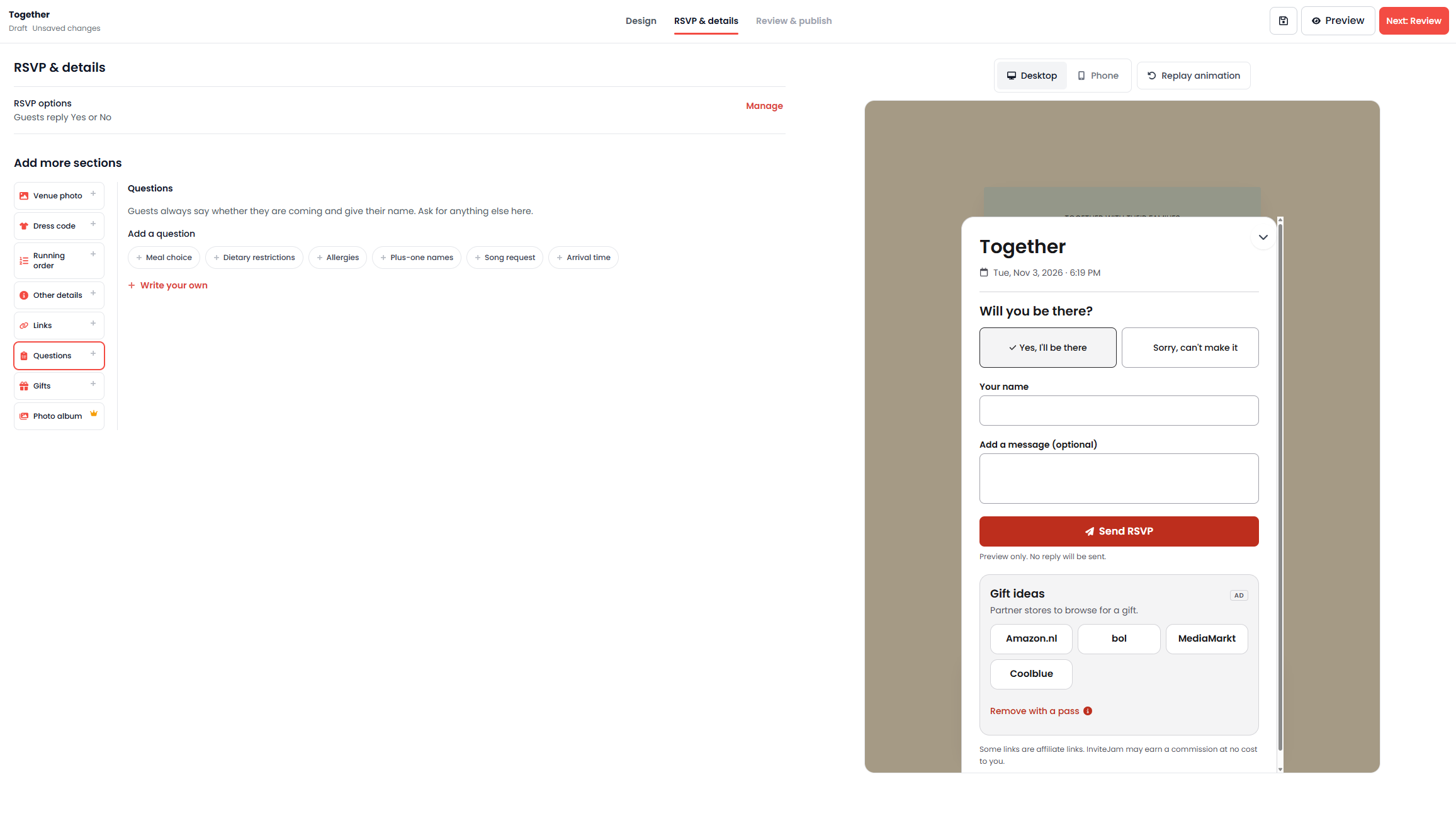
The reply sheet starts with the obvious question and then asks whatever you have set up. Typical setups include:
- Will you be there, with options to accept or decline
- What would you like to eat, with choices such as beef, fish or vegetarian
- Any dietary requirements
- Plus-one names
- Arrival time
- A question you write yourself
InviteJam's guide to collecting replies online turns the job into a handful of habits, and they matter more than features:
- Set the deadline earlier than you need it. For most parties that means about a week before, so there is room to chase and still brief the caterer.
- Ask only what you will use. Attendance, party size, dietary needs and one free-text note cover most events. The guide's blunt version of this is that every extra field costs you replies.
- Share one link through every channel your guests already use, and pin it in the group chat so late joiners can find it.
- Send a reminder a few days before the deadline. Most people who have not replied are undecided rather than declining, which is a much easier problem to solve.
- Keep the numbers in one place, so the final count is already assembled when someone asks for it.
Every answer is stored against the right person, not against "the party". That distinction is the whole point of a guest list, and it shows up most clearly on a real one.
Household replies, plus-ones and the headcount question
Most free RSVP tools come apart on this next bit.
A household can reply together while each person's answers stay attached to them. So a couple replying on one invitation can still record two different meal choices, or one vegetarian and one "no dietary requirements". You set the allowed party size on each invitation, and the attending headcount counts the people in that party who are coming, not the number of replies.
Two replies can mean two guests or five, and two households saying yes might mean six people at the table. An RSVP tracker that reports replies instead of people will hand your caterer the wrong number, which is why InviteJam's dashboard counts attendees.
Guest statuses are kept separate too:
| Status | What it means for planning |
|---|---|
| Attending | Counts towards the headcount, with party size included |
| Maybe | Available when you enable it, useful for soft commitments |
| No reply | The people you still need to chase |
| Declined | Confirmed no, kept in the list for your records |
A wedding example from start to finish
Say you are planning a wedding for 60 guests and the venue needs meal choices three weeks out.
You choose a hand-drawn floral design, add a photo from the engagement shoot, and set the title, date and place. You add three questions: meal choice, dietary requirements and song requests. You add your guest list, marking each invitation as an individual or a party with an allowed size.
Guests open their named envelope and reply. Your dashboard shows how many invitations have replied out of the total, then breaks it into attending, maybe, declining and no reply, with a live headcount. Meal choices sit beside each name. You filter by no reply when you want to see who is still outstanding, and when the caterer asks for the final list you export a CSV with names, response statuses, party sizes and answers.
No copying from messages, no spreadsheet reconstruction, no guessing whether the "us four" reply included the toddler.
A kids' birthday works the same way with fewer questions. Invite 31 people, ask about allergies and whether a parent is staying, and watch the headcount build. InviteJam's own example events include a children's party alongside the wedding, which suggests the pattern they expect.
Guest list management in the dashboard
The dashboard gets less attention than the envelope and deserves more. Based on InviteJam's own description of the RSVP tracker, it offers:
- A live headcount of yes, no and maybe
- A clear view of who has not replied yet
- Every custom answer kept next to the right guest
- Individual or party invitations, with the party size you set
- Search to find a guest quickly
- Filters, including filtering by no reply
- CSV export for a venue, caterer or planning spreadsheet
- Follow-up reminders, with automatic reminders available on a pass or Pro
The detail carries more than the headline here. Submitted replies appear in the dashboard beside the invited guest information, so you can compare who you invited with who answered. The CSV also carries party sizes and question answers, not just names, which is the difference between a list a caterer can use and one you rebuild by hand.
Chasing stragglers on a free plan means filtering to no reply and sending your own message. It works; it just is not automated.
Build the guest list before you design anything
The best pages on InviteJam's blog are not about design. They are about arithmetic, and they are better read before you open a template.
Start with a number rather than a list. Take your catering and drinks budget, divide it by the cost per head, and you have a rough maximum. Compare that with what the venue holds and take the smaller figure. The blog's own example is blunt about it: catering at around $40 a head against a $2,000 budget allows roughly 50 people, and if the room seats 40 then 40 is your ceiling.
Then split that number into three tiers before writing any names:
- Must invite: close family and the friends whose absence you would feel
- Should invite: people you see regularly and close colleagues
- Would like to invite: newer friends and wider circles
If two families are hosting, each side trims its own list after agreeing the split, which is far calmer than negotiating names one at a time.
Most of the friction in guest list management comes from two policies, and both need one rule applied to everybody:
Plus-ones. Spouses, fiancés and long-term partners are invited by name on the invitation. A plus-one for someone who knows nobody else, or who is travelling a long way, is a kindness. Write the name when you know it, and "and guest" when you do not. What you should not do is leave the question hanging, because that is how "can I bring my boyfriend" emails happen.
Children. Pick one approach: welcome children and list them, run an adults-only event, or invite only children within the family. Adults-only wording that does the job without offence is a single line: "Our celebration is for adults only. Thank you for understanding."
An A-list and a B-list still work too, provided the first round goes out early enough that the second round is not arriving two weeks before the day, and provided the B-list stays private.
Whatever system you use, a guest list needs the same columns: everyone in the household, a contact route, whether a plus-one and children are allowed, RSVP status, meal and dietary answers, and gifts received so thank-you notes are not guesswork later. InviteJam's guest list covers the status, party size and answer columns directly, and the CSV export gives you a file with the same structure rather than a copy of your reply emails.
There is no reliable response rate to plan around. A local gathering tends to fill; a wedding with guests flying in collects more declines. Budget for the chasing either way.
A timeline for invitations, deadlines and chasing replies
InviteJam's guidance on timing is specific enough to plan against, and it applies to digital invitations too, even though there is no printing to wait for.
| Task | When to do it |
|---|---|
| Save-the-dates | 6 to 8 months before, or 8 to 12 months for destination weddings and holiday weekends |
| Wedding invitations | 6 to 8 weeks before, add 1 to 2 weeks for printed cards, around 3 months out for destination or visa-dependent guests |
| RSVP deadline | 3 to 4 weeks before, or 6 to 8 weeks for a destination wedding |
| Chasing non-repliers | A few days before the deadline, not after it |
| Final numbers to the venue | 1 to 2 weeks before, as the venue requires |
| Thank-you cards | Within about 3 months afterwards |
The row people get wrong is the deadline. Set it by working backwards from the date your caterer needs numbers, then add a week for chasing replies, which is where three to four weeks out comes from for a wedding. If a wedding is planned in under four months, the advice is to skip save-the-dates entirely, send invitations as soon as the venue and date are confirmed, and put the deadline roughly two weeks before the day.
Smaller events run on shorter clocks. Engagement parties and showers tend to go out 4 to 6 weeks ahead, a rehearsal dinner 3 to 4 weeks, and a bachelor or bachelorette weekend 6 to 8 weeks if travel is involved. For a kids' party, the working rule in the kids' wording guide is a reply-by date about a week before the party, which is late enough for parents to know their Saturday and early enough for you to buy the food.
The digital part helps here rather than changing the maths. Guests still need weeks to plan, so an online invitation sent at six weeks beats one sent at two weeks even though there is nothing to post.
Editing an invitation after you have sent it
Venues shift times. A start moves by an hour, a rehearsal dinner gets a new address.
You can edit the invitation at any time, and the link stays the same, so guests see the update at the address they already have and there is nothing to resend. Anyone who has already replied does not need to redo anything. It is a common complaint about tools that generate a new file on every correction.
The same design and the same guest list also carry across to save-the-date cards and thank-you cards, which keeps a wedding's stationery consistent from announcement to follow-up.
The wording takes longer than the design
Choosing a design takes ten minutes. The sentence can take an hour. How formal do you go, do you mention gifts, how do you say adults only without sounding like a bouncer.
InviteJam's blog is essentially a wording library written for this, by the InviteJam Team, organised by occasion and by tone. A few of those guides are worth reading before you write anything, because they hand you sentences rather than advice.
The RSVP line, in six registers
The same request, from the RSVP wording guide:
"Let us know if you can make it by July 5!"
"Please RSVP by July 5 so we can save you a seat."
"The favor of a reply is requested by the fifth of July."
"RSVP at the link below by July 5. One tap, no account needed."
"Kindly RSVP to Maya at 555-0142 by July 5."
"Will we see you there? Tap yes (or no) by July 5!"
Pick the register that matches the event, but the structural advice holds across all six. Give one reply route only, because three channels produce three piles of answers. Use an actual date instead of "let me know". And where it helps, say why the date exists: "Please reply by July 5. We finalize the catering that weekend" is harder to ignore than a bare deadline.
One option deserves a warning. Regrets only is fine for a casual gathering:
"Regrets only by July 5 to 555-0142."
But it works by treating silence as a yes, which is exactly what you do not want when a caterer is counting plates. For anything catered, ask everyone to reply either way.
Kids' parties are written for the parents
The kids' birthday guide starts from a useful premise: the invitation has to sound fun to the child and answer every practical question for the adult reading it. The checklist it works from is the one parents scan for: name and age, start and end time, address with parking or entrance notes, whether parents stay or drop off, food and allergies, what to bring, and a reply-by date roughly a week before.
What leads changes with age. At one to three, the headline is that parents and siblings are welcome. By seven to nine, the drop-off takes over:
"Game on! Max is turning 7. Join us for a games party on Saturday, February 21, 2-4pm, at 22 Fern Avenue. Drop-off party. Pickup at 4pm."
"Pizza and cake will be served. Please tell us about any allergies when you reply."
By ten to twelve the activity carries the invitation, and the practical notes shrink to socks, sleeping bags or a swim towel.
The guide is also unusually direct about the two questions parents are too polite to ask. On siblings, either say so or do not:
"Siblings are welcome."
"Due to space, we can only host invited guests. Thank you for understanding."
The technique behind that second line is to write only the invited children's names on the invitation. Ambiguity is what generates the awkward text message, not the rule itself.
Dinner parties, three ways
The dinner party guide splits by formality, and the differences are more than decorative.
"Come for dinner! Pasta, wine and good conversation at our place. Saturday, February 7, at 7pm, 18 Hazel Road. Let us know by February 1."
"Nina and David Brooks request the pleasure of your company at dinner. Saturday, November 14, at seven thirty in the evening. 22 Linden Square. Black tie. Kindly reply by November 1."
"Potluck at the Greens'! Saturday, April 18, 6pm. We'll provide the main course and drinks. Please bring a side or a dessert to share."
The guide's habits transfer to any tool. If drinks start before dinner, give both times: "7 for 7:30" tells guests what the half hour is for and takes away the worry of arriving too early. For a potluck, name the category you want ("a side or a dessert") and ask people to reply with the dish, or you will end up with four desserts and no main course.
Dress code is another one-phrase problem. "Come as you are", "smart casual", "cocktail attire" and "black tie" are understood instantly. "Festive" is not.
Timing for a dinner party is shorter than for a wedding: one to two weeks for a casual dinner, three to four weeks for a formal one or a holiday weekend, with replies requested a few days before so there is time to shop.
Birthdays, where tone swings furthest
The birthday guide carries more than 40 examples, and the useful part is how far the tone moves between them.
"Let's taco 'bout a party! Diego is 8! Saturday, August 9, 1-3pm, 14 Pine Road. RSVP by August 2."
"Sweet 16! Come celebrate Maya's 16th birthday on Friday, July 11 at 7pm, at The Loft. Dress to impress. RSVP by July 4."
"Shhh, it's a surprise! We're throwing Priya a surprise 30th. Please arrive by 6:45pm sharp on Saturday, May 3, at 9 Hill Crescent. Don't breathe a word!"
Both examples carry a judgement call. A first birthday is really a party for the adults, so it reads warmer than it reads funny. A surprise party needs an arrival time earlier than the reveal, plus a warning to keep quiet, which is the one detail to keep out of the group chat.
The awkward bits, solved with a sentence
Gifts, plus-ones, children and dietary needs are where invitations get over-written. The blog's approach is one clear sentence and no apology:
- No gifts: "No gifts please, your company is the gift" or "Your presence is the present"
- A gentle steer: "If you'd like to bring something, Leo loves dinosaurs and books"
- Adults only: "Our celebration is for adults only. Thank you for understanding"
- Dietary needs: "Please let us know about any allergies or dietary needs when you reply"
That last one belongs in the RSVP form rather than the invitation body, and that is how InviteJam structures it: the question sits on the reply sheet, the answers land beside the name, and you get one list for the caterer instead of answers scattered through messages.
Once you have a line you like, it goes into the wording fields on the template. For a dinner party, a potluck line plus a dietary question covers the whole job before the kettle boils.
And afterwards, the thank-you card
Thank-you cards reuse the invitation design and the guest list, which most tools in this category simply do not offer. The blog's guide to thank-you notes is the one to read for wording, because the etiquette is oddly specific.
The structure it recommends is five short moves: greet the person by name, name the actual thing you are thanking them for, say what it means or how you will use it, mention the party, and close warmly. Three or four sentences is a complete note.
A few rules that save embarrassment:
- Never mention the amount of a cash gift. Say what you will put it towards instead.
- For a group gift, one note to everyone is fine, or short individual messages if you have the energy.
- Timing is 1 to 2 weeks for a birthday, shower or dinner party, and about 3 months after a wedding. Late still beats never.
- Keep a gift column on the guest list as presents come in, otherwise you are reconstructing who gave what from memory in January.
That gift column is in the guest list guide's own template, and it is the sort of detail that tells you the blog was written by people who have actually hosted things.
One check before you plan around the thank-you card: the wedding package includes them, but the free tier is described around invitations and replies, so confirm on the pricing page whether cards for a non-wedding event need a pass or Pro.
What you get for free
The free plan is not a demo. It includes:
- Up to 3 events
- 15 guest places per event
- Invitation sharing
- RSVP tracking and the guest list dashboard
Free invitations display a small InviteJam banner. Guests never need an account on any plan, and the banner affects the invitation rather than your ability to collect replies.
The reply page on a free event also carries a short row of gift ideas from partner stores. The editor marks that block as removable with a pass, which is the same trade as the banner: nothing stands between a guest and their reply, but the free tier does keep reminding you that it exists.
What a pass costs, and when you need one
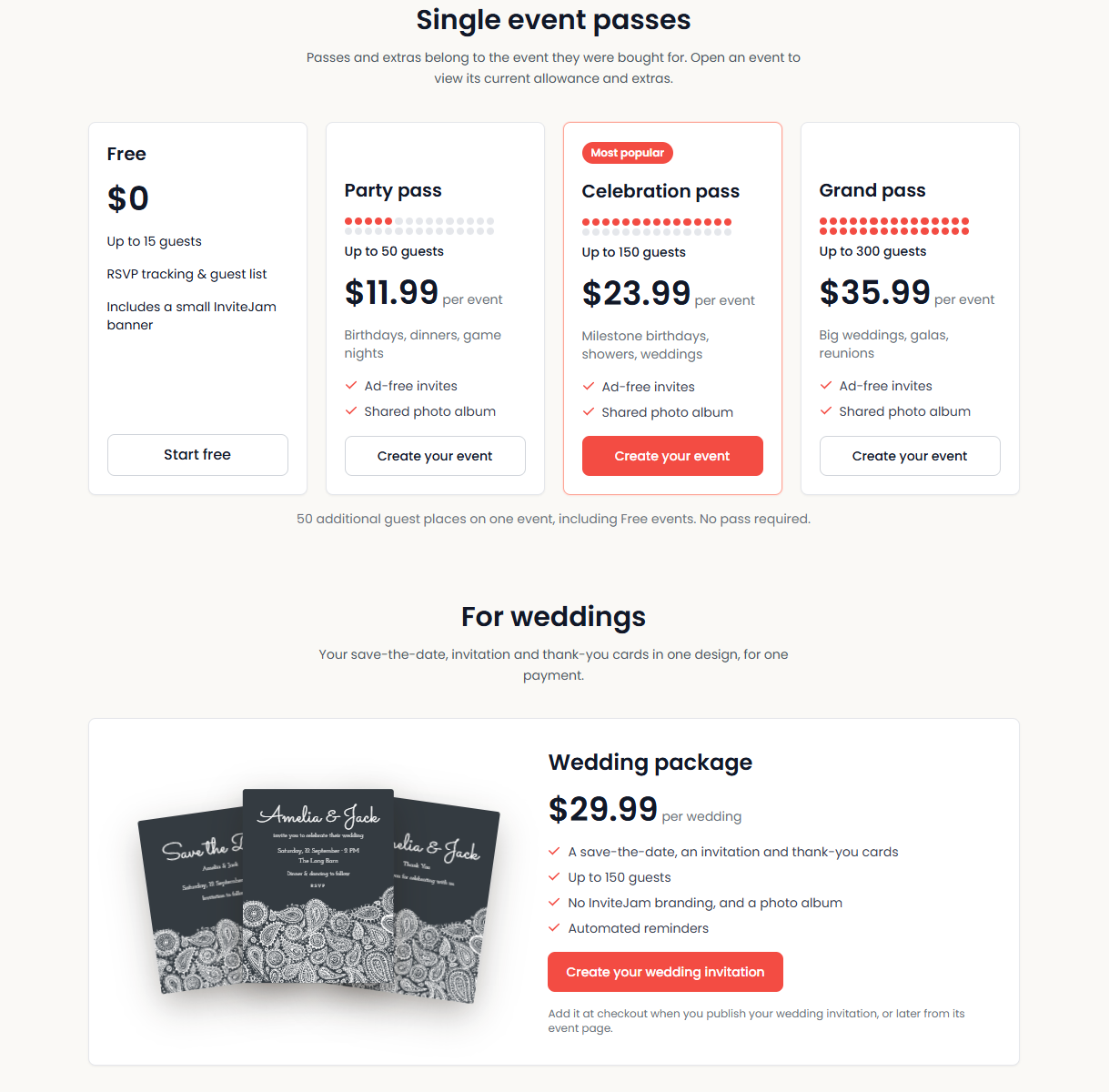
Passes are sold per event rather than per account, which decides whether this is cheap or expensive for you. A pass or extra belongs to the event it was bought for, and you choose one when you publish an invitation or add it later from that event's page.
| Pass | Guest allowance | Price | Built for |
|---|---|---|---|
| Free | Up to 15 | $0 | A dinner, a small birthday, a kids' party |
| Party pass | Up to 50 | $11.99 per event | Birthdays, dinners, game nights |
| Celebration pass | Up to 150 | $23.99 per event | Milestone birthdays, showers, weddings |
| Grand pass | Up to 300 | $35.99 per event | Big weddings, galas, reunions |
Every pass removes the adverts and adds a shared photo album. Past that, InviteJam's comparison table lists custom RSVP questions, email invites, calendar sync, branding removal, automated reminders and priority support as you move up the tiers, with the full set of premium designs and backgrounds on Pro.
Alongside the passes:
- An extra of 50 guest places for a single event, available even on a free event, with no pass required. Useful when a 40-guest dinner becomes a 60-guest one.
- A wedding package at $29.99 per wedding, which puts the save-the-date, the invitation and the thank-you cards in one design for one payment, for up to 150 guests, with no InviteJam branding, a photo album and automated reminders. Nothing else on the page covers a wedding start to finish in one payment.
- Pro at $199.99 per year, billed annually and about $16.67 a month, for regular hosts, planners, venues and teams. That covers up to 50 events with 1,000 guests per event, all premium designs and backgrounds, plus priority support.
Against a real guest list the arithmetic is simple. A 20-person dinner fits the free tier. A 60-guest wedding needs the Celebration pass or the wedding package, because the $11.99 Party pass stops at 50. A venue running events every month is the Pro case rather than the pass case.
Two things are easy to overlook. A pass is tied to one event, so three big events in a year mean three passes, which is where Pro starts to make sense. On the free tier you get one event per day, which matters only if you are hosting overlapping celebrations. Prices and allowances are set by InviteJam, so confirm them on the pricing page before you buy.
The free tier also says something about priorities: fifteen guest places covers a dinner party, a small birthday or a kids' party without paying anything, and three events is a whole season of small celebrations.
Where InviteJam fits and where it does not
What it does not do matters as much as what it does.
It is not a full event management platform. It handles the invitation and the replies, and it stops there, with nothing for seating charts, budgets or vendors.
It is not a print service: everything is sent digitally, so if you want cards posted to guests, look elsewhere.
It is not a Canva integration. You upload an export, and changes in Canva mean a new upload.
And automatic reminders are a paid feature, so do not assume a free event will chase guests on your behalf.
Within those boundaries, the product is well aimed. The audience is clear: couples planning weddings and engagement celebrations, parents organising children's birthday parties, hosts running baby showers, dinner parties and other personal celebrations, and the particular group who designed something in Canva and now need replies collected without rebuilding the design. All of them are non-technical by assumption, and the interface reflects that.
Who will get the most out of it
- Couples who want online wedding invitations that gather meal choices and dietary needs without a spreadsheet
- Parents throwing kids' parties, where the guest list is really a list of parents plus children plus siblings
- Hosts of smaller events, including dinner parties and brunches, where a free event covers the whole job
- Canva users who already have a design they love and need an RSVP mechanism to go with it
- Anyone managing households and plus-ones, where "how many of you" is the hardest question of the planning process
- Celebrations with meal choices, such as weddings, where the caterer's questions need individual answers
It is a weaker fit for corporate events with registration forms, ticketing or multi-session agendas, and for anyone who needs printed stationery included.
Frequently asked questions
Can I use a Canva invitation with InviteJam?
Yes. You export your design from Canva as PNG, JPEG, WebP or PDF, upload it to InviteJam, and the platform wraps it in an animated envelope with an RSVP form and a shareable link. It is a one-way upload, so editing the Canva file later means exporting and uploading again.
How far in advance should invitations go out?
For a wedding, InviteJam's guidance is 6 to 8 weeks for the invitation and 6 to 8 months for a save-the-date, stretching to 8 to 12 months for destination weddings or holiday weekends. Set the RSVP deadline 3 to 4 weeks before the day by working back from when your venue needs numbers. Smaller events run shorter: 4 to 6 weeks for a shower or engagement party, and for a kids' party the usual advice is a reply date about a week before.
Where can I find wording examples?
InviteJam's blog is built around this, with copy-and-paste wording for birthdays, kids' parties by age, weddings, baby showers, dinner parties, graduation, Halloween and Christmas parties, plus guides to RSVP etiquette and collecting replies online. Take a line you like and paste it into the wording fields on your chosen template.
Do guests need an account or an app?
No. Guests open the link, see the envelope, and reply in their browser on a phone or computer. No account, no download, no password.
Is InviteJam really free?
The free plan covers up to 3 events with 15 guest places each, including sharing and RSVP collection, with a small InviteJam banner on the invitation. Bigger guest lists need a pass: $11.99 for up to 50, $23.99 for up to 150, $35.99 for up to 300, with a wedding package at $29.99 or Pro at $199.99 a year for regular hosts. It is not an unlimited free service, and I would be suspicious of anyone claiming otherwise.
Can I change the details after sending invitations?
Yes. You can edit the invitation at any time and the link stays the same, so guests see the update without you resending anything.
How are plus-ones counted?
You set the allowed party size on each invitation. The attending headcount includes the people in that party who are coming, so a couple replying on one invitation counts as two attending guests.
Do reminders send automatically?
Automatic reminders are part of the pass or Pro offering. On the free plan you can filter the guest list to see who has not replied and follow up yourself.
Can I export the guest list?
The CSV export includes names, response statuses, party sizes and answers to your questions, which is what a venue or caterer usually asks for.
Can I email invitations directly from the platform?
You can email everyone on your guest list from InviteJam, or share a single link by text, WhatsApp, email or a group chat.
The verdict
What InviteJam gets right is picking one problem and finishing it. It does not sprawl into event management; it solves two things that belong together, making an invitation people want to open and collecting the replies somewhere you can plan from.
The animated envelope gives the invitation a moment of its own, which most digital invitations lack. The hand-drawn design library keeps that moment looking like a celebration rather than a calendar entry. And the RSVP side is where the work has gone in, particularly on household replies, party sizes, and counting people rather than replies.
The reservations are narrow. Passes are tied to a single event, so a year with three big celebrations costs three passes, and the things most hosts eventually want (no banner, automated reminders, custom questions) sit above the free tier. The Canva workflow is an upload rather than a live connection. None of that is unreasonable, but all of it is easier to know now than later.
The pricing will surprise anyone braced for another subscription. There is nothing to forget to cancel at the low end: $11.99 for a party, $23.99 for a wedding-scale event, and a 60-guest wedding lands under $30 whether you take the Celebration pass or the wedding package with cards included. Pro only earns its $199.99 a year if you host regularly.
If your event fits inside three events at 15 guests each, you can try the whole thing at no cost. If you are planning a wedding, the pass arrives early, and it buys a guest list you will use on the day.
Review summary
- Ease of use: 5/5
- Design quality: 4.5/5
- Guest experience: 5/5
- RSVP management: 5/5
- Custom questions: 4.5/5
- Value for money: 4.5/5
- Overall score: 4.5/5
Ready to send an invitation guests actually open? Create your first event free with InviteJam and see how the envelope, the replies and the guest list come together in one place.
Tags
# Review# InviteJam# online invitations with RSVP# digital invitations# online invitation maker# RSVP tracker# RSVP management# online wedding invitations# birthday invitations# hand-drawn invitations# animated envelope invitations# Canva invitations with RSVP# guest list management# online RSVP form# wedding invitations# kids party invitations# baby shower invitations# dinner party invitations# save the date# thank you cards# event planning# guest list dashboard# CSV guest list export# headcount tracking# meal choices# dietary requirements# plus ones# household invitations# no app required# free invitationsFollow for new blogs
Subscribe to our blog
Subscribe to Newsletter
Subscribe to our newsletter to get the best products weekly.