QR Cake Review: A Free Dynamic QR Code Generator That Never Expires
I printed 500 postcards before I ever tried QR Cake. Two weeks later the landing page they pointed at went stale, and I was looking at a reprint bill. That is the exact moment this kind of tool matters, and it is the exact moment most QR code generators quietly let you down.
So I cleared a weekend and actually used QR Cake across a handful of real projects. Not a once-over of the homepage. I made a menu code for a cafe owner friend, a packaging code for a small candle brand, a vCard for my own contact details, a review code that sends customers to Google, and an event code for a small launch party. I also read through their guides on when dynamic beats static, what size to print, and why codes fail to scan. This QR Cake review is the product of that week, with the trade-offs stated the way I wish more tools stated theirs.
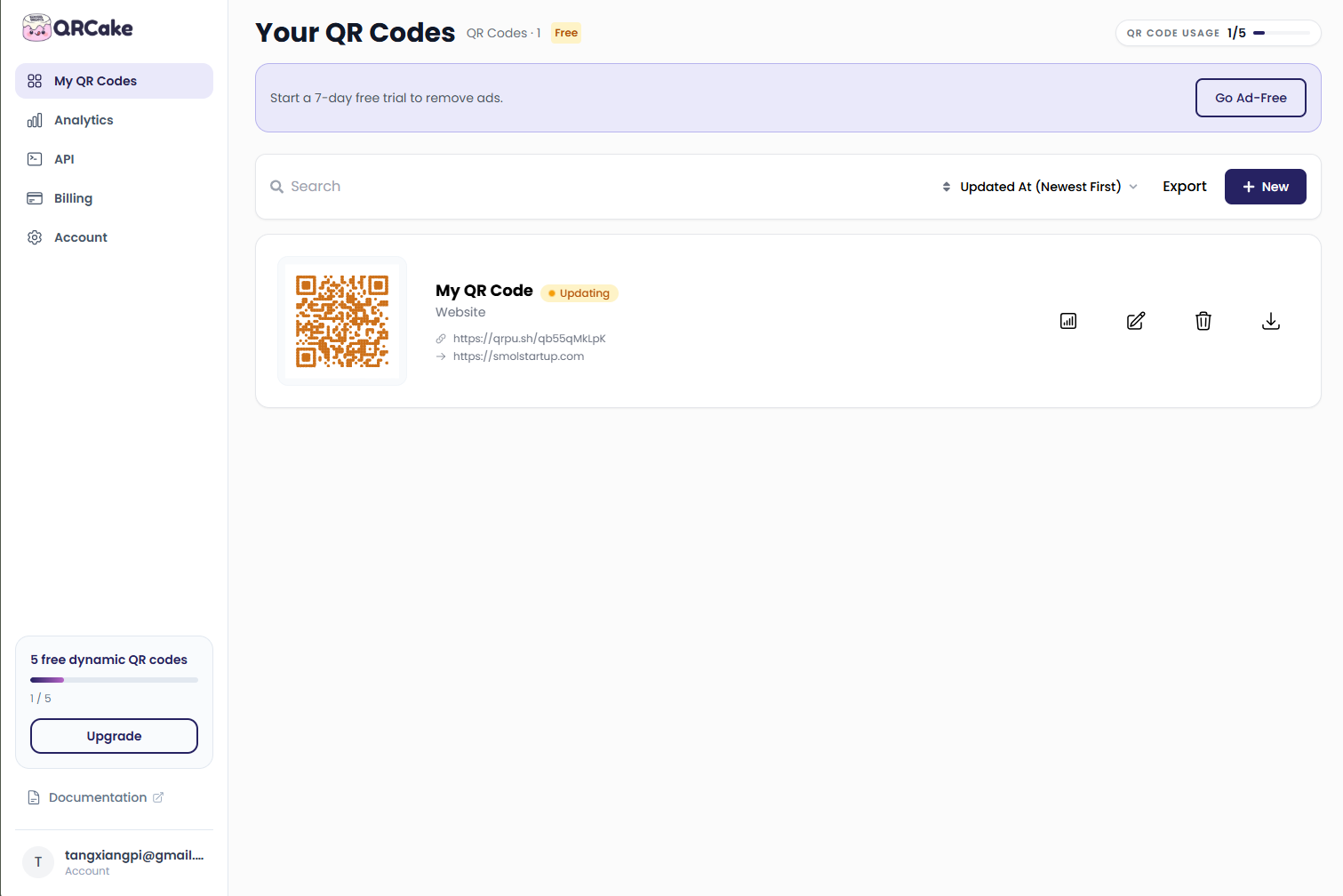
The short version: QR Cake is a free dynamic QR code generator with an unusually honest business model. It makes editable, changeable QR codes that keep working even after you stop paying. If your codes are going on print, that matters more than any extra feature. Here is the full picture.
Why "Dynamic" Actually Matters, Not Just As A Buzzword
A static QR code bakes the URL straight into the pattern. Once it is printed, that is it. You cannot fix a typo, swap a menu, or point a shelf of packaging at a new promotion without throwing the whole batch away. Print is permanent, and static codes are permanent with it.
A dynamic code works differently. The pattern you print only holds a short link, something like qrcake.com/r/x9k, not the real destination. That short link lives on a server QR Cake controls. When someone scans, their phone hits that server and the server redirects them to wherever you have set the target to be that day.
So the printed square never changes. But where it points can change at any time, from your dashboard, with zero reprints. This is why an editable QR code generator and a changeable QR code generator are really the same thing wearing two names. Both just mean you can edit where a live, printed code points after the ink is dry. QR Cake's guide on changing a QR code after printing walks through exactly what you can change: the target URL, the content behind a code, the code type itself, the routing logic, even the password protection.
The trade-off, and I will be straight about it, is that a dynamic code depends on the provider. If their server dies, or if they deactivate you, your codes die too. That is why the one question every dynamic tool should answer up front is: what happens when I stop paying? Most tools dodge it. QR Cake does not, and that honesty is the thread that runs through everything below.
The Feature That Made Me Stay: Codes Survive A Cancelled Plan
Here is the part I did not expect, and it is the single strongest reason to pick QR Cake over almost anyone else.
When you cancel or downgrade a paid plan, your codes keep working. They keep redirecting to their last saved destination, indefinitely. You lose editing and analytics, and scans show a brief ad again, but nothing you printed goes dead. I want to underline this because it is unusual.
Think about what most competitors do. Let a subscription lapse and they deactivate your codes. A cafe that stops paying suddenly has dead menus on every table, and the fix is a reprint invoice. A brand that moved off a paid tier loses every packaging code already out in the world. QR Cake is the opposite. The worst case on their side is a short ad before the redirect, not a dead code. For anyone who has already paid for print, that difference is the difference between a small annoyance and a reprint bill.
Their own guides call this out plainly. The dynamic vs static QR codes explainer lists QR Cake alongside a handful of providers that keep codes resolving after you stop paying, while naming Bitly, QR TIGER, and Flowcode as the ones that let your codes die the moment the subscription lapses. The can you change a code after printing guide makes the same point. That is not marketing spin; it is a direct, checkable claim, and it is why I trust the rest of this review.
The Free Plan Is Genuinely Usable, With One Honest Catch
A lot of "free" generators cap you at a single code or a few hundred scans, which makes the free tier basically a demo. QR Cake is more generous.
- Five dynamic QR codes
- Unlimited scans
- Codes that never expire
- Design customization, including colors and an embedded logo
- No credit card to start
I created my first code without even making an account, which lowers the barrier more than you would think. You get a feel for the tool before you commit anything to it.
Their free dynamic QR code generator page makes the logic explicit in a way I respect: the value of a dynamic code compounds over time, so you should not have to keep paying just to keep printed codes working. That is a fair principle, and they honour it.
Now the honest catch, because the brand itself volunteers it and any review that hides it is not worth reading. On the free plan, a short ad shows before the redirect. That is how the free tier pays for itself. I would rather a tool tell me that up front than hide it behind fine print. If you want a qr code generator without ads, that is what the paid plans remove. If you just need a qr code generator no expiration and can live with a two-second ad, the free plan might be all you ever need.
Edit After Printing, And I Tested It On A Menu
This is the feature I reach for most, and I want to show it, not just claim it.
A friend runs a small cafe. She has table tents printed with a restaurant menu qr code on them, laminated and meant to last. Before QR Cake she was trapped: every seasonal menu change meant either reprinting the tents or leaving stale menus up. QR Cake's qr code menu for restaurants flow fixed it. She uploads her menu as a PDF, QR Cake hosts it and shows it full-screen on phones, and she prints the code once. When the menu changes, she uploads a new PDF in the dashboard and every printed tent shows the new menu instantly.
For a restaurant, this is the difference between a recurring print cost and a one-time cost. The daily special, the new wine list, the allergen updates, even multi-language menus for international customers, all of it updates through one dashboard without touching the physical cards. QR Cake even recommends printing the PDF in portrait so it reads cleanly at full width on a phone screen.
Two practical notes from her setup. Keep the menu file under five megabytes, or it crawls on mobile data and you lose impatient diners. And because the menu changes often, she stamps a version date in the footer, so a customer never wonders whether the paper in front of them is current. Both are tips from the QR Cake pages, and both are worth stealing.
Packaging: Print Once, Redirect Forever
The other project I tested was packaging, and this is where the tool quietly shines. QR codes for packaging are the clearest "print once, redirect forever" use case there is.
A candle brand I know puts a code on every jar label. The label is printed once and the batch is out the door. Before the product, if they wanted to rotate promotions, they would be reprinting labels. Now they run the same printed code through a seasonal promo, then swap it to a care instructions page, then to a reorder link. Every jar in the wild follows the latest target with no new label.
The packaging page lays out how deep this can go. Food and drink labels can link to ingredients, allergens, recipes, and batch or recall lookup. Cosmetics can open a full ingredient list from a tiny label. Wine can repoint between vintages without a new label. Electronics can tuck the manual, setup videos, and warranty registration behind a code and keep the box clean.
Two honest notes here. First, a standard QR code is not anti-counterfeit on its own. If you need provenance verification, you need unique serialized codes, not a single batch code. Second, put a qr code with logo in the centre, because on a shelf the code is part of the brand, and QR Cake lets you set colours, a centre logo, the eye style, and a frame to make it match.
Fifteen Content Types, Not Just Links
Most generators stop at "paste a URL." QR Cake does not, and the difference matters more than people expect. The non-URL types are hosted by QR Cake and get a real landing page, so you never have to host a file yourself. Here is what I actually built and used.
Website and link codes
A website qr code generator is the baseline. Paste any https URL and the code points there. A link list qr code generator rolls several links into one scannable page, which is perfect for a social profile card or an "everything about us" code that holds a website, a phone number, and a review link in one scan. If you find yourself wanting to put a portfolio, a booking page, and a phone number on one code, a link list beats a single URL every time.
Files and documents
You can turn a file into a code without building a site. The pdf qr code generator is the one I use most, for menus and brochures. QR Cake hosts the file on their server and the code just points at it, so you can swap the file later without reprinting. Their guidance on keeping a menu PDF under five megabytes is real; above that, opening times on mobile data crawl, and past ten megabytes you start losing impatient scanners. If you link a Google Drive file, remember to set sharing to "anyone with the link can view", or logged-out visitors hit a permission wall. I hit that one the hard way.
The same engine works as a file to qr code converter for ZIP, DOCX, and XLSX. A zip qr code can hand over a folder of assets, a docx qr code shares a Word brief, an xlsx qr code delivers a live spreadsheet. Hand any of them to a customer through a scan and the file is hosted for you, no server of your own needed.
Images and media
An image qr code generator shows a picture, and the tool covers JPG, PNG, GIF, and WebP output. That means a png qr code, a gif qr code, or a straight jpg to qr code are all a couple of clicks apart. A video to qr code path handles MP4 and YouTube, so a mp4 qr code or a youtube qr code generator is just a paste away. Audio works too: an audio qr code generator covers MP3 and any music qr code use, from a band's single to a podcast episode.
Contact and review
A vcard qr code generator builds a digital contact card qr code using the vCard 3.0 format, which both iPhone and Android read natively. I tested this with my own details and it dropped into a phone's contacts cleanly on both systems. One thing to know: it holds a name, company, job title, up to two phones, up to two emails, a website, a postal address, and a short note. It is not built for a photo, and social profile links are not a native field, so if you need more than one destination, a link list code is the better pick. Their vCard QR code generator page is clear about that boundary.
Where a vCard really earns its keep is real estate. A for-sale sign with a five-centimetre code lets a buyer save the agent's details on the spot. On an open-house flyer, a bigger code does the same. It beats a row of tiny icons on a business card, and it is the sort of placement that QR Cake's own material walks through in detail.
A review qr code generator, including a google review qr code, sends customers to a branded landing page with buttons for Google, Trustpilot, Yelp, or Facebook, so they land on the right write-a-review page in one tap. I tested the Google flow and it saved a customer the whole "search the business, find the review section" dance. Fair warning from their own page, which I appreciate them stating: no review gating, and never offer a reward in exchange for a review. Both violate platform policy and the FTC rules. Keep the ask neutral.
Events: print a placeholder, fill it in later
This was the surprise of the bunch. An event QR code generator does more than point a poster at a link. You enter the event name, date, times, location, and a short description, and QR Cake builds a hosted event page with an add to calendar button. Here is the useful part: it supports Apple Calendar, Google Calendar, and Outlook, and it converts the time to each scanner's own timezone, which matters for a webinar with a global audience.
The real trick is that you can print before the details are final. Print a "save the date" card while the venue is still unconfirmed, then log in later and fill in the date, add the address, and switch on the registration link. Every flyer, banner, and badge you already printed updates the moment you save. One code carries the whole life of an event: pre-event it drives registration, on the day it points to the agenda or live stream, and afterwards it flips to a feedback survey or next year's signup. I used it for a small launch party and it killed the entire "add it to my calendar" back-and-forth.
A business qr code generator does the quieter version of this on a card or receipt, keeping it pointed at your latest offer or booking page.
Put Your Logo In The Middle
A plain black square looks like a placeholder. QR Cake lets you build a qr code with logo, putting your qr code image in the middle so the brand shows even before the scan. This is the detail reviewers and clients notice first. You control colours and frames too, which matters when the code sits on packaging or a menu where it represents you. This is the difference between a code that looks pasted on and one that looks designed.
Print It Right, Or It Will Not Scan
I am folding this section in because it is where most people's codes actually fail, and the QR Cake guides are unusually good on it. I read the QR code size guide for print and the why your QR code is not scanning guide back to back, and they gave me one rule that covers most failures: the code should be about a tenth of the scanning distance. A business card scanned at arm's length needs at least 2.5 to 3 centimetres. A table tent at 30 centimetres needs 3 to 4. A window display read from a couple of metres away needs around 15 centimetres. A trade-show banner at three metres needs 30. A billboard at twenty metres needs two full metres. When in doubt, go bigger; an oversized code never fails to scan, an undersized one fails constantly.
Three more things worth stealing from those guides. Always download SVG for anything you print, because vector scales to any size without the blur that breaks scans. Leave a quiet zone around the code, at least four modules wide, roughly ten percent of the code size on each side; a code jammed into a corner or touching a fold is a common silent killer. And if you print on a curved can or behind glass, print it on a flat label instead of the curve itself, and add twenty to thirty percent in size or use a matte finish, because reflections wreck codes. For dark labels, keep the code black on white, or add a white backing plate behind it; low contrast is the single most common reason a code refuses to scan.
Before you commit to a full batch, do the ten-minute test: print one at actual size, scan it with both an iPhone and an Android, scan from the nearest and farthest distances a customer will use, test in the darkest spot, and check that the destination loads within about three seconds. I skipped this once and paid for it with a scratchy code on a dark label. Learn from me.
Where Designers Already Work
If you place codes inside designs, QR Cake meets you where you already are. There is a Canva app, and it is a featured one, so you can drop a dynamic, trackable code into a design in a few seconds. There is an Adobe Express app and a Chrome extension too, plus API docs if you want to generate codes programmatically.
For a freelance designer, the value is simple. You place a code that looks right, and your client can change the link later without ever coming back to you. That one feature saves you from the awkward "can you redo the code, the URL changed" email that every designer knows.
Scan Analytics On Paid Plans, Gated Honestly
On any paid plan you get a scan dashboard: counts, where scans come from, and when they happen. Because every scan routes through the server, the tool can tell you a surprising amount about who is using your codes.
I want to be clear about the gate, because it is easy to miss. Analytics is not on the free plan. That is the upgrade, not the edit-after-print feature. If you run a campaign and you need to know whether the window code or the counter code pulls more scans, that is the tier you pay for. The guides suggest creating a separate code for each channel so you can compare, and spotting peak scan times this way is genuinely useful. Just not free.
Pricing, Without The Spin
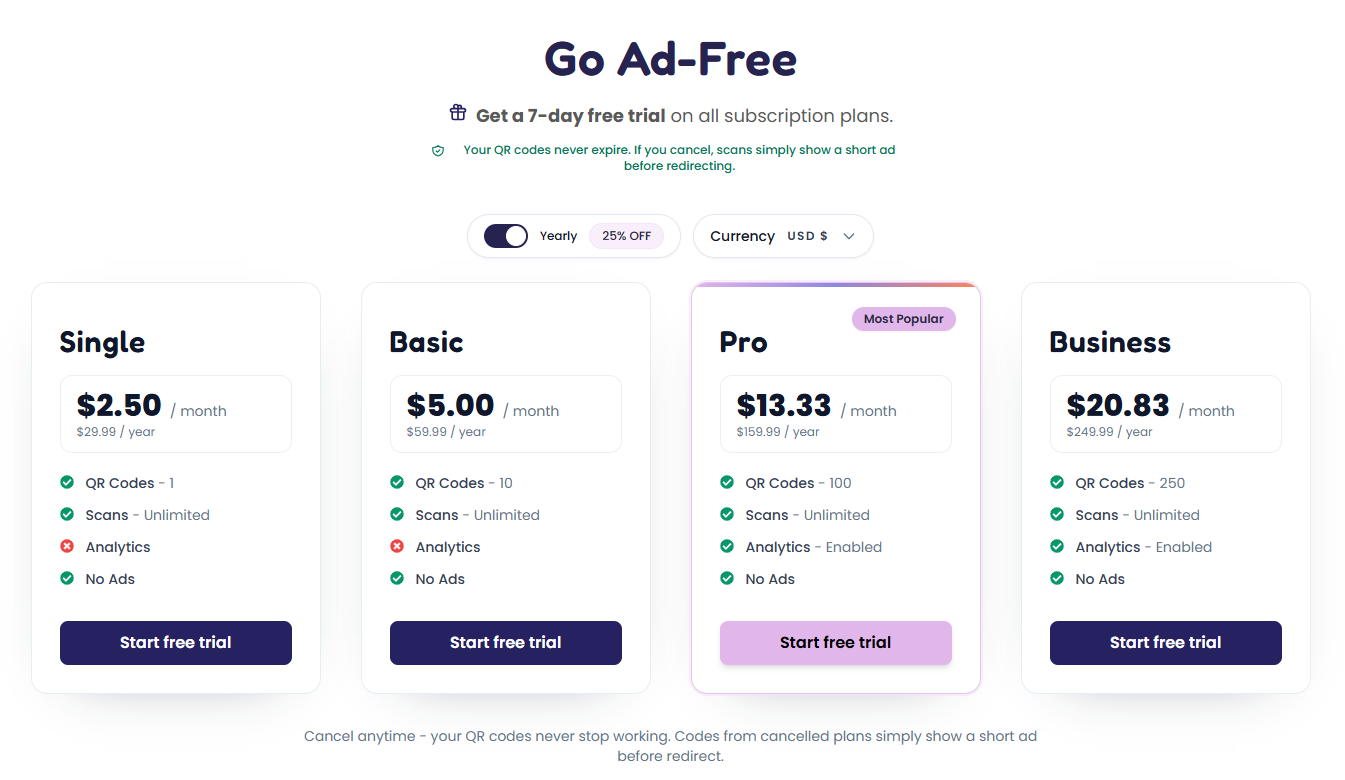
All paid plans share the core: unlimited scans, no expiration, no ads, analytics, and brand styling. Annual billing takes about a quarter off.
- Free: 5 dynamic codes, unlimited scans, never expires, ad before redirect
- Single: 1 code, around $2.50 a month or $29.99 a year
- Basic: 10 codes, around $5 a month or $59.99 a year
- Pro: 100 codes, around $13.33 a month or $159.99 a year, marked most popular
- Business: 250 codes, around $20.83 a month or $249.99 a year
Every plan keeps your printed codes alive after cancellation. You just lose editing and analytics, and the ad returns. There is a seven-day free trial on the paid plans, so you can verify the analytics and the ad-free experience before you commit.
How QR Cake Compares, With The Big Names
I am not going to pretend the others are bad. They are not, and a review that says so is lying to you. Here is the honest read.
- Bitly is genuinely better if you want unified link and QR analytics in one place. Pick it if link management is your main job, not QR codes.
- Uniqode, formerly Beaconstac, leans enterprise with strong bulk and team features. Choose it for large teams that need seat management.
- QR TIGER leads on design customization and campaign templates. If styling is everything to you, it wins there.
- Flowcode is design-forward and strong in US retail and events.
- ME-QR and qr-code-generator.com are high-volume free-tier competitors that you will meet in comparison searches.
Here is what none of them lead with, and it is QR Cake's lane: your codes keep working after you stop paying. For a small business that already paid for print, that is the one that matters. And the can you change a code after printing guide makes the same point, naming the competitors that kill your codes on cancellation.
| Feature | QR Cake | Typical competitor |
|---|---|---|
| Codes work after cancellation | Yes | Often deactivated |
| Free dynamic codes | 5, unlimited scans | Usually limited |
| Edit after printing | On the free tier | Often paid only |
| No expiration | All plans | Varies |
| Ad on free plan | Brief, stated | Hidden or none |
| Analytics | Paid plans | Paid plans |
| Logo in middle | Yes | Yes |
Who QR Cake Is For
The shared trait is not an industry. It is a moment: you just printed something, or you are about to. That is the emotional engine behind every piece of this product's content, and it is accurate. Write to yourself holding a proof copy, because that is the person QR Cake saves.
- Small businesses printing physical things: restaurants with changing menus, event organizers with signage and tickets, retail and product packaging, estate agents with property boards and brochures, salons, trades, market stalls, anyone ordering business cards.
- Freelance designers and marketers: you want the code to look right and the client to change the link later without calling you.
- Developers: teams generating codes programmatically through the API. A smaller audience, but high value, and worth the API documentation QR Cake ships.
If you recognise yourself in that list, the reprint anxiety is the reason to use a dynamic generator at all. The static code saves you a dollar today and costs you a batch tomorrow.
Quick Answers
Is QR Cake free? Yes. The free plan gives you five dynamic QR codes, unlimited scans, codes that never expire, and design customization, with no credit card. A short ad appears before the redirect on free codes.
Can I edit a QR code after printing? Yes, if it is a dynamic code. Change the URL, file, or content behind a printed code from your dashboard and every printed copy follows, no reprint.
Do QR Cake codes expire? No. Codes keep resolving indefinitely, even after a paid plan ends. You lose editing and analytics, and the ad returns, but the code still scans.
Can I put my logo in the middle? Yes. QR Cake lets you build a QR code with a logo and a QR code image in the middle, plus custom colours and frames.
What can I turn into a QR code? A link, PDF, file, image, video, audio, vCard, link list, review prompt, event, or business card. Most of the non-link types are hosted by QR Cake.
Is there a QR code generator without ads? Yes, on any paid plan. The free plan shows a brief ad before redirecting.
Getting Started
- Go to the create page and pick a content type
- Add your URL, file, image, or contact details
- Customize the design: colours, centre logo, frame
- Download PNG, JPG, WebP, or SVG
- Print, then edit the destination anytime from your dashboard
No credit card, and your first codes need no account. Print a sample at actual size and scan it on a real phone before you bulk order. If you plan to print a lot over a long period, the guides suggest setting up a custom domain like qr.yourbusiness.com, so you can switch providers later without reprinting. It is sensible advice and it costs little to set up.
Final Verdict
QR Cake does the one thing a dynamic QR code generator must do. It lets you edit a code after printing, and it keeps that code alive even if you walk away from the subscription. The free tier is usable rather than a teaser, the trade-off of a brief ad is stated honestly, and the range of content types means a PDF menu, a vCard, a YouTube clip, a Google review prompt, or an event with a one-tap calendar save are all a single scan away. Whatever you need, whether a website QR code generator for a landing page, a link list QR code generator for a card, or a business QR code generator for a receipt, it is one code in the same dashboard.
Where it lags the enterprise names is deep team tooling and bulk features, and analytics sits behind a paid plan. For a small business, a designer, or anyone holding a proof copy, those gaps rarely matter. What matters is that the code you print today still works next year, and that it costs you nothing to keep it that way. If that is what you are shopping for, QR Cake earns its place in this review and on your print job.
Review Summary
- Ease of Use: 5/5
- Edit After Printing: 5/5
- Free Plan Value: 5/5
- Works After Cancellation: 5/5
- Customization: 4/5
- Analytics: 4/5
- Print Guidance: 5/5
- Value for Money: 5/5
- Overall Review Score: 5/5
Ready to make a code you can actually change later?
No credit card. Your codes never expire.
Tags
# Review# free dynamic qr code generator# editable qr code generator# changeable qr code generator# qr code generator no expiration# qr code generator without ads# qr code with logo# qr code image in the middle# website qr code generator# link list qr code generator# image qr code generator# pdf qr code generator# vcard qr code generator# digital contact card qr code# review qr code generator# google review qr code# qr codes for packaging# restaurant menu qr code# business qr code generator# event qr code generator# add to calendar qr codeFollow for new blogs
Subscribe to our blog
Subscribe to Newsletter
Subscribe to our newsletter to get the best products weekly.