Jam SQL Studio Comprehensive Review - The AI-Native SQL IDE for Every Desktop Platform
With Azure Data Studio scheduled for retirement in February 2026, developers, database administrators, and data engineers are scrambling to find replacements — particularly on macOS and Linux, where native SQL tooling has historically lagged behind Windows. This Jam SQL Studio review examines a modern contender that not only fills that void but rethinks what a SQL IDE can be.
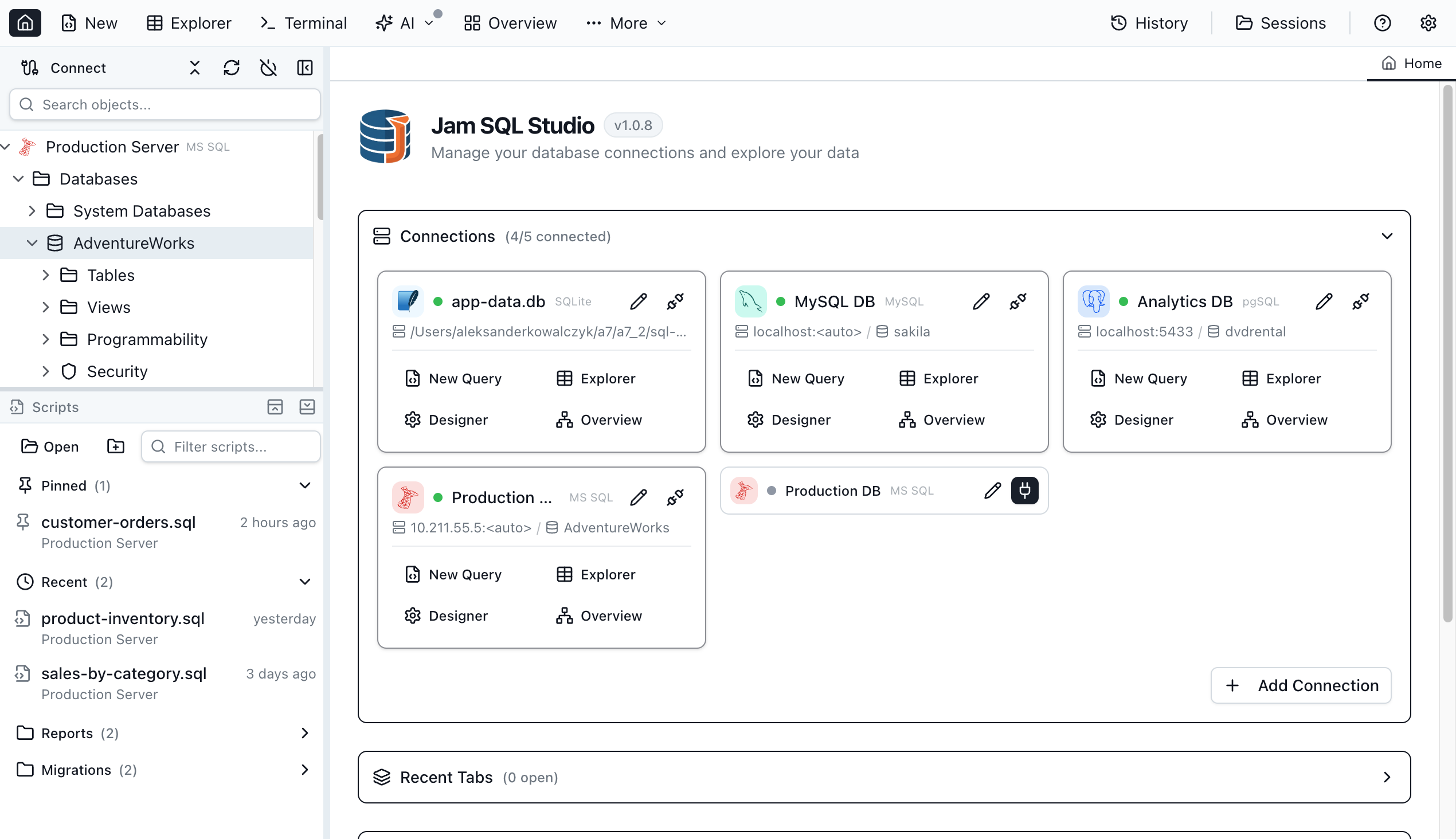
Built from scratch as an AI-native, cross-platform SQL IDE, Jam SQL Studio integrates deeply with modern development workflows. Unlike legacy SQL clients that feel frozen in time, it ships with a built-in MCP (Model Context Protocol) server for AI assistant integration, professional-grade schema and data comparison tools, execution plan visualization, and first-class support across macOS, Windows, and Linux.
The bottom line? A SQL client that delivers enterprise features and AI integration without locking you into a single operating system or subscription tier.
In this review, we'll examine how Jam SQL Studio positions itself as the natural successor to Azure Data Studio for developers who demand AI-enhanced productivity, complete database tooling, and a responsive, modern interface.
Why the SQL Tooling Landscape Needed a Reset
The database tool ecosystem suffers from several persistent gaps:
- Azure Data Studio Is Going Away: Microsoft retires it on February 28, 2026, stranding millions of cross-platform users
- Mac and Linux Left Behind: SSMS remains Windows-exclusive, forcing non-Windows users into remote desktop workarounds or inferior substitutes
- Dated Development UX: Most SQL clients lack AI autocomplete, notebook support, and AI assistant integration
- Enterprise Features Behind Paywalls: Schema compare, data compare, and execution plans typically require costly enterprise licenses
- AI Integration Absent: Few SQL clients offer secure, structured connectivity with AI coding assistants via MCP
- Performance Bloat: Many cross-platform tools suffer from slow startup and heavy resource consumption
Jam SQL Studio directly addresses every one of these issues with an AI-first, cross-platform architecture that bundles professional-grade features without requiring multiple subscriptions.
What Makes Jam SQL Studio Stand Out
- ✨ AI-Native Core: Built-in MCP server exposing 13 tools and 9 resources for Claude, Copilot, and custom AI agent integration
- 🗣️ English-to-SQL: Describe queries in plain language; the AI transforms them into syntactically correct SQL
- 🎨 Native Charting: Bar, line, pie, area, and scatter charts generated directly from query results
- 📓 SQL Notebooks: Jupyter-compatible .ipynb files combining SQL queries with JavaScript cells and Markdown documentation
- ⚡ Context-Aware IntelliSense: Real-time autocomplete with syntax and semantic error detection for tables, columns, functions, and keywords
- 📊 Execution Plan Visualization: Tree and graph views, side-by-side plan comparison, and bottleneck identification
- ⚖️ Schema and Data Compare: Professional comparison tools typically reserved for expensive enterprise database suites
- 🗺️ Visual Schema Overview: Interactive graph of tables, views, procedures, and functions with foreign key relationships as arrows
- 🤖 AI Workspace Sync: Query tabs sync to .sql files with auto-generated context files (schema, history, results) for AI agents
- 🔗 Cross-Platform Native Apps: macOS, Windows, and Linux with consistent feature parity
- 🗄️ Multi-Engine Support: SQL Server, PostgreSQL, MySQL, MariaDB, SQLite, and Azure SQL with per-engine IntelliSense
- 🎨 Modern UI: Clean, responsive interface with dark mode, semantic theming, and familiar SSMS/Azure Data Studio shortcuts
- 🆓 Free Personal Tier: Unlimited connections with core features forever — no account required
- 💰 Clear Pricing: Pro at $9.99/month or $99/year, 14-day free trial with no credit card needed
- 💻 CLI Tool: Execute SQL from any terminal with the jam-sql CLI
- 🔄 Session Persistence: Automatic workspace saving — pick up exactly where you left off
Core Features in Depth
MCP Server and AI Workspace: The AI-Native Difference
Jam SQL Studio is the first SQL IDE architected from day one for AI coding assistants.
Built-In MCP Server
The desktop app runs a local MCP server enabling external AI tools to safely interact with your databases:
- 13 MCP Tools: Query execution, UI control, table viewer operations, and more
- 9 MCP Resources: Workspace snapshots, connection status, editor content, query results, and app capabilities
- Secure Defaults: Binds to 127.0.0.1 only, requires bearer token authentication, enforces read-only queries by default
- Policy Engine: Configurable policy levels (block, confirm, allow) with full audit logging of every tool invocation
- No Credential Leaks: Connection list reveals no secrets — AI agents see connection names without passwords
The MCP server lets AI assistants like Claude Desktop, Claude Code, GitHub Copilot, and custom agents enumerate saved connections, open query tabs, write SQL into editors, and execute policy-governed queries.
AI Workspace Inside the Application
When an AI Workspace is opened, Jam SQL Studio auto-generates context files that equip AI agents with everything they need to understand your database:
- Bidirectional File Sync: Query tabs sync to .sql files — AI edits files, your editor updates live
- Auto-Generated Context: CLAUDE.md and AGENTS.md files deliver database schema, active connections, and usage examples
- Schema Export: Database schemas written to
.schema/directory for AI reference - Results History: Query results saved to
.history/with timestamped Markdown summaries - Knowledge Pack:
.knowledge/directory stores app manifest, capabilities, and user guide
Claude Code CLI Integration
Chat with Claude directly inside Jam SQL Studio using your local Claude Code CLI:
- In-App Claude Code CLI: Leverages your existing Claude subscription and configuration
- Full Database Context: @-mentions enable schema-aware conversations about your database
- No Extra API Keys: Your local Claude Code setup powers the integration — no additional subscriptions
- Privacy First: AI features are disabled by default. Query result history, write operations, and detailed context sharing all require explicit opt-in via Settings
The AI Agent's View
The auto-generated CLAUDE.md provides AI agents with a complete picture:
# Jam SQL Studio - AI Context

## Active Connection

- Name: Production DB
- Engine: PostgreSQL 15.2
- Database: ecommerce_prod

## Database Schema

Tables: 24 | Views: 8 | Functions: 12

users (id, email, name, created_at, subscription_tier)
orders (id, user_id → users.id, total, status, created_at)
products (id, name, price, category_id → categories.id)
order_items (order_id → orders.id, product_id → products.id, qty)

## MCP Tools Available

✓ query_execute - Run read-only SQL (SELECT, EXPLAIN)
✓ connections_list - List saved connections
✓ ui_open_tab - Open query/table tabs
✓ ui_set_editor_text - Write SQL to editor
This context-aware architecture lets AI agents write precise queries, understand relationships, and deliver meaningful database assistance.
Best suited for: Teams embracing AI-assisted development, developers using Claude or other AI coding assistants, and organizations building custom AI agents that need structured database access.
SQL Notebooks: Jupyter Meets Your Database
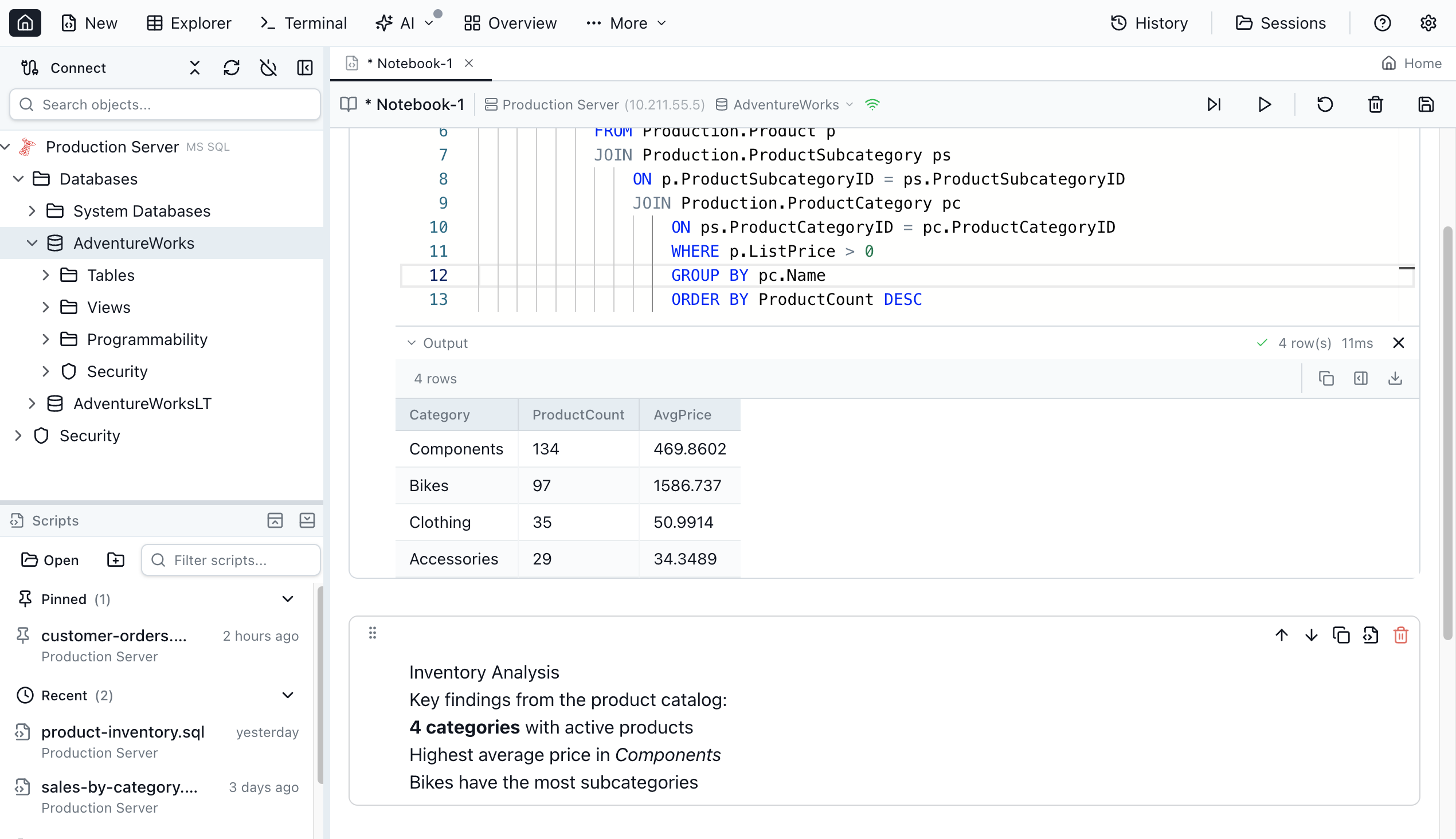
Jam SQL Studio provides full SQL Notebook support (.ipynb), marrying SQL query power with Jupyter-style organization.
Notebook Capabilities
- SQL and JavaScript Cells: Interleave SQL queries with JavaScript for transformation and visualization
- Markdown Documentation: Embed explanatory text, methodology, and result interpretation inline
- Inline Results: Query output displays in-place with execution stats and row counts
- Shared Sessions: Variables and state persist across cells within a notebook
- Run All: Execute entire notebooks for automated reporting and data pipelines
- Export and Share: Save as .ipynb for collaboration or version control
When to Use SQL Notebooks
- Data Analysis Reports: Document queries, charts, and insights in a single reproducible notebook
- Operational Runbooks: Create step-by-step procedures with executable queries and explanations
- Team Onboarding: Teach schema and query patterns with runnable examples
- Performance Investigations: Track query optimization with before/after execution plans
- ETL Workflows: Build data transformation pipelines combining SQL and JavaScript
This notebook capability fills the gap left by Azure Data Studio, bringing data-science organization to database workflows.
Smart IntelliSense and the Query Editor
The query editor is packed with developer-centric features that speed up SQL authoring and catch errors early.
Context-Aware Autocomplete
- Tables and Columns: IntelliSense suggests based on your active connection's schema
- Functions and Keywords: Engine-aware suggestions for SQL Server, PostgreSQL, and MySQL
- Schema Filtering: Suggestions filtered by database schema to minimize noise
- Real-Time Error Detection: Syntax and semantic issues highlighted as you type
Editor Features
- Query History: Access recently run queries from any editor — never lose work
- Tab Management: Reopen closed tabs with full context, multiple tabs with connection-specific isolation
- Transaction Modes: Auto, Manual, and Smart Commit with one-click commit and rollback
- SQL Snippets: Built-in templates for common patterns; create custom snippets per database engine
- Script Organization: .sql file management with Recent, Pinned, and Mounted Folders
Script Generation
Generate CREATE, DROP, SELECT, INSERT, UPDATE, and DELETE scripts for tables, views, and databases — with engine-aware syntax for MSSQL, PostgreSQL, and MySQL.
Natural Language to SQL
Describe what data you need in plain English and let AI transform it into SQL. No syntax memorization required — ideal for beginners and experienced developers looking to accelerate query writing.
Integrated Terminal
A built-in terminal opens in your workspace folder with connection context. Environment variables are pre-set for quick CLI database access. Move between query editing and command-line operations without leaving the app.
Execution Plan Analysis
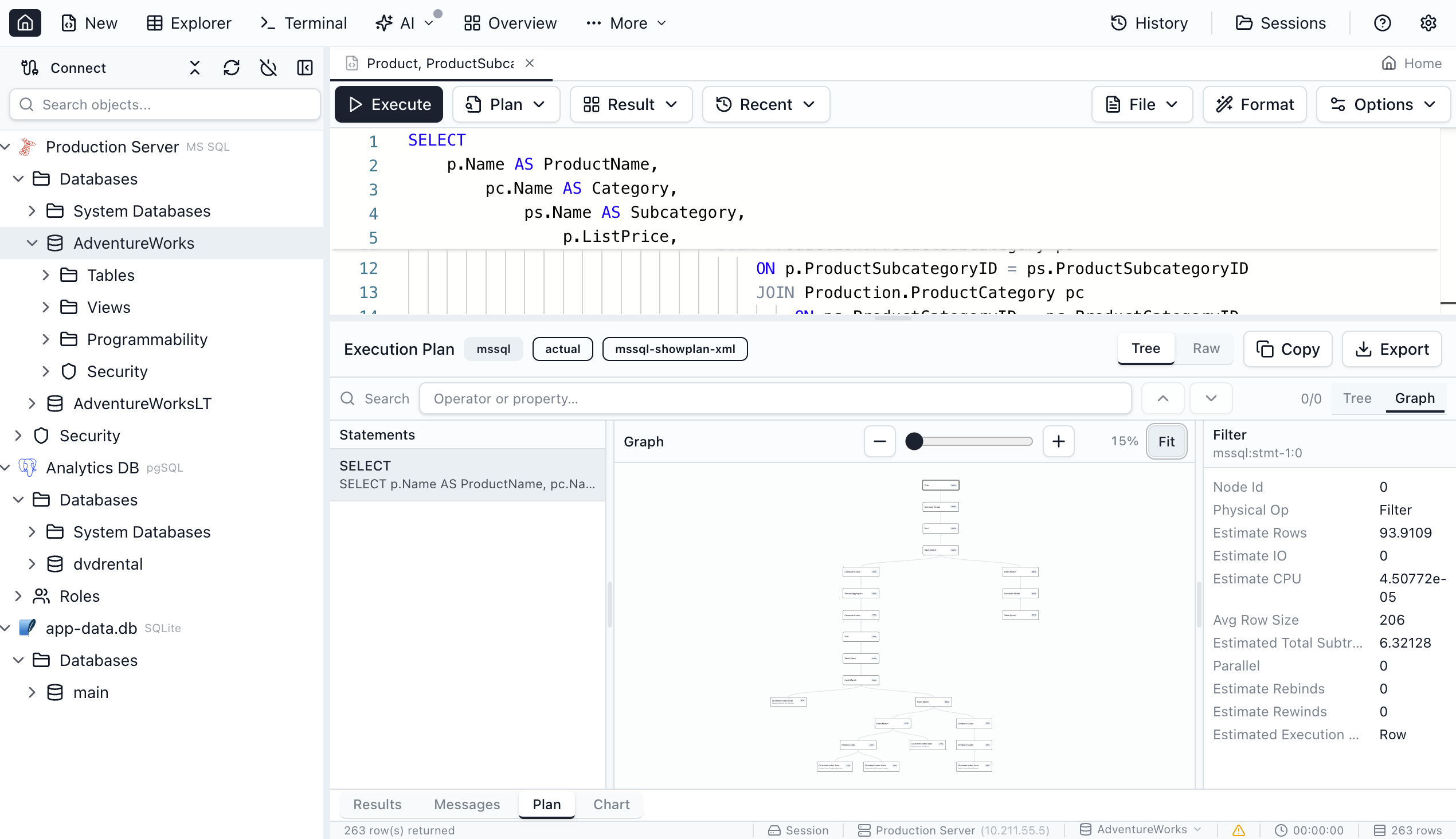
Query performance analysis is essential for database optimization, and Jam SQL Studio delivers comprehensive execution plan tooling:
- Tree and graph visualization modes
- Operator cost breakdowns
- Side-by-side plan comparison
- Import/export for team collaboration
- Expensive operation highlighting
This capability — typically exclusive to premium tools like SSMS — is available on Mac, Windows, and Linux, solving a major pain point for developers on non-Windows platforms.
Schema and Data Comparison
Professional database development demands comparison tools, and Jam SQL Studio delivers both schema and data comparison:
Schema Compare
- Side-by-side DDL diffs across connections
- Selective change inclusion for sync scripts
- Auto-generated ALTER, CREATE, and DROP scripts
- Compare schemas across development, staging, and production
Data Compare
- Row-level table data comparison
- Color-coded change visualization (added, modified, deleted)
- INSERT, UPDATE, and DELETE sync script generation
- Export comparison results for documentation
These tools — typically locked behind expensive enterprise licenses — are accessible in Jam SQL Studio's Pro tier at a fraction of the competition's cost.
Built-in Data Visualization
Create polished visualizations directly from query results without exporting to external tools:
- Bar, line, pie, area, and scatter chart types
- Generate charts straight from query output
- Export as SVG or PNG
- Customizable colors, labels, and formatting
This eliminates the round-trip to Excel or other visualization tools — analyze and present database insights without leaving Jam SQL Studio.
Visual Schema and Dependency Views
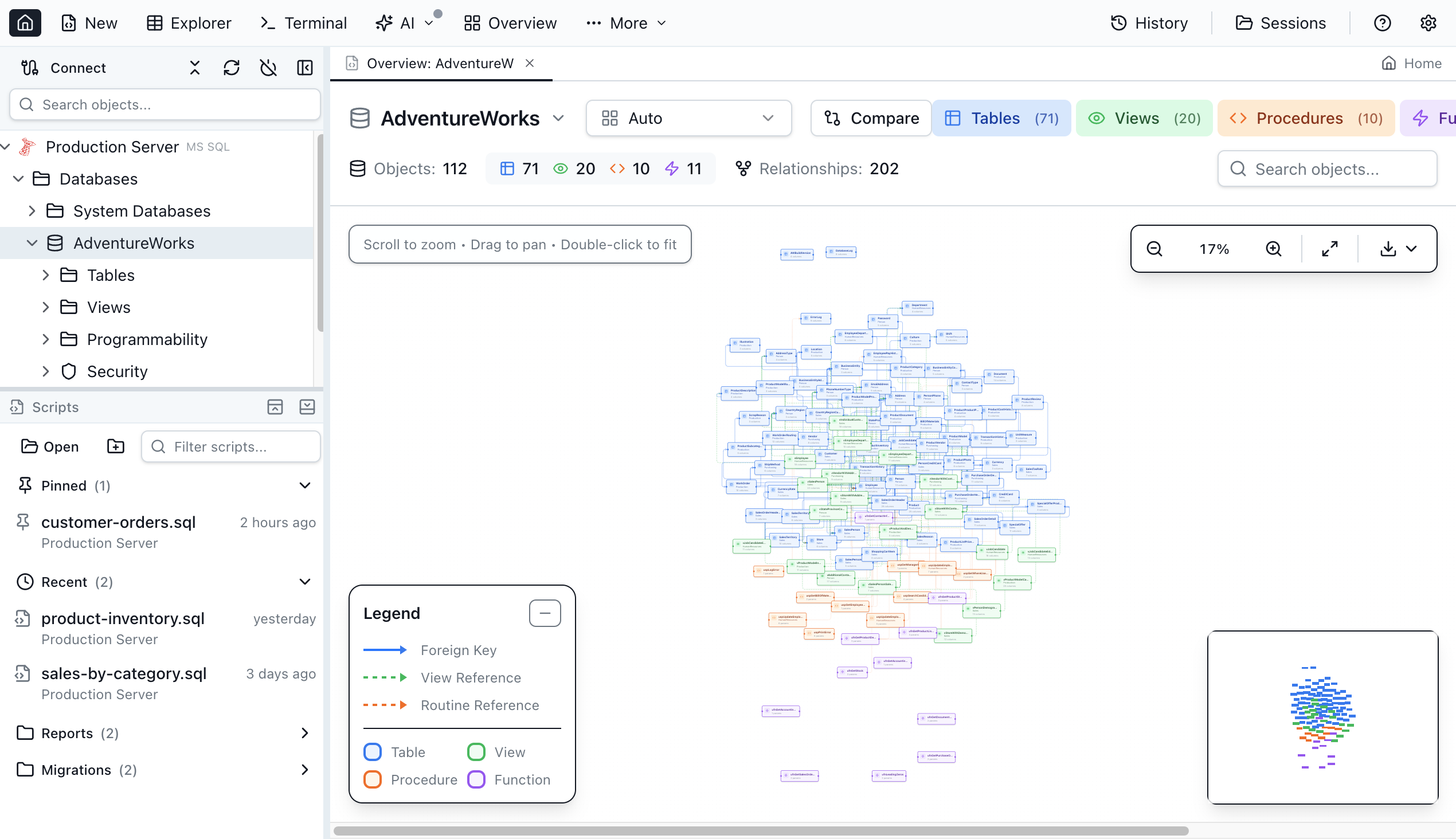
Understanding complex database relationships becomes intuitive with visual mapping tools:
Visual Schema Overview
- Interactive graph with tables, views, procedures, and functions as connected nodes
- Foreign key relationships rendered as directional arrows
- Zoom and pan for navigating large schemas
- Filter by object type (tables, views, procedures, functions)
Dependency Viewer
- Object dependency and reference visualization
- Schema change impact preview before execution
- Tree and graph view modes
- Cascading effect analysis
These visualizations are invaluable when working with legacy databases or onboarding new team members.
Table Explorer and Data Operations
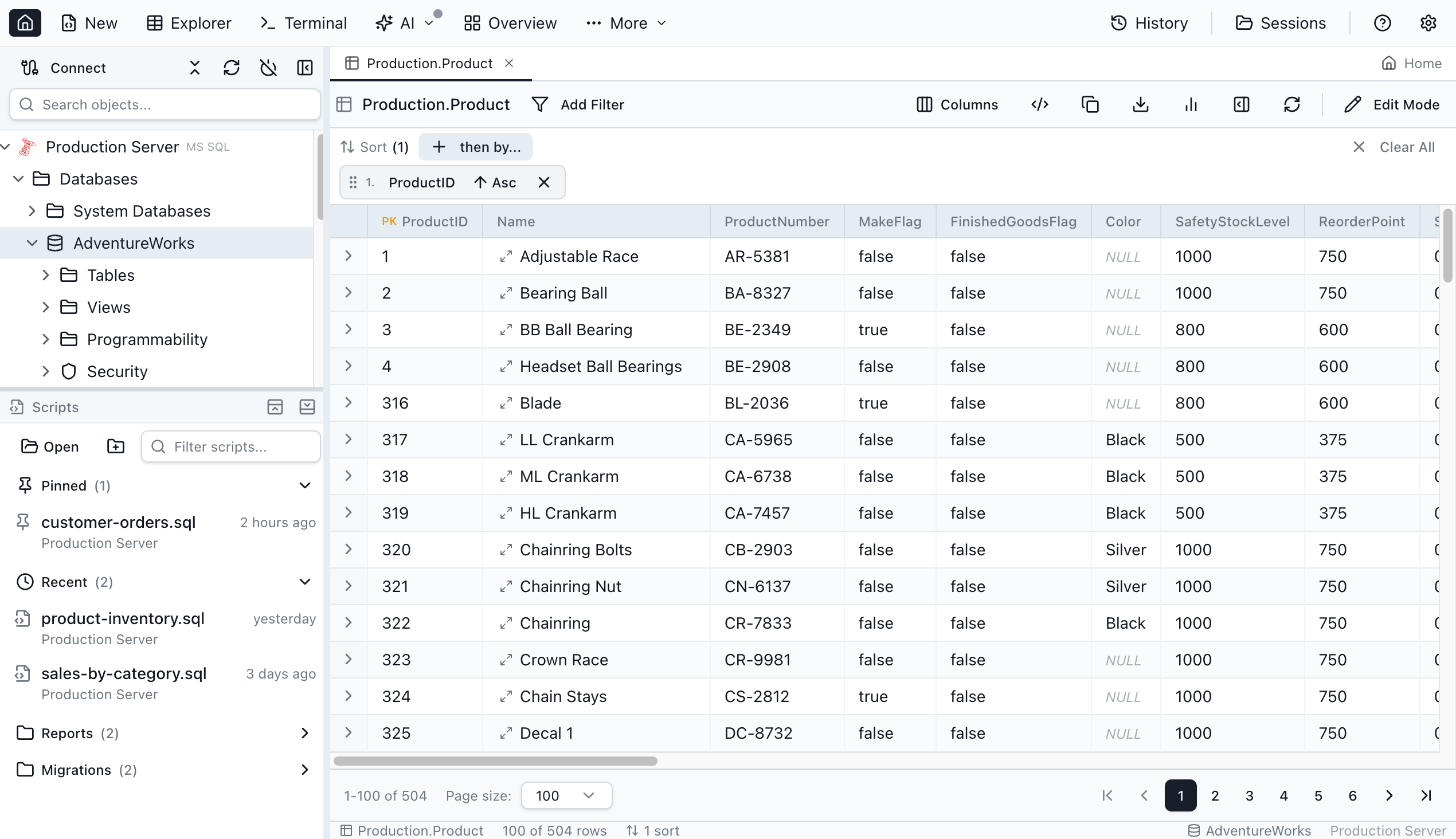
A spreadsheet-like interface purpose-built for database workflows:
Table Explorer
- Browse and filter table data
- Inline row editing with validation
- Foreign key navigation with row preview
- Multi-format export (CSV, JSON, XLSX)
- Row details panel with JSON preview
Data Management
- Backup and restore (.bacpac, .bak, pg_dump/pg_restore)
- One-click database and table cloning
- Query result and table data export
These capabilities cover day-to-day data operations without requiring separate administration tools.
Session Persistence
Jam SQL Studio automatically preserves your working state:
- Auto-Save Workspace: Your session is saved continuously as you work
- Full State Restoration: Reopen with all tabs, connections, and query state intact
- Query History Access: Reopen closed tabs with full context and recent queries
- Tab Isolation: Each query editor maintains independent transaction state and context
Close the application mid-task and return later — nothing is lost, no queries forgotten.
jam-sql CLI
Extend Jam SQL Studio to any terminal with the Go-based command-line tool:
jam-sql doctor: Verify installation and MCP server statusjam-sql connections: List all saved database connectionsjam-sql query -c <connection> "<query>": Execute SQL directly from the terminaljam-sql tools/jam-sql resources: Explore MCP server capabilities
CLI Use Cases
- Automation Scripts: Embed SQL queries in shell scripts and CI/CD pipelines
- Quick Checks: Run ad-hoc queries without launching the full GUI
- Dev Workflows: Integrate with Git hooks or deployment automation
- Remote Operations: Query databases over SSH with minimal dependencies
The CLI wraps the MCP server for programmatic access, making Jam SQL Studio suitable for both interactive GUI work and automated scripting.
PostGIS Support (Roadmap)
For PostgreSQL users working with geospatial data, PostGIS support is on the way:
- Geometry Visualization: View geometry columns on an interactive map
- Spatial Types: Full PostGIS spatial type support
- Map Rendering: Spatial query results displayed directly in the interface
- Spatial IntelliSense: Write and test PostGIS queries with autocomplete
This upcoming feature will extend Jam SQL Studio to GIS professionals and teams working with location data.
Database Engines and Platform Support
Supported Engines
- Microsoft SQL Server: Full support including Azure SQL Database and Azure SQL Managed Instance
- PostgreSQL: Including Azure Database for PostgreSQL and Amazon RDS PostgreSQL
- MySQL: Versions 5.7+ and 8.x, including Amazon RDS MySQL and Azure Database for MySQL
- MariaDB: Versions 10.x and 11.x
- SQLite: Local file-based databases
Platform Availability
Native desktop applications for all major operating systems:
- macOS: Full-featured native macOS application
- Windows: Familiar SSMS keyboard shortcuts
- Linux: Full GUI SQL tooling for Linux distributions
Every platform supports SQL Server, PostgreSQL, MySQL, MariaDB, and SQLite with IntelliSense, query execution, table explorer, and data export.
Authentication Methods
- SQL Authentication: Standard username/password
- Windows Authentication: Integrated Windows auth for SQL Server
- Microsoft Entra ID: Azure SQL device code flow, MFA-compatible with persistent token caching
Cross-platform support is especially valuable for mixed-OS teams or MacBook-using developers who need SQL Server connectivity.
Who Is Jam SQL Studio For?
Jam SQL Studio targets software developers, DBAs, and data engineers working with SQL Server, PostgreSQL, or MySQL — particularly those on macOS or Linux who've lacked quality native tooling.
Primary Audiences
🛠️ Backend Developers: A daily SQL client for querying, debugging, and schema work. AI autocomplete speeds up query writing; schema compare tools safeguard production deployments.
🗄️ Database Administrators: DBAs managing SQL Server from Mac or Linux who previously depended on Azure Data Studio or remote SSMS. Execution plans, schema compare, and data compare — no Windows required.
🤖 AI-First Teams: Teams adopting AI-assisted development who want their SQL client to integrate with AI coding agents via MCP. The built-in MCP server enables Claude, Copilot, and custom agents to interact with databases securely.
🔄 Azure Data Studio Migrants: Developers transitioning after the February 2026 retirement. Familiar SQL notebooks, similar shortcuts, and enhanced AI capabilities smooth the migration.
⚡ Performance-Conscious Developers: Anyone tired of DBeaver's Java overhead and slow startup, or avoiding DataGrip's subscription model. Jam SQL Studio delivers fast launch and transparent pricing.
Industry Applications
- Software Development: Backend teams querying databases during development and debugging
- SaaS Companies: Managing databases across dev, staging, and production
- Fintech: High-security database operations with AI-assisted development and audit logging
- Healthcare IT: HIPAA-compliant database management with local-only MCP server operations
- Consulting: Client database work demanding cross-platform compatibility and pro-grade tools
- E-commerce: Query optimization and schema management for high-traffic transactional databases
User Profile
- Age Range: 25–45 professionals with database development or administration duties
- Experience: Intermediate to advanced — comfortable with SQL fundamentals
- Platform: Mac, Windows, and Linux users wanting consistent cross-environment tooling
- Workflow: Developers embedding AI into SQL workflows, DBAs needing cross-platform access, Azure Data Studio migrants
Pricing: Free Tier and Pro Options
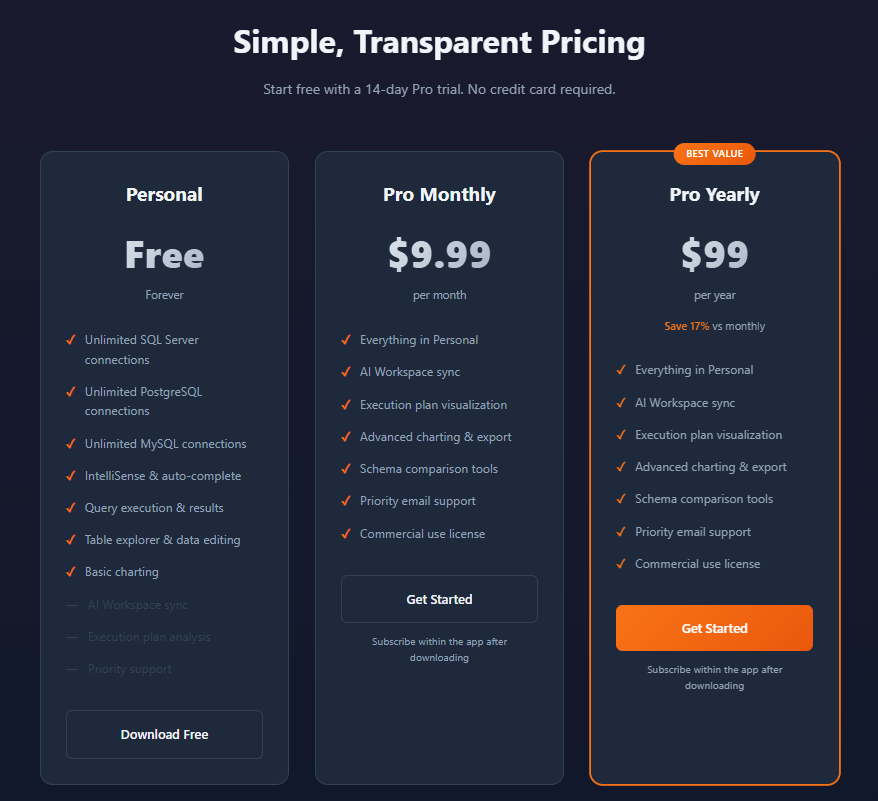
Transparent pricing with a generous free tier and affordable Pro subscription.
Personal Tier — Free Forever
For individual developers and personal projects:
- Cost: Completely free, no credit card required
- Connections: Unlimited SQL Server, PostgreSQL, and MySQL connections
- Features:
- IntelliSense and autocomplete
- Query execution and results
- Table explorer and data editing
- Basic charting
- AI Workspace sync
- Execution plan analysis
- Priority support
- Account: None required for basic usage
- License: Personal use only
Pro Monthly — $9.99/month
For developers and small teams needing advanced features:
- Cost: $9.99 per month
- All Personal features, plus:
- Advanced charting and export
- Schema and data comparison tools
- Priority email support
- Commercial use license
- Trial: 14-day free trial, no credit card required
Pro Yearly — $99/year (Best Value)
Save 17% versus monthly billing:
- Cost: $99 per year (equivalent to $8.25/month)
- Features: Identical to Pro Monthly
- Best For: Long-term users and teams committed to Jam SQL Studio
Enterprise — Custom Pricing
For organizations needing volume licensing and dedicated support:
- Includes: Volume licensing, priority support, SSO/SAML (coming soon), dedicated account management
- Contact: Reach out to sales for custom pricing and SLAs
Every plan includes a 14-day Pro feature trial — download and start immediately.
Migrating from Azure Data Studio
With Azure Data Studio retiring February 28, 2026, Jam SQL Studio offers a clear migration path:
Migration Steps
- Download and Install: Get Jam SQL Studio for your OS (macOS, Windows, or Linux)
- Re-Create Connections: Add SQL Server, PostgreSQL, MySQL, or Azure SQL connections using your existing server addresses and credentials
- Transfer Scripts: Copy .sql files from your Azure Data Studio workspace to any folder and open them directly
- Explore New Capabilities: Discover AI workspace sync, built-in charting, data compare, and other features beyond Azure Data Studio
What Transfers Over
- SQL query files (.sql)
- Notebook files (.ipynb)
- Connection credentials
- Database projects
- Saved scripts
- Keyboard shortcuts (familiar SSMS and Azure Data Studio mappings)
Jam SQL Studio uses familiar shortcuts from SSMS and Azure Data Studio, minimizing the learning curve for Microsoft tool migrants.
Competitive Positioning
Jam SQL Studio distinguishes itself through AI-native architecture, cross-platform parity, and enterprise features at accessible pricing.
Key Differentiators
- Built-in MCP Server: First SQL IDE with a local MCP server for AI agent integration
- SQL Notebooks: Jupyter-compatible notebooks with SQL and JavaScript cells
- Schema and Data Compare: Professional comparison tools typically locked behind expensive enterprise subscriptions
- Cross-Platform Parity: Full feature set on macOS, Windows, and Linux
- AI Workspace Sync: Auto-generated context files for AI coding assistants
- Free Personal Tier: Unlimited connections with core features forever
- Execution Plan Visualization: Performance analysis on Mac and Linux
- Multi-Engine Support: SQL Server, PostgreSQL, MySQL, MariaDB, and SQLite in one tool
Feature Comparison
| Feature | Jam SQL Studio | Azure Data Studio | SSMS | DBeaver | DataGrip |
|---|---|---|---|---|---|
| AI-Native (MCP + Workspace) | ✅ Yes | ❌ No | ❌ No | ❌ No | ⚠️ Limited |
| Claude Code CLI Integrated | ✅ Yes | ❌ No | ❌ No | ❌ No | ❌ No |
| SQL Notebooks (.ipynb) | ✅ Yes | ✅ Yes (Extension) | ❌ No | ❌ No | ❌ No |
| Cross-Platform (Mac/Win/Linux) | ✅ Yes | ✅ Yes | ❌ No | ✅ Yes | ✅ Yes |
| Execution Plan Visualization | ✅ Yes | ✅ Yes | ✅ Yes | ✅ Yes | ✅ Yes |
| Schema Compare | ✅ Yes | ✅ Yes | ❌ No | ✅ Yes | ✅ Yes |
| Data Compare | ✅ Yes | ❌ No | ⚠️ Via Tools | ✅ Yes | ✅ Yes |
| Built-in Charting | ✅ Yes | ✅ Yes | ❌ No | ⚠️ Pro Only | ❌ No |
| Command-Line CLI | ✅ Yes | ❌ No | ⚠️ Limited | ❌ No | ❌ No |
| Natural Language to SQL | ✅ Yes | ❌ No | ❌ No | ❌ No | ⚠️ Limited |
| Free Tier Available | ✅ Yes | ✅ Yes | ✅ Yes | ✅ Yes | ❌ No |
| SQL Server Support | ✅ Yes | ✅ Yes | ✅ Yes | ✅ Yes | ✅ Yes |
| PostgreSQL Support | ✅ Yes | ⚠️ Extension | ❌ No | ✅ Yes | ✅ Yes |
| MySQL / MariaDB Support | ✅ Yes | ❌ No | ❌ No | ✅ Yes | ✅ Yes |
| Modern UI | ✅ Yes | ✅ Yes | ⚠️ Classic | ✅ Yes | ✅ Yes |
What Makes Jam SQL Studio Unique
AI-Native from Inception: Built around AI integration with MCP server, AI Workspace, and context generation designed to work with Claude, Copilot, and other AI assistants — unlike competitors that bolt AI on as an afterthought.
Cross-Platform Enterprise Tools: Schema compare, data compare, and execution plan visualization on macOS and Linux — capabilities previously requiring Windows-only SSMS or expensive third-party alternatives.
Genuinely Useful Free Tier: Unlimited connections with core features permanently available, making the tool accessible to students, open-source contributors, and hobbyists.
Final Verdict
After a thorough exploration, Jam SQL Studio clearly fills a critical void in the SQL development landscape. As Azure Data Studio sunsets in February 2026, macOS and Linux developers finally have a modern SQL client that demands no compromises.
What stands out most is the AI-native architecture. The built-in MCP server and AI Workspace integration reflect a forward-thinking philosophy that understands how developers actually operate in 2026. Rather than retrofitting AI onto a traditional SQL client, Jam SQL Studio is architected around AI-assisted workflows from its foundation.
The free Personal tier is genuinely useful — unlimited SQL Server, PostgreSQL, and MySQL connections with IntelliSense, query execution, and table editing. This removes financial barriers for individual developers, students, and open-source contributors.
For professionals needing advanced capabilities, the Pro subscription at $9.99/month or $99/year delivers exceptional value. Schema compare, data compare, and execution plan visualization — tools that routinely cost hundreds annually elsewhere — are bundled at a fraction of the price.
Cross-platform parity deserves special mention. Unlike many SQL tools that treat Mac and Linux as second-class platforms, Jam SQL Studio provides complete feature availability across all operating systems. This is transformative for developers who prefer macOS or work in Linux environments but require SQL Server access.
Jam SQL Studio is particularly compelling for Azure Data Studio migrants, AI-adopting teams, and any professional who needs enterprise-grade SQL tooling on Mac or Linux.
Ratings Summary
- Ease of Use: ⭐⭐⭐⭐⭐ (5/5)
- Feature Completeness: ⭐⭐⭐⭐⭐ (5/5)
- AI Integration: ⭐⭐⭐⭐⭐ (5/5)
- Cross-Platform Support: ⭐⭐⭐⭐⭐ (5/5)
- Performance: ⭐⭐⭐⭐⭐ (5/5)
- Value for Money: ⭐⭐⭐⭐⭐ (5/5)
- Documentation: ⭐⭐⭐⭐⭐ (5/5)
- Overall Review Score: ⭐⭐⭐⭐⭐ (5/5)
Ready to upgrade your SQL workflow? 👉 Download Jam SQL Studio and start your 14-day Pro trial. Discover why this AI-native SQL IDE is the definitive Azure Data Studio alternative for Mac, Windows, and Linux.
Tags
# Review# SQL client for Mac# AI SQL editor# Azure Data Studio alternative# SQL Server Management Studio for Mac# SQL notebook Mac# AI-powered SQL client for macOS# best SQL Server client for Mac 2026# SSMS alternative for Mac and Linux# SQL editor with AI autocomplete Mac# SQL IDE# SQL Server# PostgreSQL# MySQL# MCP server# SQL development# database management# schema compare# execution plans# Claude# AI coding assistant# cross-platform SQL toolTagPulse Hands-On Review - AI-Driven Windows System Monitoring Reimagined
ChitterChatter Chat Review - AI-Powered WhatsApp Relationship Insights & Analysis
Follow for new blogs
Subscribe to our blog
Subscribe to Newsletter
Subscribe to our newsletter to get the best products weekly.