TickTappy Review - The Minimalist One-Tap Time Tracker That Just Works
Welcome to our TickTappy review! Let's examine how this elegantly minimalist one-tap time tracking app redefines the way you monitor your hours.
Why Most Time Trackers Fail Individuals
Time tracking ought to be frictionless. Yet for freelancers, developers, and solo business owners, the majority of time tracking tools feel engineered for large organizations—packed with compulsory fields, elaborate categorization schemes, and intimidating dashboards.
TickTappy embraces a fundamentally different philosophy. This streamlined, minimalist time tracking application is purpose-built for individuals, not teams. One-tap activation, vibrant color-coded tags, and uncluttered summaries make it the ideal choice for people who prize simplicity above all else.
The outcome? Time tracking that operates in seconds rather than minutes.
What elevates this review's significance is TickTappy's uncompromising commitment to simplicity and privacy. Developed by a solo creator as a privacy-first indie product, TickTappy delivers native applications for iPhone, iPad, Mac, Apple Watch, Android, and web—free from advertisements, free from data monetization, and free from the crushing complexity of enterprise platforms like Toggl, Clockify, or Harvest.
In this review, we'll investigate how TickTappy empowers freelancers, developers, and students to track their time without the administrative burden.
The Pain Points TickTappy Eliminates
Conventional time tracking methods suffer from multiple frustrating deficiencies:
- Crushing complexity: Enterprise-grade trackers demand project selection, team designation, elaborate descriptions, and mandatory categorization before allowing you to simply start a timer
- Compulsory accounts: Most applications force account creation and sign-in merely to begin tracking
- Privacy compromises: Enterprise platforms frequently monetize user data or leverage it for advertising, creating concerns for those handling sensitive client engagements
- Prohibitive pricing: Numerous platforms impose monthly fees for features individual freelancers will never utilize
- Steep learning curves: Byzantine interfaces and overwhelming dashboards consume valuable time to learn and operate efficiently
- Connectivity dependency: Web-based solutions cease functioning without an active internet connection
TickTappy addresses each of these pain points through radical simplification—enabling anyone to track time without friction, administrative overhead, or privacy anxiety.
How TickTappy's Core Features Work
The One-Tap Tracking Philosophy
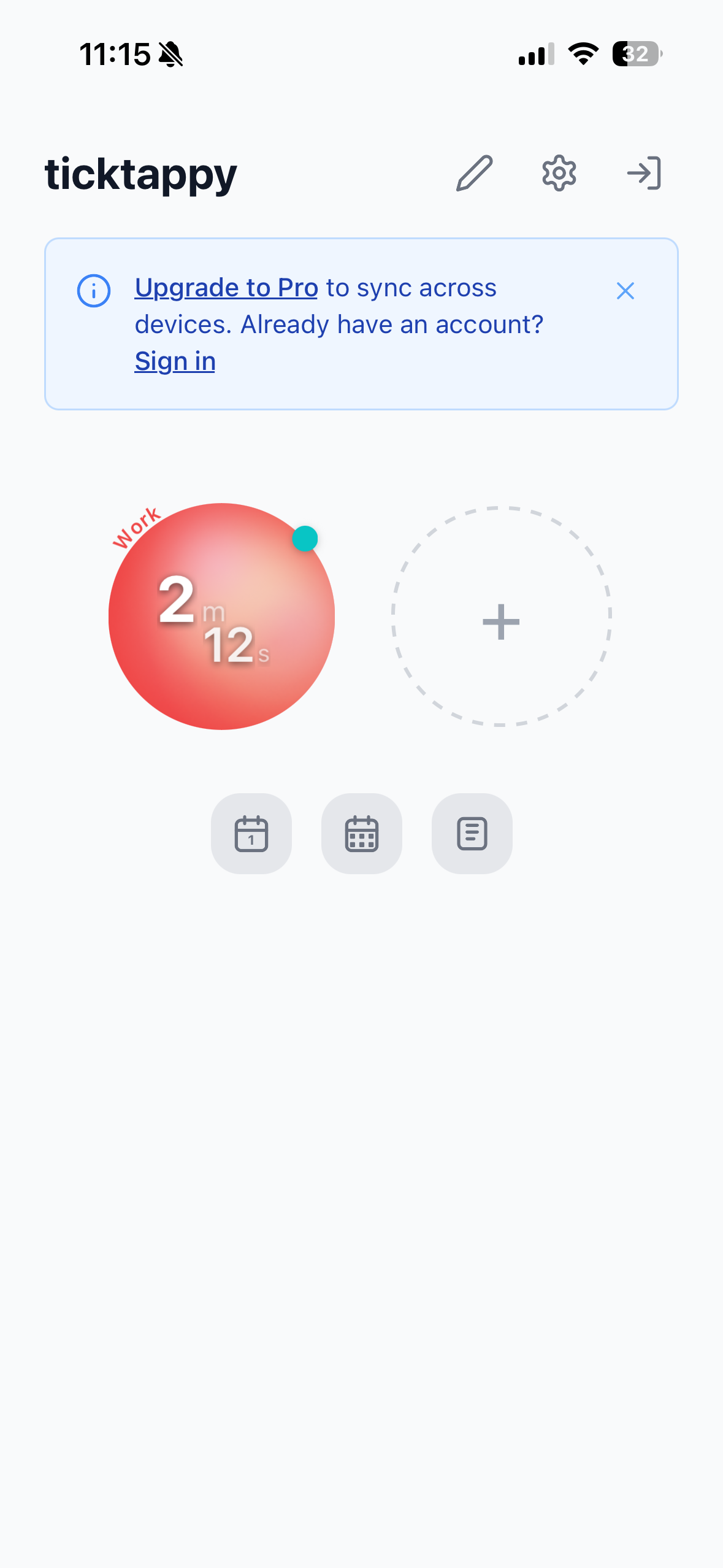
One-tap operation forms the foundation of the TickTappy experience.
The Mechanics of One-Tap
Time tracking reduces to just two actions:
- Establish colorful tags: Create unlimited project identifiers with your chosen colors
- Tap to toggle: Touch a tag circle to commence tracking, touch it again to conclude
The elegance lies in the simplicity. No dropdown project selectors, no mandatory form fields, no enforced categorization. Tap and proceed.
Intelligent Automation
TickTappy incorporates thoughtful features that enhance the one-tap paradigm:
- Single active timer: Switching to a different tag automatically halts the previous timer (unless explicitly pinned)
- Background timer pinning: Optionally keep designated timers running in the background during tag switching
- Instant time correction: Rectify "oops" moments immediately after starting or stopping
- Retroactive start: Begin tracking for past sessions (e.g., "commenced 30 minutes ago")
This smart automation eliminates concerns about concurrent timers or forgetting to deactivate one before initiating another.
Best suited for freelancers, developers, and anyone seeking time tracking that never disrupts their workflow.
Native Cross-Platform Presence
TickTappy provides genuine native applications across multiple platforms—not merely web-based wrappers.
Platform Availability
- iPhone & iPad: Fully native iOS applications purpose-built for Apple's touch interface
- Mac: Native Mac application with keyboard shortcuts and desktop-optimized experience
- Apple Watch: Complete watch application with complications, keeping your timer perpetually one tap distant
- Android: Native Android application for non-Apple users
- Web: Progressive web application accessible from any browser
Deep Apple Ecosystem Integration
TickTappy leverages Apple platform capabilities extensively:
- Home Screen Widgets: Small and Medium widgets featuring interactive tag circles
- Live Activity: Running timer visible on Lock Screen and Dynamic Island
- Control Center Widget: Rapid access from Control Center (iOS 18+)
- Apple Watch Complications: Timer perpetually visible on your wrist
This native-first architecture delivers smooth performance, offline functionality, and seamless integration with each platform's distinctive capabilities.
The Color-Coded Tag System
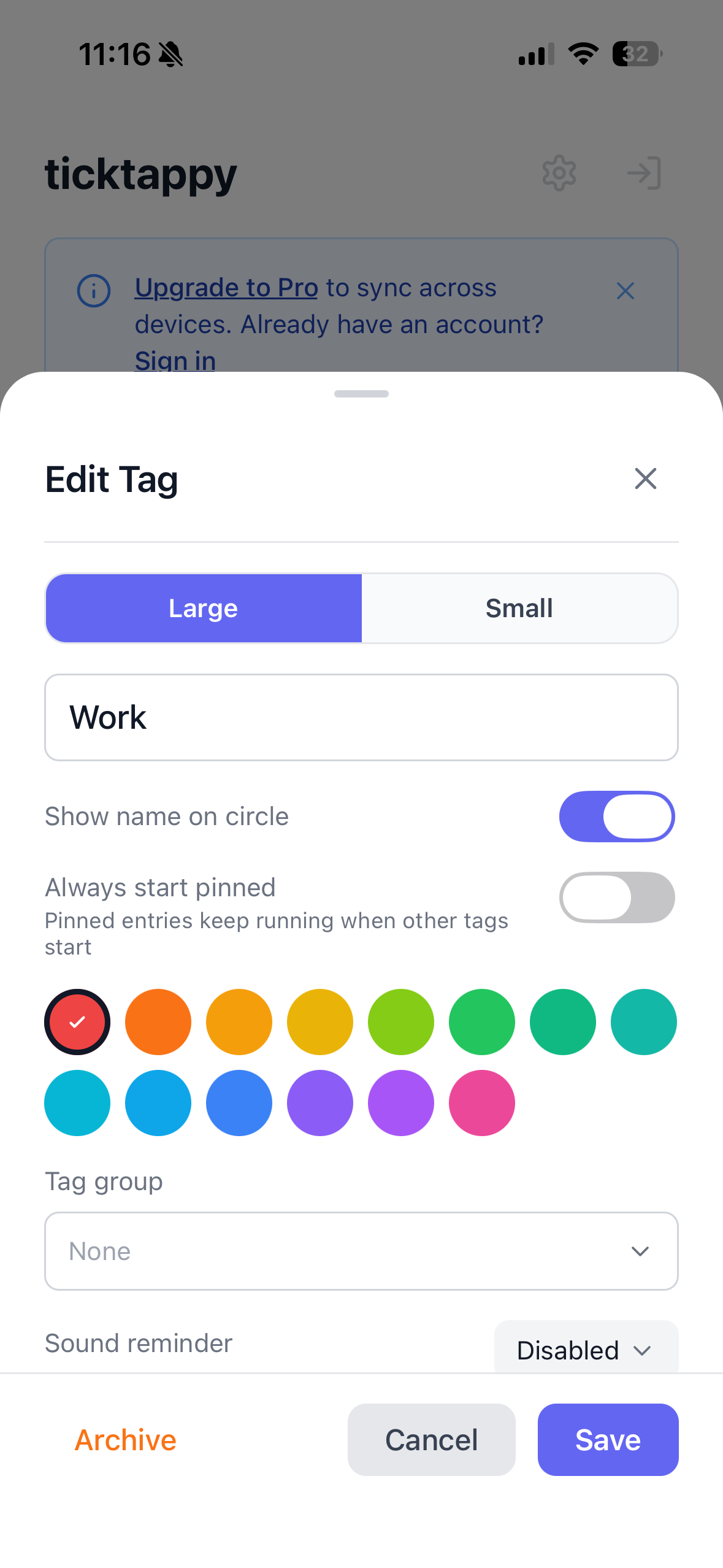
Structure your work through unlimited, color-coded tags that render time tracking visual and instinctive.
Tag Management Capabilities
- Unbounded tags: Generate as many identifiers as needed for diverse projects, clients, or activities
- Color assignment: Attribute colors to tags for instantaneous visual differentiation
- Tag grouping: Organize identifiers into logical clusters for improved structure
- Drag-and-drop ordering: Arrange tags in sequences meaningful to your workflow
- Tag archiving: Retire unused tags without sacrificing historical records
- Optional audio cues: Configure sound reminders per tag to maintain awareness
The visual color coding facilitates rapid scanning and immediate comprehension of time allocation.
Streamlined Day and Week Summaries
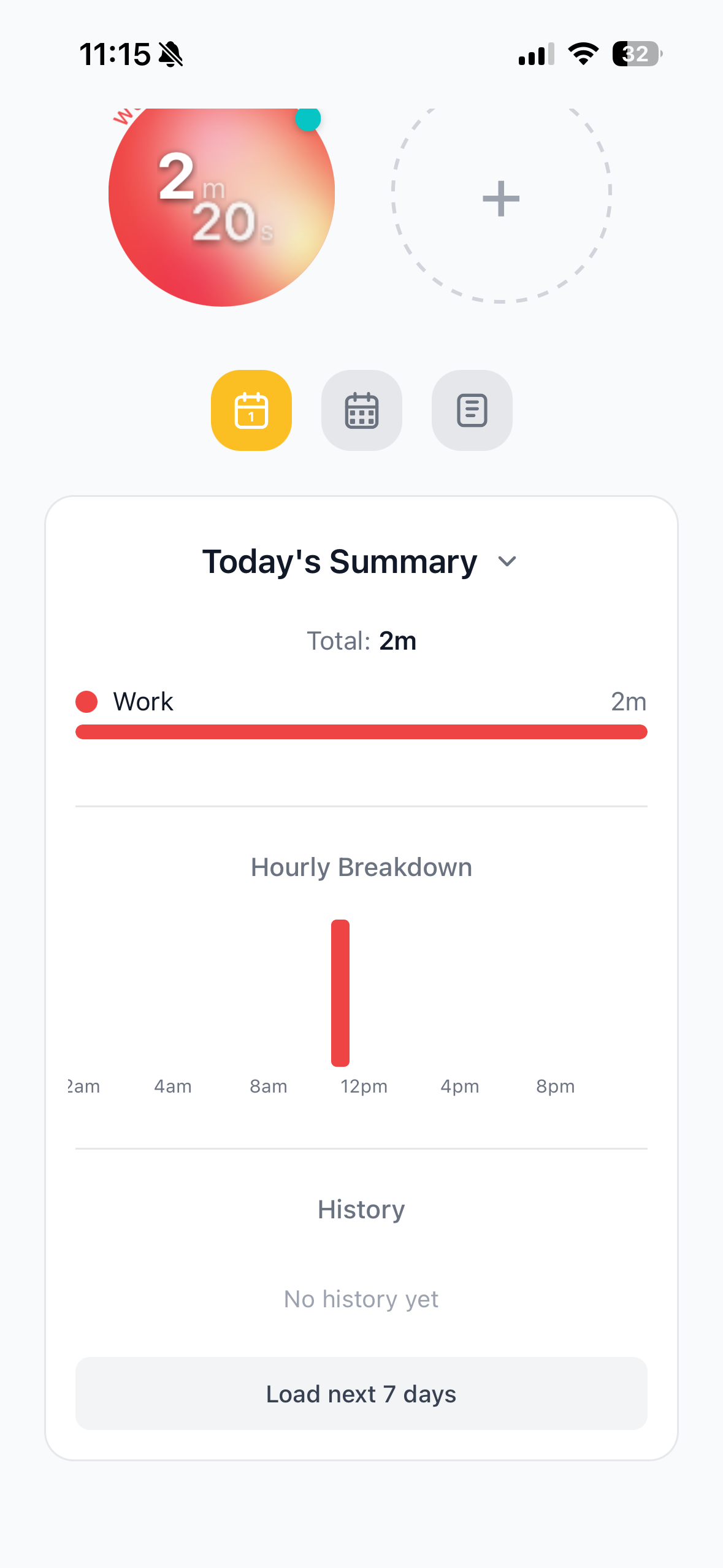
Understand your time distribution through clean, simple summaries—no overwhelming dashboards or convoluted reports.
Summary Perspectives
- Daily summary: Review your day's time breakdown by tag with proportional progress bars
- Weekly summary: Observe weekly patterns via bar charts displaying time per project
- Time distribution: Clear visual representations of how hours were allocated
Entry Controls
Complete authority over your tracked time:
- Historical entry review: Inspect all previously recorded time entries
- Entry modification: Rectify errors or supplement missing details
- Entry removal: Eliminate entries no longer needed
The summary design prioritizes insight delivery without data overload. You obtain a lucid picture of time allocation without enterprise reporting complexity.
Pricing Structure
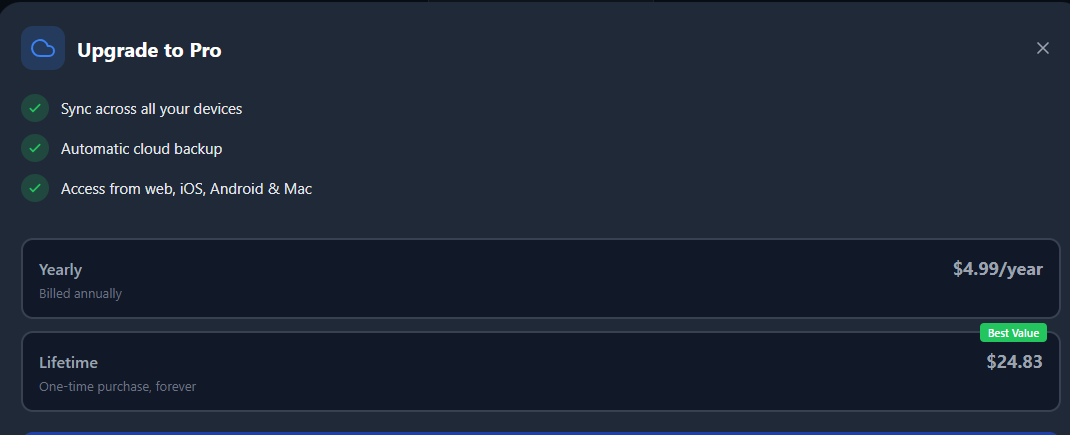
TickTappy democratizes time tracking through a generous free tier and affordable premium synchronization.
Free Tier: Local Time Tracking
Optimized for single-device usage:
- Cost: Entirely free
- Account: None required
- Included capabilities:
- One-tap time tracking
- Unlimited color-coded tags
- Day and week summaries
- All platform applications
- Offline tracking capability
- Local device storage
Premium Tier: Cross-Device Synchronization
For users requiring ubiquitous data access:
- Annual Premium: $4.99/year
- Lifetime Premium: $24.83 one-time payment
- Includes: All Free Tier features, plus:
- Cloud synchronization across all devices
- Unified tags and entries everywhere
- Data accessibility from any device
At $4.99/year or a single $24.83 lifetime investment, Premium sync is remarkably affordable relative to competitor subscriptions charging $10-20 monthly. The lifetime option recoups its cost in merely 1.25 years compared to annual billing.
Technical Requirements
- Account: Optional—establish an account for Premium sync; unnecessary for free usage
- Connectivity: Required for web application and sync functionality—native apps operate offline
- Storage: Device-local storage for free tier; cloud storage for Premium subscribers
Getting Started with TickTappy
Beginning your TickTappy journey is intuitive and rapid:
- Acquire the application: Download TickTappy from the App Store, Google Play, Mac App Store, or visit ticktappy.com
- Establish your first tag: Configure a colorful identifier for your initial project
- Tap to commence tracking: Touch your tag to initiate timing
- Tap to conclude: Touch again upon completion
- Review your summaries: Examine daily and weekly summaries to understand time allocation
- Activate Premium (optional): Enable cross-device synchronization (see Pricing section)
The complete process consumes minutes, and no account creation is required to begin tracking.
Competitive Differentiation
TickTappy distinguishes itself through radical dedication to simplicity and individual users rather than organizational structures.
Core Differentiators
- Authentic one-tap tracking: Zero mandatory fields, zero forms—tap and proceed
- Individual-centric architecture: Constructed for solo users, not teams or enterprises
- Privacy-first ethos: No advertisements, no data monetization, indie-made transparency
- Offline-first design: Track anywhere without internet dependency
- Accessible pricing: Premium sync at $4.99/year or $24.83 lifetime
- Native applications everywhere: Authentic native experiences, not web wrappers
- Account-free operation: Begin tracking immediately without registration
- Clean summary views: Simple perspectives, not overwhelming dashboards
Market Positioning
Various time tracking applications adopt divergent approaches to helping users monitor their hours.
| Feature | TickTappy | Toggl | Clockify |
|---|---|---|---|
| One-Tap Tracking | ✅ Yes | ❌ No | ❌ No |
| Mandatory Fields | ✅ None | ✅ Required | ✅ Required |
| Account Required | ✅ No | ✅ Yes | ✅ Yes |
| Privacy-First | ✅ Yes | ⚠️ Enterprise Focus | ⚠️ Enterprise Focus |
| Offline Support | ✅ Full | ⚠️ Limited | ❌ No |
| Native Apps | ✅ All Platforms | ✅ Mobile + Web | ✅ Web + Mobile |
| Pricing Model | ✅ Free + $4.99/yr or $24.83 lifetime | ✅ Free + Paid | ✅ Free + Paid |
| Clean Summaries | ✅ Yes | ⚠️ Complex | ⚠️ Complex |
| Team Focus | ❌ Individual Only | ✅ Teams First | ✅ Teams First |
Who TickTappy Is For
TickTappy targets individuals aged 22-45 across technology, design, consulting, and education who've grown weary of convoluted time trackers.
Freelancers & consultants juggling 3-5 client projects frequently find tools like Toggl or Harvest excessive for solo operations—they require something simpler for billable hour tracking.
Software developers engaged in side projects, open source contributions, or client work employ TickTappy to differentiate deep work from meetings and optimize their schedules.
Students cultivating better focus habits depend on TickTappy to monitor study sessions and comprehend time allocation patterns.
Solo entrepreneurs & indie hackers managing multiple ventures value the ability to oversee everything without the overhead of team-oriented tools designed for larger organizations.
Anyone curious about their daily temporal distribution can benefit—whether tracking work, personal initiatives, or simply understanding their behavioral patterns.
What unites these users? An appreciation for simplicity. Most have experimented with and abandoned more complex time trackers, seeking insights without administrative burden. Their interests gravitate toward productivity, minimalism, indie software, self-improvement, and remote work. While TickTappy supports multiple platforms, it finds particular resonance within the Apple ecosystem—iPhone, iPad, and Mac users who desire a native experience that respects their time.
Final Verdict
After comprehensive exploration of TickTappy, it's evident this minimalist time tracking application fills a critical market void. Unlike enterprise solutions engineered for teams, TickTappy is constructed for individuals who prioritize simplicity over complexity.
What distinguished itself most during evaluation was the unwavering commitment to the one-tap philosophy. No mandatory fields, no forms, no complexity—simply tap a tag and commence tracking. The color-coded identifiers, clean summaries, and cross-platform native applications collectively deliver a complete time tracking experience that honors your time and attention.
The free tier dismantles every barrier—you can initiate tracking immediately without establishing an account. Premium synchronization is remarkably affordable, particularly contrasted against competitors demanding $10-20 monthly for features most freelancers will never require.
This time tracking solution proves especially valuable for freelancers, developers, students, and anyone who finds enterprise time trackers excessively complex for individual work.
Review Summary
- Ease of Use: ⭐⭐⭐⭐⭐ (5/5)
- Time to Start Tracking: ⭐⭐⭐⭐⭐ (5/5)
- Simplicity: ⭐⭐⭐⭐⭐ (5/5)
- Cross-Platform Support: ⭐⭐⭐⭐⭐ (5/5)
- Offline Capability: ⭐⭐⭐⭐⭐ (5/5)
- Value for Money: ⭐⭐⭐⭐⭐ (5/5)
- Privacy: ⭐⭐⭐⭐⭐ (5/5)
- Overall Review Score: ⭐⭐⭐⭐⭐ (5/5)
Ready to simplify your time tracking? 👉 Try TickTappy for Free today. Experience one-tap time tracking that just works—built for people who hate complex time trackers.
Tags
# Review# time tracking app# simple time tracker# minimalist time tracking# freelance time tracker# one-tap time tracking# best simple time tracking app for freelancers# easy time tracker for iPhone and Mac# minimalist alternative to Toggl# time tracking app for people who hate time trackingAlphaAI Review - The Stock News API Built for Trading Bots and AI Agents
TagPulse Hands-On Review - AI-Driven Windows System Monitoring Reimagined
Follow for new blogs
Subscribe to our blog
Subscribe to Newsletter
Subscribe to our newsletter to get the best products weekly.